Your Dashcam Footage Doesn’t Need to Visit Google’s Servers
The cloud-first AI revolution has an embarrassing secret: we’ve been shipping our most sensitive video data to third-party APIs like it’s nobody’s business. Dashcam footage of your daily commute? Sent to Google’s servers. Security camera clips from your home? Processed in someone else’s data center. The convenience of semantic video search, typing “red truck running a stop sign” and finding the exact moment in hours of footage, has historically required a privacy trade-off that would make a GDPR lawyer weep.
That calculus just changed. Optimizing Qwen models for edge devices has reached a tipping point where you can run sophisticated multimodal embeddings locally, turning your consumer GPU into a private video search engine that never sends a pixel to the cloud.
The Transcription Trap
Traditional video search pipelines are Rube Goldberg machines of inefficiency. They extract frames, run OCR, generate captions, transcribe audio, and stuff all that text into a vector database. It’s computationally expensive, error-prone, and requires you to trust that the API provider won’t train models on your footage or suffer a data breach.
The alternative has been prohibitively expensive. Using Google’s Gemini Embedding API for video indexing costs approximately $2.84 per hour of footage processed. For a security system recording 24/7, that’s nearly $2,000 a month just to make your videos searchable, before you even factor in the privacy implications of sending your data to Mountain View.
Enter Qwen3-VL-Embedding
Qwen3-VL-Embedding represents a fundamental architectural shift. Instead of forcing video through a text bottleneck, it projects raw video pixels directly into the same vector space as text queries. A text query like “car cutting me off” is directly comparable to a 30-second video clip at the embedding level, no transcription, no frame captioning, no text middleman.
The SentrySearch project demonstrates this in practice. Built around Qwen3-VL-Embedding, it splits MP4 files into overlapping chunks, embeds each chunk as video using either the local model or Gemini’s API, and stores vectors in ChromaDB. When you search, your text query gets embedded into the same space and matched against stored video embeddings. The top result gets automatically trimmed from the original file and saved as a clip.
The kicker? The 8B model produces genuinely usable results running fully local on consumer hardware. We’re talking Apple Silicon (MPS) and CUDA support out of the box, with the 8B model requiring roughly 18GB of RAM and the 2B variant squeezing into ~6GB. That’s laptop territory, not data center.
How Local Beats the Cloud
Running embedding models locally isn’t just about privacy, it’s about performance optimization that would make a cloud architect jealous. The SentrySearch implementation uses several techniques to keep inference fast and memory-efficient:
Aggressive Preprocessing: Each 30-second chunk gets downscaled to 480p at 5fps via ffmpeg before hitting the model. A ~19MB dashcam chunk becomes ~1MB, a 95% reduction in pixels the model must process. Since inference time scales with pixel count, not video duration, this is the single biggest speedup.
Low Frame Sampling: The processor sends at most 32 frames per chunk to the model (
fps=1.0,max_frames=32). A 30-second chunk produces ~30 frames, not hundreds.
MRL Dimension Truncation: Qwen3-VL-Embedding supports Matryoshka Representation Learning. Only the first 768 dimensions of each embedding are kept and L2-normalized, reducing storage and distance computation in ChromaDB.
Auto-Quantization: On NVIDIA GPUs with limited VRAM, the 8B model automatically loads in 4-bit (bitsandbytes), dropping from ~18GB to ~6-8GB with minimal quality loss. A 4090 (24GB) runs the full bf16 model with headroom to spare.
Still-Frame Skipping: Chunks with no meaningful visual change get detected by comparing JPEG file sizes across sampled frames and skipped entirely, saving a full forward pass per chunk.
The result? Expect ~2-5 seconds per chunk on an A100 and ~3-8 seconds on a T4. On a 4090 with the 8B model in bf16, you’re looking at low single digits per chunk. That’s fast enough to index hours of footage overnight on a gaming PC.
The Hardware Reality Check
Let’s be honest about the limitations. Replacing cloud transcription with local hardware requires actual hardware. The 8B model won’t run on your 8GB MacBook Air, it’s a non-starter. Intel Macs and machines without dedicated GPUs fall back to CPU with float32, which is too slow and memory-hungry for practical use.
But for those with the hardware, the economics are brutal for cloud providers. Once you’ve paid for the GPU (which you probably already own), incremental indexing costs approach zero. Compare that to the ~$2.84/hour cloud alternative, and the break-even point comes quickly for anyone processing significant video volumes.
The model auto-detection logic is clever: it defaults to qwen8b for NVIDIA GPUs and Macs with 24GB+ RAM, qwen2b for smaller Macs and CPU-only systems. You can override with --model qwen2b or --model qwen8b, and the system handles the rest.
Privacy Isn’t Just a Feature
Browser-based local LLMs without APIs have shown us that keeping data on-device isn’t just about avoiding subscription fees. When you index footage locally, you eliminate an entire class of security risks. No API keys to leak (speaking of which, risks of exposing API keys in agent networks are real and expensive). No network transit of sensitive footage. No terms of service changes that suddenly allow your provider to train on your data.
For Tesla owners specifically, the SentrySearch implementation includes a metadata overlay feature that burns speed, location, and time onto trimmed clips by extracting telemetry embedded in Tesla dashcam files. This works entirely offline, processing SEI metadata that only exists in driving footage (not parked/Sentry Mode) from Tesla firmware 2025.44.25 or later.
Benchmarking the Competition
The Qwen3.5 family (which includes the VL-Embedding variants) has been putting up numbers that challenge proprietary models. In video understanding benchmarks, Qwen3.5-397B-A17B achieves 87.5% on VideoMME (with subtitles) compared to GPT5.2’s 86% and Gemini-3 Pro’s 88.4%. On VideoMMMU, it scores 84.7% versus GPT5.2’s 85.9% and Gemini-3 Pro’s 87.6%.
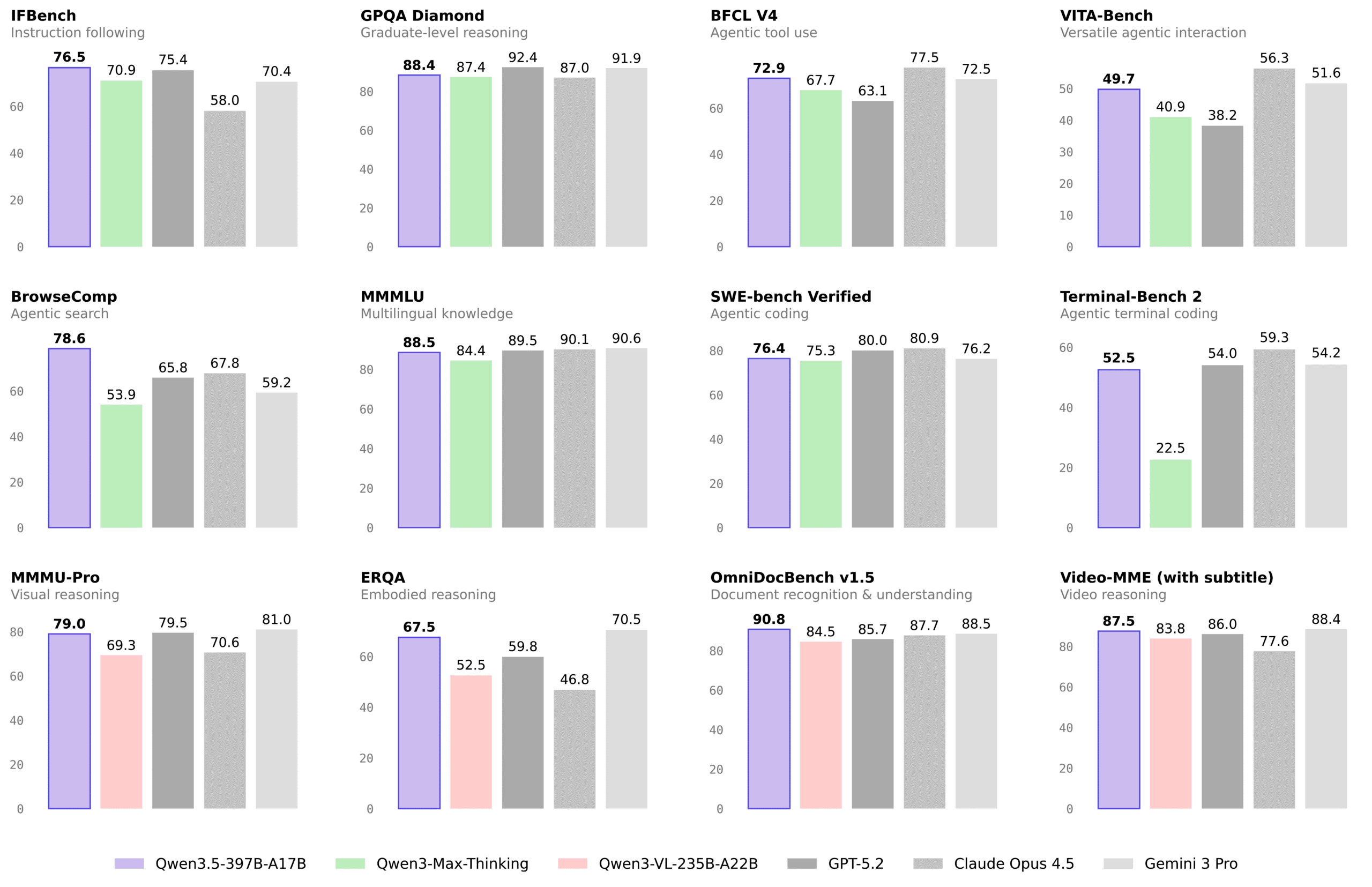
While the cloud models still hold edges in some categories, the gap is narrowing rapidly. For the specific use case of retrieval, finding relevant clips based on text queries, the local 8B model’s performance is described by early adopters as “genuinely usable”, which is engineer-speak for “surprisingly good given the hardware constraints.”
The Implementation Reality
Getting this running isn’t quite as simple as pip install privacy. You’ll need ffmpeg for video chunking and trimming, Python 3.11+, and either a CUDA-capable GPU or Apple Silicon with sufficient RAM. Open-source tools for local model inference like the SentrySearch CLI abstract away some complexity, but you’re still managing model weights (~16GB for 8B, ~4GB for 2B) and dealing with the idiosyncrasies of local inference.
The trade-offs are real. Cloud APIs offer consistent performance and infinite scale. Local inference offers zero marginal cost and absolute privacy. For many use cases, legal proceedings, sensitive security footage, personal dashcam archives, the choice is obvious.
The Bottom Line
We’re witnessing the democratization of multimodal AI. Versatility of specialized Qwen models has expanded beyond text and code into video understanding, and consumer GPUs enabling local AI access are finally powerful enough to run them.
The next time you need to find that one specific moment in hours of footage, you have a choice. You can ship your data to a cloud provider, pay by the hour, and hope their privacy policy doesn’t change. Or you can keep it local, pay nothing beyond the electricity bill, and sleep soundly knowing your footage never left your machine.
For privacy-conscious developers and organizations, that’s not just a technical preference, it’s a competitive advantage. Cost comparisons of cloud vs local automation increasingly favor the local approach for high-volume workloads, and video search is just the beginning.
The cloud isn’t dead. But for video search, it’s suddenly optional. And that’s a revolution worth watching, locally, of course.