The conventional wisdom says a dense 27B model needs 24GB of VRAM, minimum. The VRAM tier charts all agree: 16GB cards are for 14B models, maybe a gpt-oss-20B if you’re feeling fancy. A 27B dense model “spills to RAM” and collapses into unusable sludge.
Qwen3.6-27B performance on consumer hardware already challenged that thinking. But what happened last week makes those tier guides look like they were written in a different decade.
A developer running an absolute budget rig, Intel N100 (4 cores, 16GB RAM) paired with an RTX 5060 Ti 16GB, pushed over 1 million tokens through Qwen 3.8 27B in a single weekend. Not for chat. For agentic coding. Building a complete REST API and MCP server for a legacy vBulletin forum from three prompts. The model ran at 73,728 tokens of context. On 16GB of VRAM. And it didn’t just work, it delivered.
Here’s the config that makes it possible, why it shouldn’t work, and what the benchmarks actually reveal about the tradeoffs.
The “How the F*ck” Moment
When the config first hit r/LocalLLaMA, the immediate reaction from anyone who’s tried to fit a 27B model on a 16GB card was disbelief. One commenter with two 5060 Ti cards noted they can get 100K context with q8 KV cache, but they’re spreading that across 32GB of VRAM.
The secret isn’t magic. It’s a layered optimization strategy that squeezes every single megabyte:
The model: Qwen3.8-27B-UD-Q3_K_XL.gguf. That’s a 3-bit quant. Unsloth’s Dynamic quantization, but still, Q3. The purists will flinch. We’ll get to that.
The KV cache compression: q4_1 for the main context, q5_1 for the MTP draft context. That’s aggressively quantized KV cache on top of an already-quantized model.
The context window: 73,728 tokens. On a 16GB card. That’s 3x what most people assumed was possible.
Speculative decoding: Native MTP enabled with spec-type = draft-mtp and n-max = 2. The draft head ships inside the GGUF file, it’s a real extra layer at index 64, behind the 64 transformer layers.
The CPU: The catch nobody mentions. The N100 is a 4-core/4-thread Intel chip with single-channel DDR5 and PCIe 3.0 x4. This config was built to work despite that bottleneck, not because of it.
Here’s the actual .ini configuration that makes it work:
[qwen3.8-27b]
model               = /opt/llama-infrastructure/models/Qwen3.8-27B-UD-Q3_K_XL.gguf

# Disable "fit" to prevent layers from being loaded into the CPU due to an automatic calculation error
fit                 = off
ctx-size            = 73728
context-shift       = 1

# Native Model MTP (Speculative Decoding)
spec-type           = ngram-mod,draft-mtp
spec-draft-n-max    = 2

# KV Quantization (q4_1 allows us to fit 73k context in 16GB VRAM)
cache-type-k        = q4_1
cache-type-v        = q4_1

# Thinking / Reasoning Budget Params
chat-template-kwargs = {"preserve_thinking": true, "reasoning_effort":"medium"}
reasoning-budget    = 5000

# Reduced batch sizes to prevent VRAM spikes during massive prefills
batch-size          = 1024
ubatch-size         = 512

# Official / Recommended Quant Sampler Tuning
temp                = 0.4
top-p               = 0.90
top-k               = 15
min-p               = 0.02
The Real-World Test: 3 Prompts, 1 Million Tokens, Zero Handholding
Benchmarks lie. Synthetic tests tell you nothing about whether a model can actually do something. So the developer skipped the benchmarks and went straight to a real project: building an unofficial REST API and MCP server for a legacy vBulletin forum.
Prompt 1: Map the target site. The model generated a ~1,500-line markdown spec covering structural analysis, scrapable HTML nodes, expected JSON payloads, stack selection, pagination logic, session auth, and search endpoints.
Prompt 2: Design the development architecture from that spec. It produced a modular NestJS implementation plan across 9 execution phases, scaffolding, domain models, scraping core with rate limiting and retries, HTML parsers, cache layer, application services, auth, MCP server, and hardening.
Prompt 3: Execute autonomously. OpenCode (running Qwen 3.8 27B) acted as orchestrator, spawning sub-agents per phase. It ran for ~2 hours. When context limits approached, it summarized state and kept building. It wrote unit tests, enforced linting, and only needed one minor automated fix when fed an edge-case HTML payload.
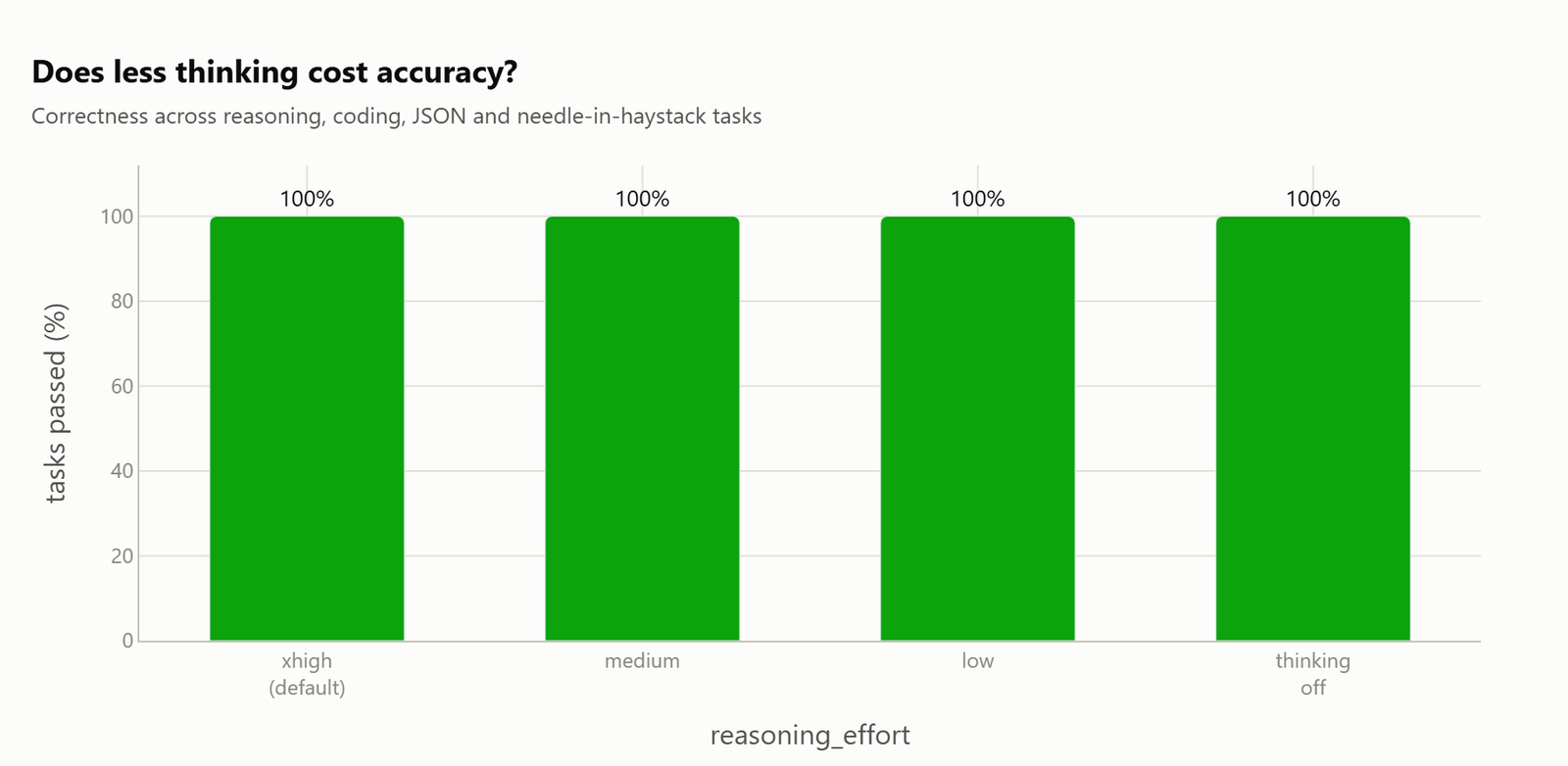
Task correctness across every reasoning level: 100%.
That’s not a benchmark suite, that’s a working software engineering pipeline running on a $300 GPU and a $100 CPU.
The Q3 Quant Skepticism: Valid or Overblown?
The most common pushback: “I don’t trust a Q3, I’ll stick to my q6 offloaded MoEs.”
It’s a fair concern. Q3 is aggressive. The quality loss from 4-bit to 3-bit is real, even if modern quantization techniques, imatrix calibration, Unsloth Dynamic quants, have narrowed the gap significantly.
But here’s the counterargument from someone who actually ran it: the model’s own test suite caught syntax errors, linters flagged issues, and the model self-corrected. The quality loss at Q3 didn’t manifest as broken output, it manifested as minor syntax slips that automated tooling caught and the model fixed independently.
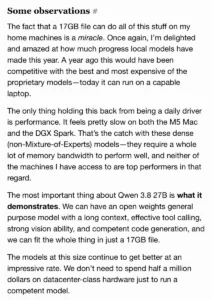
That’s not to say Q3 is always fine. If a model can’t one-shot simple tasks at Q3, that’s a red flag. But the evidence here suggests Qwen 3.8 27B handles aggressive quantization better than most, likely due to the hybrid attention architecture and dense parameter layout.
The “run what runs fast” philosophy has merit: a Q3 that executes at usable speed beats a Q6 that crawls or requires offloading layers to system RAM. If even one layer gets offloaded, throughput collapses. That’s the real tradeoff most people miss.
The MTP Head: One Flag, 1.81x Faster, For Free
The single most impactful optimization in this entire stack is the Multi-Token Prediction (MTP) head that ships inside the GGUF file. One llama.cpp flag turns it on:
--spec-type draft-mtp
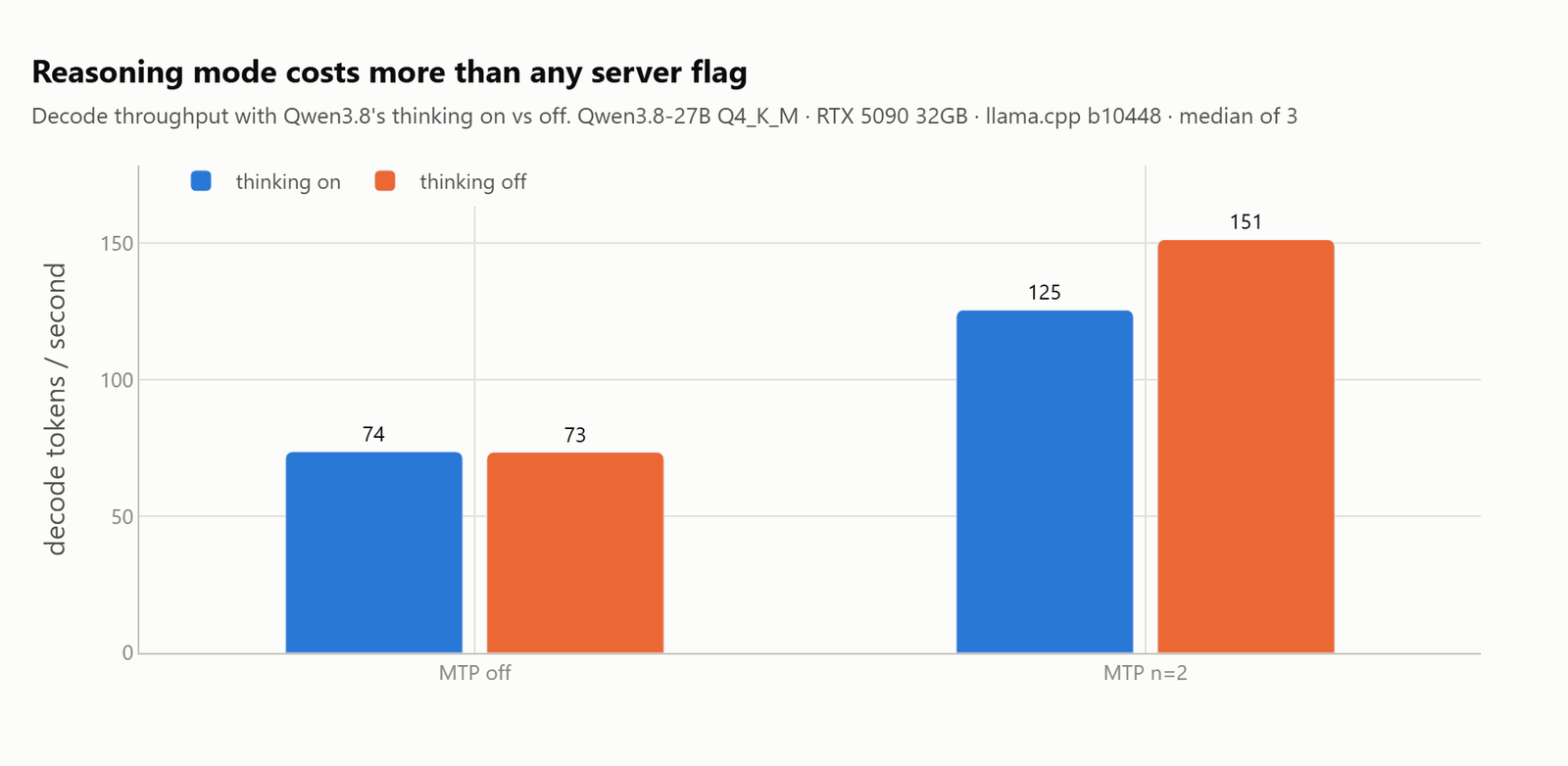
That’s it. And it takes decode throughput from 74 tokens/second to 134 tokens/second at the optimal draft depth, a 1.81x improvement.
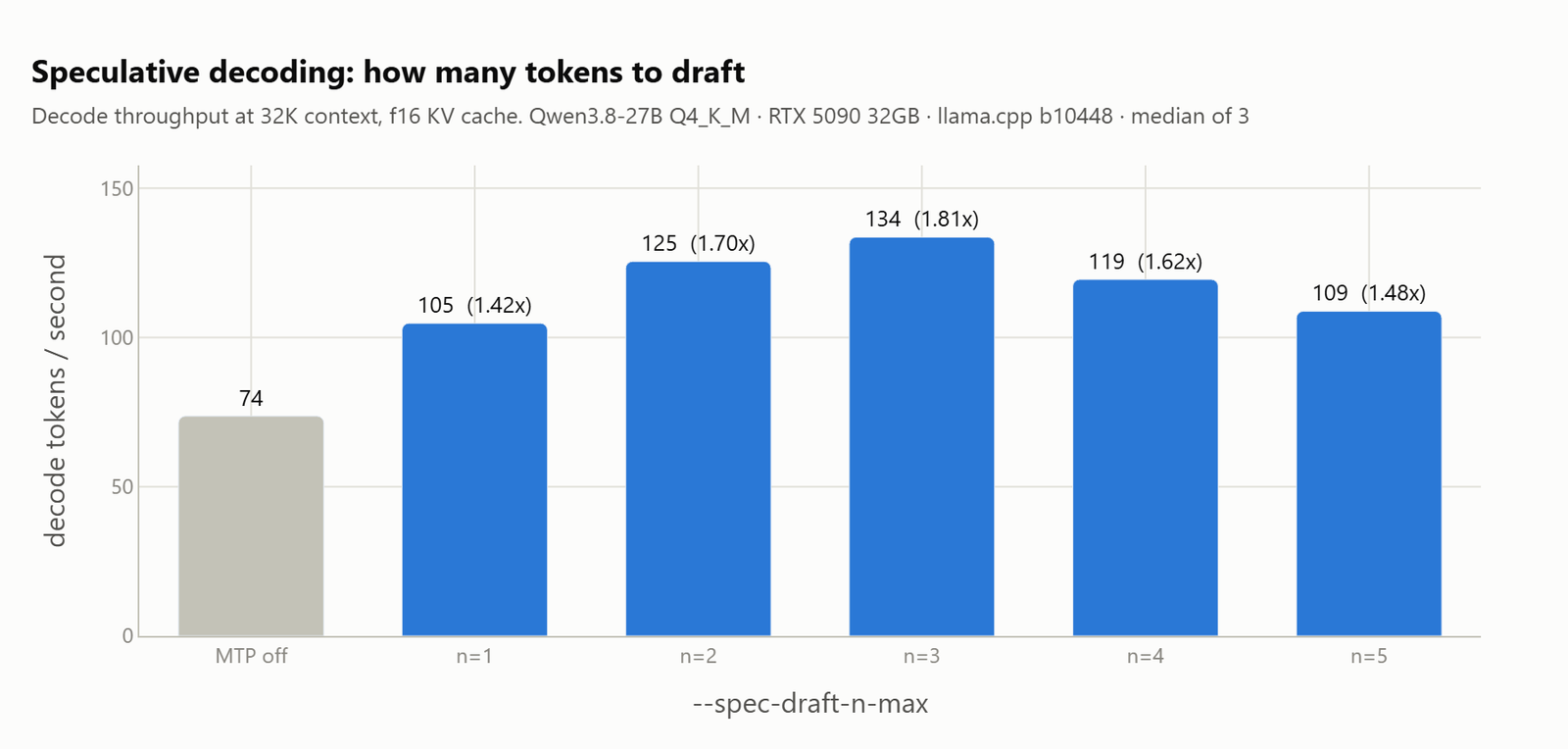
The full ladder:
| Draft depth | Decode tok/s | vs MTP off | Accept rate | VRAM MiB |
|---|---|---|---|---|
| MTP off | 73.6 | n/a | n/a | 17,966 |
| n=1 | 104.8 | 1.42x | 0.860 | 18,648 |
| n=2 | 125.5 | 1.70x | 0.766 | 18,798 |
| n=3 | 133.6 | 1.81x | 0.674 | 18,948 |
| n=4 | 119.5 | 1.62x | 0.592 | 19,098 |
| n=5 | 108.8 | 1.48x | 0.520 | 19,246 |
The peak at n=3 isn’t random. It’s the product of two competing curves: draft deeper and each token becomes less likely to be accepted (86% at n=1 down to 52% at n=5), but each successful step harvests more tokens. Multiply them together and the optimum lands at three.
Because speculative decoding is lossless by design, no quality is lost. An accepted draft token is one the full model would have produced anyway. The only cost is the drafting computation for rejected tokens.
The dirty secret about depth: The best draft depth depends on your KV cache type. With f16 cache, n=3 wins. With q4_0 cache, n=2 ties n=3 while using 150MB less VRAM. That’s not a detail, that’s the difference between fitting and not fitting on a 16GB card.
The KV Cache Quantization That Beats f16 in Both Speed and Size
Here’s the result that surprised even the benchmarkers: quantizing the KV cache doesn’t just save VRAM, it’s faster.
| KV type | Decode tok/s | VRAM MiB | Saved vs f16 | Quality |
|---|---|---|---|---|
| f16 | 125.5 | 18,798 | n/a | 100% |
| q8_0 | 128.3 | 17,924 | 874 MiB | 100% |
| q4_0 | 136.7 | 17,412 | 1,386 MiB | 100% |
Why? Decoding is memory-bandwidth-bound. A smaller cache means less data read for every token generated. The q4_0 cache wins on both axes simultaneously: 1.4GB lighter and faster.
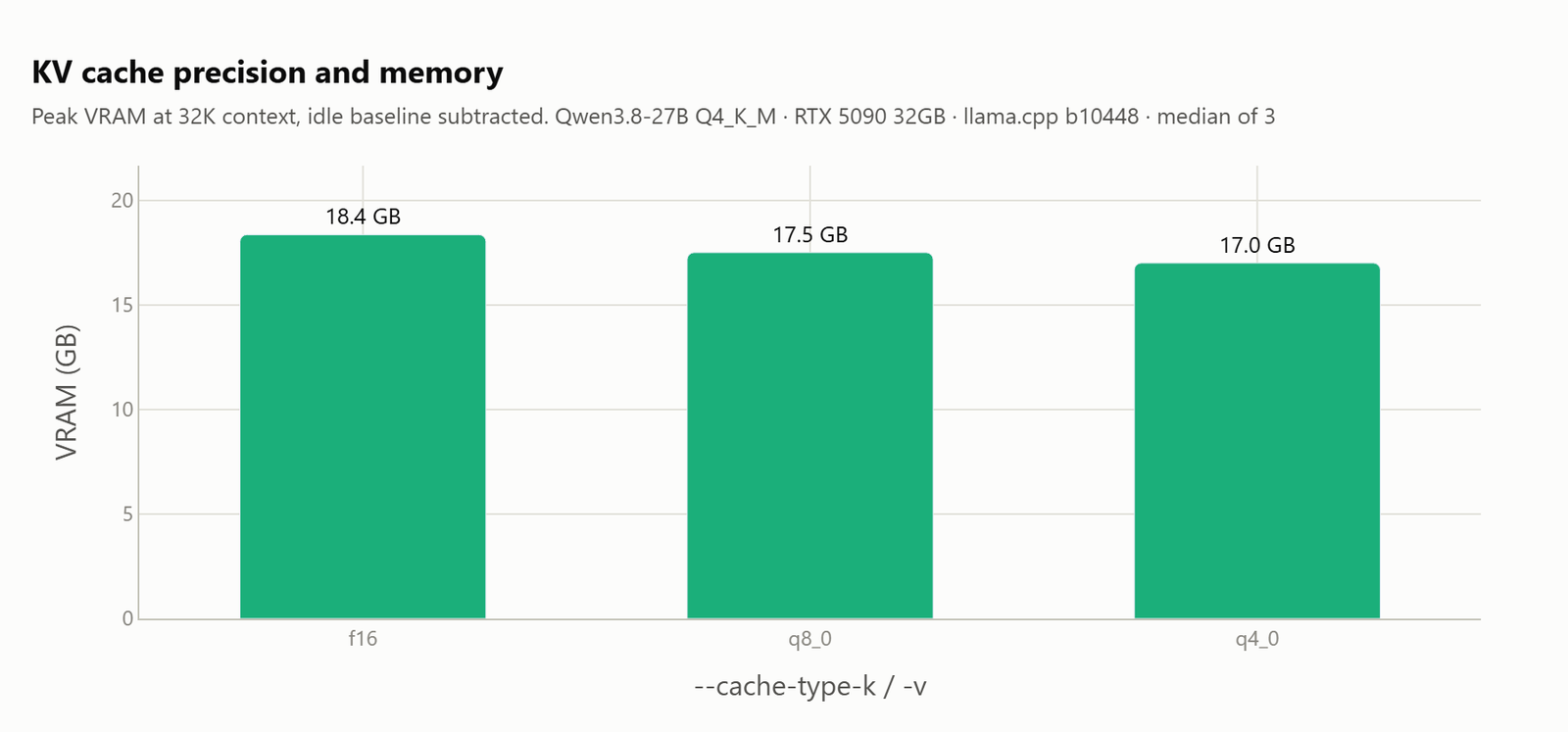
There was no quality cost at any precision, including needle-retrieval tests at three different document depths. The “quantize everything breaks long-context recall” fear doesn’t materialize here, at least not for this model.
One sizing note: q8_0 doesn’t halve the memory. It’s ~63% of f16, not 50%. Plan accordingly.
This matters more than draft depth. A q4_0 cache at n=2 gets 136.7 tokens/second. An f16 cache at n=3, the best result from the entire depth sweep, gets 133.6. The KV cache type is worth more than the draft depth.
Why Ollama’s “Speed” Is Just Good Defaults
There’s a persistent myth that Ollama is somehow magically faster than llama.cpp. It’s not. Ollama literally runs llama-server as a child process.
When benchmarkers ran the same GGUF through both, Ollama showed ~2x the throughput of a stock llama-server. That’s not a runtime advantage, that’s Ollama shipping with the MTP flags already enabled:
llama-server.exe --model <blob> -c 32768 -np 1 \
  --spec-type draft-mtp --spec-draft-n-max 4 --spec-draft-backend-sampling \
  --cache-type-k f16 --cache-type-v f16 --flash-attn on \
  -b 1024 -ub 1024 --context-shift --keep 4 \
  --no-jinja --chat-template chatml
Two-thirds of the gap is the draft head being on. The rest is the prompt template. Matched on flags and template, llama.cpp is actually ~11% faster than Ollama.
The real cost of Ollama’s approach: it discards Qwen’s model template and uses bare chatml, which means you can’t set reasoning effort through Ollama at all. That’s the cheapest performance win available, and it’s locked behind using llama-server directly.
The Reasoning Lever That Beats Every Server Flag
Nobody waits on throughput. They wait through thinking tokens before a single word of the answer arrives.
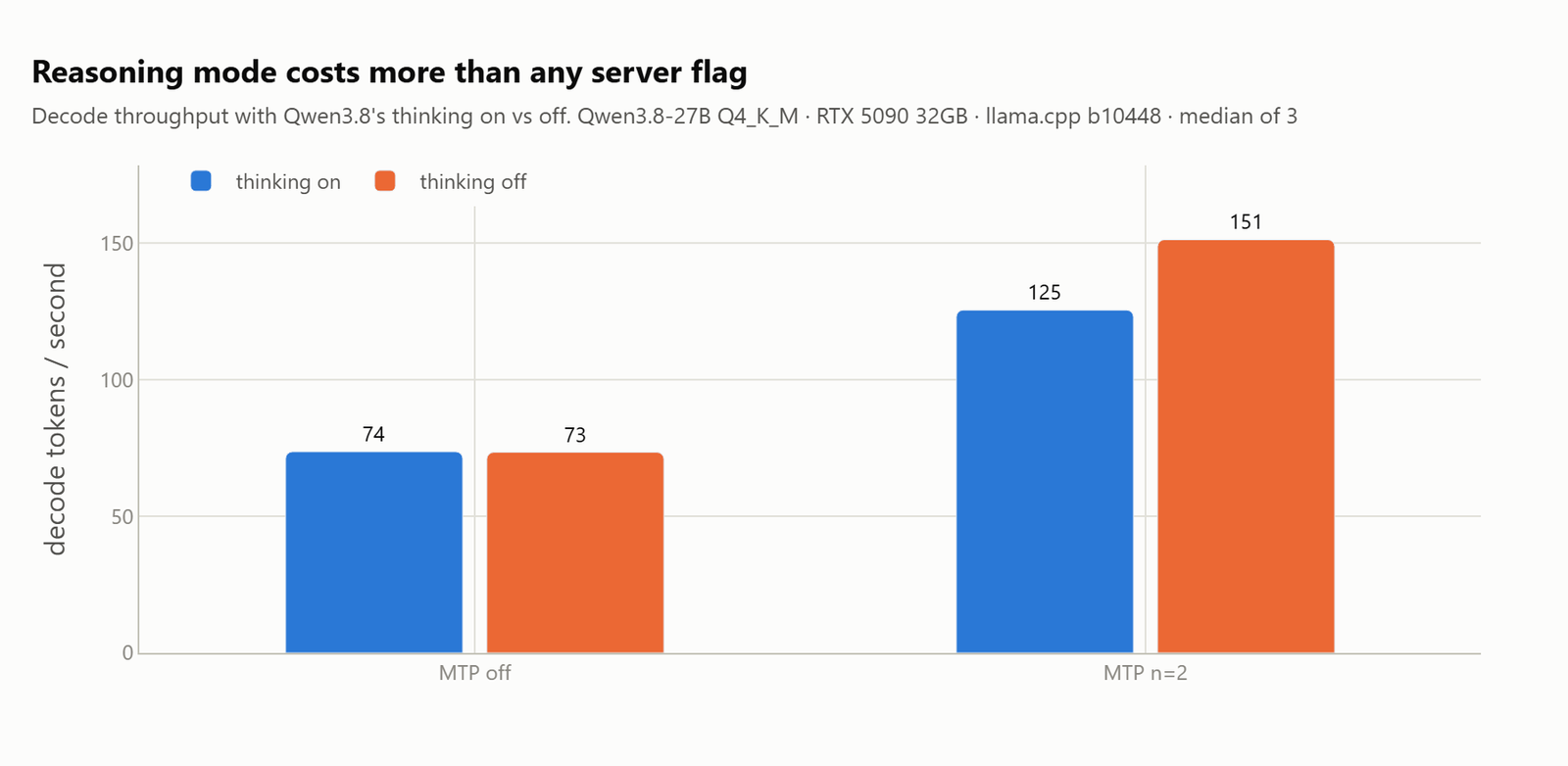
Qwen 3.8 reasons by default. The default xhigh effort produces a median of 106 thinking tokens before the answer starts. That’s 1.44 seconds of waiting before you see anything.
| Reasoning level | Think tokens | Time to answer | Decode tok/s | Accept rate |
|---|---|---|---|---|
| xhigh (default) | 106 | 1.44s | 128.9 | 0.766 |
| medium | 91 | 0.92s | 139.2 | 0.820 |
| low | 78 | 1.21s | 147.3 | 0.839 |
| off | 0 | 0.21s | 151.2 | 0.863 |
Dropping to medium effort takes a third off the wait and cost nothing measurable. The model’s task correctness stayed at 100% across all four levels.
Turn thinking off entirely and throughput roughly doubles, 151 tokens/second versus 73.6, and time-to-first-answer drops by 10x. The MTP head also works better on non-thinking output because direct answers are more predictable than reasoning prose (acceptance climbs from 0.766 to 0.863).
One trap: llama.cpp’s --reasoning-effort accepts minimal, high, and max values that Qwen 3.8’s chat template has never heard of. It throws an HTTP 500 on every single request. The template defines exactly three levels: low, medium, xhigh. That’s an afternoon gone if you don’t probe the live server first.
Context Windows: Raising It Is Free. Filling It Is Not.
The 73K context on 16GB VRAM is genuinely impressive. But it’s important to understand what that actually costs.
| Context | VRAM | Decode (short prompt) | TTFT (full window) | Decode (full) |
|---|---|---|---|---|
| 4K | 16.5GB | 126.5 | 1.4s | 136.3 |
| 32K | 18.4GB | 126.5 | 11s | 122.7 |
| 64K | 20.5GB | 126.4 | 27s | 109.7 |
| 128K | 21.6GB | 120.6 | 78s | 77.2 |
| 256K | 27.1GB | 115.1 | 757s | 13.3 |
Setting a big -c is nearly free. Decode holds at ~126 tokens/second from 4K all the way to 64K. The window costs VRAM, not speed.
Actually filling that window is the expensive part, and it’s worse than linear. Going from 128K to 256K multiplies time-to-first-token by 9.7x, not 2x. A 256K window genuinely runs on a 32GB card, but you wait 12.5 minutes for the first token. That’s a batch job, not a conversation.
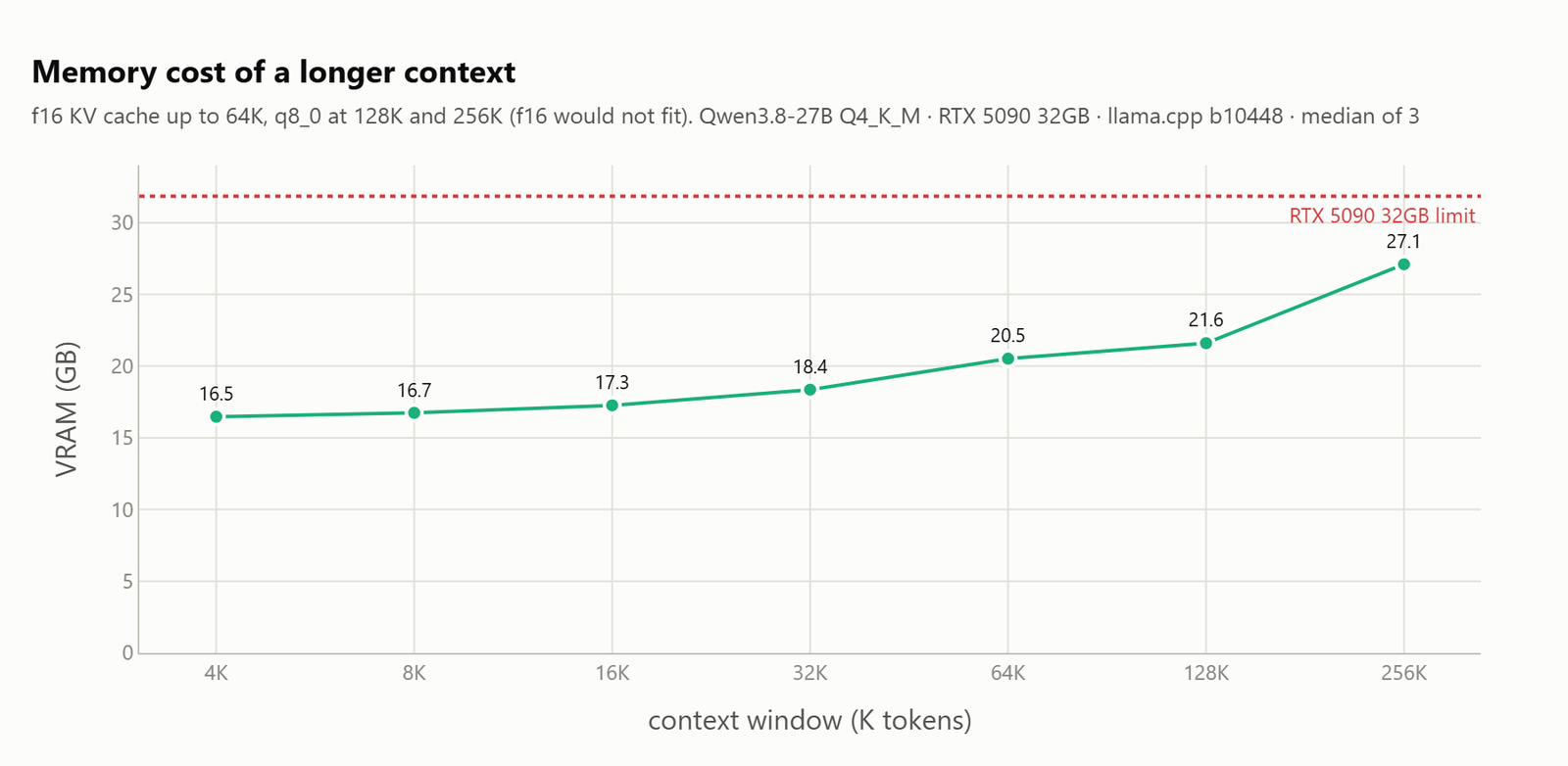
The 73K context in the 16GB config sits right at the edge of the practical interactive ceiling. Long context servers also need warming, at 256K, the first few requests run at half speed while the 5.5GB cache gets committed.
The Configs That Actually Work
For everyday interactive work (32GB card, Q4_K_M):
llama-server -m Qwen3.8-27B-Q4_K_M.gguf \
  -ngl 999 -fa on --jinja -np 1 \
  -c 32768 \
  --cache-type-k q4_0 --cache-type-v q4_0 \
  --spec-type draft-mtp --spec-draft-n-max 2
That gives 136.7 tokens/second, 17.0GB, and 100% quality measured exactly as written.
For the 16GB breakthrough (Q3_K_XL, aggressive cache quant):
llama-server -m Qwen3.8-27B-UD-Q3_K_XL.gguf \
  -ngl 999 -fa on --jinja -np 1 \
  -c 73728 \
  --cache-type-k q4_1 --cache-type-v q4_1 \
  --spec-type draft-mtp --spec-draft-n-max 2
For long documents (32GB card):
llama-server -m Qwen3.8-27B-Q4_K_M.gguf \
  -c 131072 --cache-type-k q8_0 --cache-type-v q8_0 \
  --spec-type draft-mtp --spec-draft-n-max 3
That gives 121.8 tokens/second, 21.7GB, and ~77 seconds to swallow a full 128K prompt.
Three things not worth your time: ngram-mod (a net loss on real prompts, it replays cached text and gets exposed the moment you test unique prompts), -fa off (costs 2.3GB and a fifth of prompt processing), and an f16 KV cache (slower and larger than q4_0).
The Benchmarking Traps That Produce Lies
The 45-configuration benchmark sweep on the RTX 5090 surfaced four ways clean-looking results turned out to be wrong:
Heat drift. The card sits at 599W against a 600W cap. Running a sweep from n=1 to n=5 in order means each config gets a hotter card than the previous. The “peak” at n=3 could have been an artifact of the early configs getting the cool card. Re-running the ladder backwards showed n=3 still wins, but n=5 was under-measured by 4%.
Cache replay. N-gram drafting appeared to deliver 1.04x speedup… until 699 tokens/second appeared on the third repeat of the same prompt. The drafter was replaying answers it had already given. On cold prompts it delivers 0.97x, a net loss. Any benchmark that loops the same prompt overstates n-gram drafting by up to 9x.
Template traps. Ollama’s “speed” turned out to be its flags and template, not its engine. And the attempt to use --no-jinja --chat-template chatml to replicate that speed led to the most seductive wrong answer of all: it showed 2.13x the baseline while reporting zero thinking tokens. The model was reasoning the whole time, the thinking blocks just never got separated into reasoning_content without the jinja template.
Run-order bias. Acceptance rates don’t drift with temperature, they’re a property of the draft head. When two runs show the same acceptance to four decimal places, that’s a control that can settle which results to trust.
The Bottom Line
The 16GB VRAM breakthrough isn’t about one magic setting. It’s about stacking aggressive but lossless optimizations: Q3 quant for the weights, q4_1 KV cache for the context, native MTP for throughput, and reasoning-effort control for latency. Each one individually is modest. Together, they unlock a 27B model on hardware that every tier guide says can’t handle it.
The NVFP4 quantization story showed that precision isn’t always what it seems. The Q3 quant story here makes the same point at the other end of the spectrum.
The skeptics are right that Q3 is a tradeoff. But the tradeoff isn’t “worse quality”, it’s “more attentive prompting required.” The uncensored Qwen3.6 with 4-bit quantization for local deployment makes the same case: modern quants retain more capability than their bit-level suggests, and the right workflow compensates for the residual degradation.
For agentic coding specifically, the model’s ability to self-correct through test failures and linter errors compensates for Q3’s occasional syntax slips. That’s the real insight: at Q3, the model isn’t less intelligent, it’s slightly more careless. Which is exactly the kind of problem that automated tooling was built to solve.
The VRAM tier ladder needs a new rung. 16GB doesn’t just run 14B models anymore. It runs 27B models with 73K context and agentic coding capability, if you’re willing to trust the quant and learn the config.
The era of “your GPU is too small” is officially over. Qwen3.5’s large context demands and inference challenges showed us what happens when a model demands more than the playbook provides. Qwen 3.8 just rewrote the playbook.