The local LLM community has been refreshing GitHub PR #23398 for weeks, and the payoff is finally here. Llama.cpp b9549 landed Gemma 4 Multi-Token Prediction (MTP) support on June 7, and early adopters are reporting throughput increases that make consumer GPUs look like entirely different hardware.
One user clocked 140 tok/s on a 12GB RTX 4070 Super with Gemma 4 12B using QAT and MTP simultaneously. Another saw the 31B dense model jump from 35 tok/s to 62 tok/s on dual 3090s. These aren’t cherry-picked synthetic benchmarks, they’re real-world numbers from the community’s first weekend with the merge.
But this isn’t a simple “flip a switch and go faster” story. The implementation has sharp edges, a few gotchas, and one glaring omission that MoE model users need to understand before they get disappointed.
What Actually Happened with the Merge
PR #23398 by contributor am17an added 639 lines and removed 137, integrating Gemma 4’s specialized MTP architecture into llama.cpp’s speculative decoding pipeline. Unlike generic speculative decoding where you need a separate, smaller draft model, Gemma 4 ships with a lightweight prediction head that was co-trained with the base model. This head predicts multiple future tokens simultaneously, and llama.cpp now knows how to use it.
The PR author’s benchmarks on a DGX Spark tell the story:
Without MTP (31B Q8):
Aggregate: 1728 tokens in 290.01 seconds → ~6 tok/s
With MTP (spec-draft-n-max 4):
Aggregate: 1728 tokens in 120.65 seconds → ~14.3 tok/s
That’s a 2.4x speedup on Apple Silicon, impressive, but the consumer GPU numbers are where this gets spicy.
The Real-World Numbers That Matter
Community member janvitos posted the standout result: 140 tok/s with Gemma 4 12B on an RTX 4070 Super (12GB VRAM). The exact configuration:
llama-server \
  -m gemma-4-12B-it-qat-UD-Q4_K_XL.gguf \
  --model-draft gemma-4-12B-it-qat-assistant-MTP-Q8_0.gguf \
  --spec-type draft-mtp \
  --spec-draft-n-max 4 \
  --parallel 1 \
  --ctx-size 131072 \
  --temp 1.0 \
  --top-p 0.95 \
  --top-k 64
The key insight here is the QAT (Quantization-Aware Training) GGUF. Google explicitly designed Gemma 4’s QAT checkpoints to work with MTP, as their blog post states: “Use the MTP QAT checkpoints to preserve the speedup of MTP while quantizing the models.”
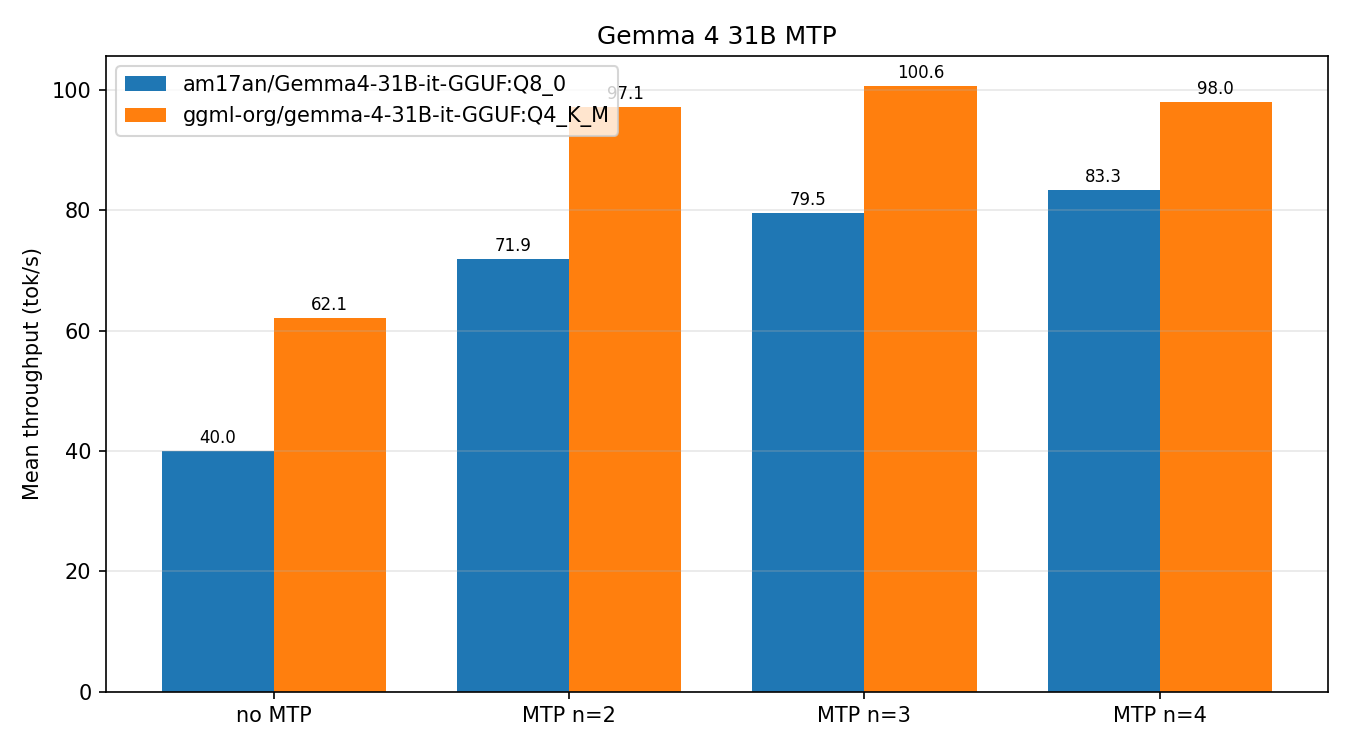
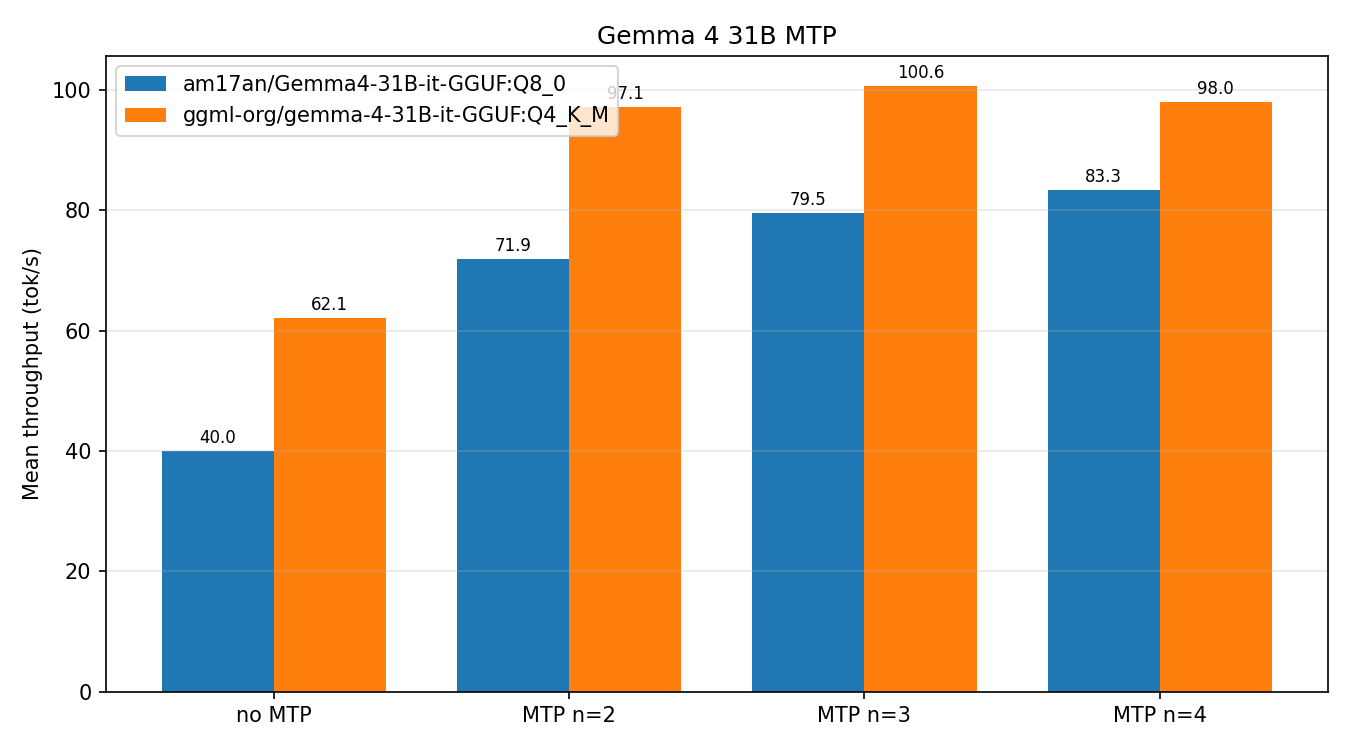
For the 31B dense model, contributor aldehir published a comprehensive benchmark on an NVIDIA RTX PRO 6000 Blackwell showing nearly 2x speedup with Q8 quantization:
| Configuration | Mean tok/s | Speedup vs. baseline |
|---|---|---|
| Q8 no MTP | 40.0 | 1.00x |
| Q8 MTP n=2 | 71.9 | 1.74x |
| Q8 MTP n=3 | 79.5 | 1.89x |
| Q8 MTP n=4 | 83.3 | 1.97x |
| Q4 no MTP | 62.1 | 1.00x |
| Q4 MTP n=2 | 97.1 | 1.51x |
| Q4 MTP n=3 | 100.6 | 1.55x |
| Q4 MTP n=4 | 98.0 | 1.50x |
Interesting pattern: n=3 outperforms n=4 for Q4. The marginal gain from the fourth speculative token doesn’t justify the overhead when the model is already quantized aggressively.
The MoE Problem Nobody’s Talking About
Here’s the catch: MTP doesn’t work well on Gemma 4’s Mixture-of-Experts models. The PR author was explicit: “For the MoE model I don’t observe a speed-up on my system, but the dense model has on average >2x speedup.”
This isn’t just a performance regression, it’s a fundamental architectural mismatch. The E4B and E2B variants aren’t supported at all yet, with only the dense 31B and the 26B-4B MoE getting initial support. Community member ruixiang63 noted that Eagle3 (a different speculative decoding approach) provides better speedups on MoE models because it uses a single-layer transformer with D2T vocabulary mapping, reducing draft-model overhead.
If you’re running Gemma 4 26B MoE, performance trade-offs when running MTP llama.cpp builds on constrained VRAM include seeing only marginal gains or even regressions. One user on a dual 3080 setup saw throughput drop from 19.3 tok/s to 9.3 tok/s with MTP enabled due to a KV cache quantization bug.
The Q8 KV Cache Trap
Several users discovered a nasty interaction between MTP and quantized KV cache. When using -ctk q8_0 -ctv q8_0, the draft acceptance rate dropped to exactly 0%.
The issue was traced to a missing Hadamard rotation for the Q tensor in the quantized cache path. Contributor theo77186 confirmed: “I can reproduce the 0% acceptance rate when the main model’s KV cache is quantized to q8_0. With f16 KV cache, the acceptance rate seems normal.”
This was fixed in a subsequent commit, but if you’re on b9549 with a build from the initial tag, you’ll hit this. The workaround is simple: drop the -ctk q8_0 -ctv q8_0 flags and let the cache default to f16.
Multi-GPU setups had their own headaches. The initial merge broke multi-GPU entirely, with PR author am17an quickly noting “Multi GPU is currently broken, I will push a fix in a bit.” The fix requires specifying --spec-draft-device with -sm layer to explicitly route the draft model to a specific GPU.
How to Actually Get This Working
Step 1: Download the models
– Target model: Use Unsloth’s QAT GGUF (UD-Q4_K_XL format offers the best quality/speed balance)
– Draft model: g0chu’s assistant GGUF (Q8_0 format, ~515MB)
Step 2: Verify your build
Ensure you’re on b9551 or later. The initial b9549 had the KV cache quantization bug and multi-GPU issues. Download from the releases page and confirm --spec-type draft-mtp is recognized.
Step 3: Run with conservative settings
llama-server \
  -m gemma-4-31B-it-qat-UD-Q4_K_XL.gguf \
  --model-draft gemma-4-31B-it-qat-q4_0-unquantized-assistant-q8_0.gguf \
  --spec-type draft-mtp \
  --spec-draft-n-max 3 \
  --parallel 1 \
  --ctx-size 64000
One user on a Strix Halo (128GB unified memory) reported a clean 2x speedup from ~12 tok/s to ~26 tok/s using this exact configuration with lemonade as the frontend. The startup logs should show:
common_speculative_impl_draft_mtp: adding speculative implementation 'draft-mtp'
load_model: speculative decoding context initialized
The Regression That Slipped Through
For users not using MTP, b9549 introduced a nasty regression. Enabling --spec-default (which uses n-gram speculative decoding) tanked throughput from 40+ tok/s to ~4 tok/s on Gemma 4 12B. The issue appears to be related to the MTP code path interfering with n-gram’s cache management.
The original MTP merge into llama.cpp including benchmark comparisons showed similar teething problems. If you’re seeing catastrophic slowdowns, try removing --spec-default and --spec-type ngram-mod from your command line. The model will run slower than MTP would, but it’ll be back to pre-merge speeds.
What This Means for the Local AI Landscape
Gemma 4 with MTP isn’t just a speed bump, it changes the calculus about what’s feasible on consumer hardware. At 100+ tok/s, the 12B model becomes genuinely usable for interactive coding assistance and real-time chat. The 31B hitting 60+ tok/s on dual 3090s puts it in the same performance bracket as hosted API solutions.
But this is still bleeding-edge software. The E4B/E2B support gap, the high-throughput llama.cpp fork that influenced MTP optimization strategies, and the MoE performance problems mean this isn’t ready for production deployment. If you’re willing to ride the git master and debug the occasional assertion failure, the rewards are substantial.
The beta stage MTP support in llama.cpp closing gap with production inference servers suggests that within a few weeks, these sharp edges will be smoothed over, and Gemma 4 MTP will be the default recommendation for anyone running local inference.
For now, the message is clear: if you have a dense Gemma 4 model and the VRAM to run it, grab b9551, find a compatible assistant GGUF, and prepare to be surprised by what your GPU can actually do.