144GB of Model on 4x RTX 3060: The Anti-Datacenter Setup That Hits 100 tok/s
Let’s get one thing straight: running a 144 GiB model on hardware that costs less than a single A100 is not supposed to work. It’s like fitting a 747 engine into a Toyota Corolla and expecting it to fly.
Yet someone did it. And the results are making the cloud-compute crowd sweat.
The setup: four RTX 3060 12GB cards (48GB total VRAM), a 12-core i9-10920X from 2019, 128GB of quad-channel DDR4, and one of the most unhinged tensor placement configurations you’ll ever see in llama.cpp. The outcome: a 144 GiB DeepSeek-V4-Flash quantization processing prompts at roughly 99.4 tokens/second with a 368k context window.
This isn’t a flex. It’s a roadmap for the rest of us.
The Model: A 284B MoE with a Shocking Secret
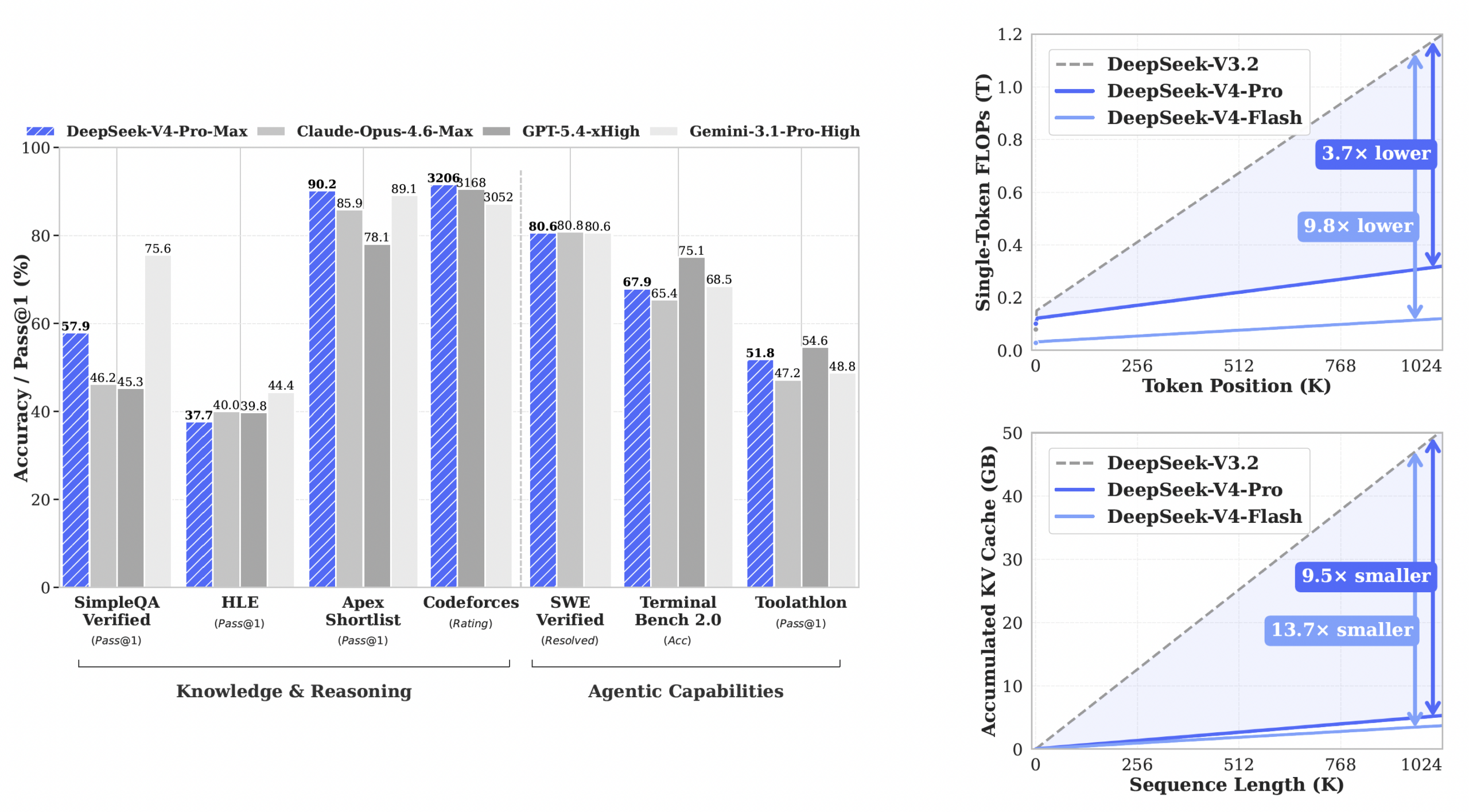
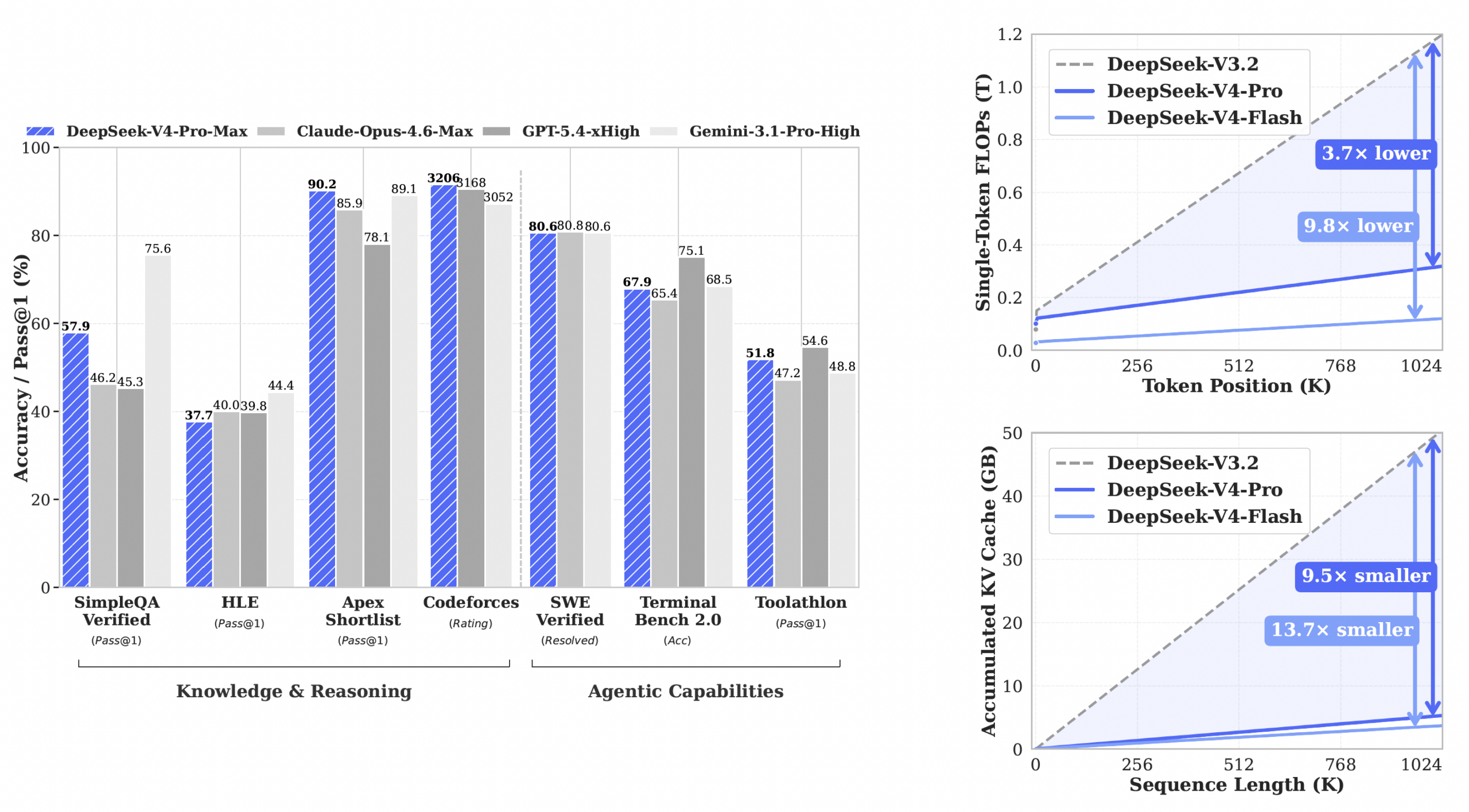
The DeepSeek V4 Flash model that made this possible is a preview of DeepSeek’s V4 series, a Mixture-of-Experts architecture with 284B total parameters but only 13B activated per token. That 1M-token context window is impressive, but the real magic lies in how efficiently DeepSeek built it.
Here’s where things get interesting. DeepSeek-V4-Flash is quantization-aware-trained. The official checkpoint stores its routed experts, 96% of the model, natively in MXFP4, with everything else in FP8 or BF16. Unsloth’s UD-Q4_K_XL quant repacks those experts bit-for-bit, meaning you get near-lossless quality without the usual quantization tax.
The GGUF benchmark comparison makes this painfully clear:
| Quant | Size (GB) | PPL | Mean KLD | Bit-exact weights |
|---|---|---|---|---|
| Official (reference) | 156.4 | 4.5319 | 0 | 100% |
| Unsloth UD-Q8_K_XL | 161.9 | 4.5319 | ~0 (lossless) | 100% |
| Unsloth UD-Q4_K_XL | 155.1 | 4.5335 | 0.0102 | 97.46% |
| Community Q4KExperts | 164.6 | 4.5743 | 0.0291 | 0.93% |
Notice something strange? The 4-bit quant is smaller than the official 156GB reference yet lands within 0.0016 perplexity of it. Meanwhile, community quants that should theoretically be smaller for higher quality end up bigger and worse. When someone claims DeepSeek’s efficiency claims are marketing fluff, point them at these numbers.
The takeaway: this isn’t just another LLM. It’s a model designed from the ground up to run lean. And on consumer hardware, that lean design translates directly into tokens per second.
The Setup: Duct Tape, Two Power Supplies, and Pure Audacity
The hardware list reads like a Craigslist bargain hunt:
- CPU: Intel Core i9-10920X (12C/24T, 2019)
- RAM: 128GB DDR4-3200 quad-channel
- GPUs: 4× RTX 3060 12GB (48GB total VRAM)
- Storage: NVMe SSD
- Engine: llama.cpp build b10181
The physical setup reportedly involved GPUs scattered across the room with an open case, powered by two separate PSUs because one 850W unit couldn’t handle all four cards. As one observer noted, four 3060s draw roughly the same power as a single RTX 5090, which puts the whole endeavor in perspective.
But the real engineering heroics happened in software configuration.
The llama.cpp Configuration: Tensor Placement Jazz
Here’s the exact configuration that unlocked the performance:
llama-server \
  -m DeepSeek-V4-Flash-0731-UD-Q4_K_XL-00001-of-00005.gguf \
  -c 368640 \
  -ncmoe 34 \
  -ts 100,1,1,1 \
  -ot 'blk.(3[4-6]).ffn_.*_exps=CUDA1,blk.(3[7-9]).ffn_.*_exps=CUDA2,blk.(4[0-2]).ffn_.*_exps=CUDA3' \
  -ctk q8_0 \
  -ctv q8_0 \
  -b 2048 \
  -ub 2048 \
  -np 1 \
  -lm none \
  --threads 20 \
  --flash-attn on
Let’s decode this madness because the logic is anythin but obvious.
-ncmoe 34 tells llama.cpp to keep the expert weights from blocks 0, 33 in system RAM. Only the experts in blocks 34, 42 get moved to GPUs, three layers per GPU on CUDA1, CUDA2, and CUDA3 via -ot overrides.
-ts 100,1,1,1 is the extreme part. This tensor split pushes 100% of non-expert tensors, attention weights, KV-related allocations, everything that isn’t an expert, onto GPU0. GPUs 1, 3 are essentially reserved for the massive expert layers they’ve been explicitly assigned.
This counterintuitive arrangement works because of how MoE models behave during inference. The attention mechanism needs fast access to its weights for every token, so it gets the bulk of GPU0’s 12GB. Meanwhile, expert activation is sparse, only 2-3 experts fire per token, so the data transfer bottleneck from system RAM matters less than you’d think.
The developer’s own words capture the trial-and-error nature: tensor placement in llama.cpp’s multi-GPU MoE handling is “discrete and somewhat unintuitive”, so they measured every candidate configuration rather than trying to calculate the optimal layout analytically.
The Numbers: What 100 tok/s Actually Looks Like
Measured with a ~20.5k-token prompt, the benchmark table tells the full story:
| Context | Prefill | Decode | Min free VRAM |
|---|---|---|---|
| 376,832 | 99.5 t/s | 10.4 t/s | 611 MiB |
| 368,640 | 99.4 t/s | 10.1 t/s | 671 MiB |
| 360,448 | 99.4 t/s | 10.1 t/s | 735 MiB |
The 100 tok/s headline refers to prompt processing speed. Generation, meaning sequential token output, lands at 10-10.5 tok/s. That’s an order-of-magnitude difference, and it’s worth being clear about which number matters for which use case.
For context ingestion (the “get this 20k-token document into my model” workflow), 100 tok/s means a 20k prompt loads in roughly 200 seconds. Model load itself takes about 198 seconds. Generation at 10 tok/s is slow compared to cloud APIs but perfectly usable for interactive coding or chat where you’re reading while the model thinks.
Microbatch Size: The Hidden Performance Lever
The single most impactful parameter turned out to be -ub, the microbatch size:
-ub 1024: ~63.4 tok/s prompt processing-ub 2048: ~99.4 tok/s prompt processing
Just doubling the microbatch delivered a 57% improvement in prompt throughput, with decode speed remaining essentially unchanged. That’s a finding worth internalizing for anyone tuning large-model inference, regardless of their GPU count.
The 2048 value also unlocked the full 393,216-token context window, though the tightest GPU card had only 493 MiB free under load. Dropping to 368,640 context restored a comfortable 671 MiB margin without sacrificing prompt-processing speed.
The safer -ub 1024 configuration allows a 524,288-token context with 1032 MiB headroom on the tightest GPU. Trade-off: you lose those ~35 tok/s of prompt processing.
The Performance Ceiling: Memory Bandwidth
Here’s the observation most people miss: the model is mostly in system RAM. The MoE expert weights for blocks 0-33 live entirely on CPU memory and get fetched across the PCIe bus on demand.
This means quad-channel memory bandwidth is the real bottleneck, not GPU compute. The developer’s hardware choice (quad-channel DDR4-3200) is the unsung hero of this build. A dual-channel system would likely see dramatically worse performance, particularly as context grows and KV cache pressure increases.
We covered single-GPU alternatives for V4 Flash previously, and the stark difference in approach shows what’s possible with more memory per card versus more cards total. The RTX 3060 path uses a CPU-RAM-assisted strategy, a single 192GB MI300X just handles it outright.
Practical Considerations for Would-Be Replicators
Before you start hunting for used 3060s on eBay, consider these caveats:
Don’t skip -np 1. Multiple parallel slots multiply KV-cache requirements. With VRAM measured in hundreds of MiB of free space, that’s a fast way to hit a CUDA allocation failure.
Q8_0 KV cache is the default for a reason. F16 KV at c=393216 cut free VRAM to 587 MiB on the tightest card, dangerously close to the edge. Q8_0 in both key and value caches is the safety margin that keeps this running at all.
-lm none is mandatory. Memory mapping must stay disabled with split tensors across multiple cards. The developer’s testing found this fixed, so don’t experiment unless you know what you’re doing.
A production claim this is not. The developer explicitly notes the full 368k context window has not yet been filled end-to-end in a single generation. The numbers represent configured capacity, not a completed stress test. Treat the 100 tok/s as “prompt ingestion speed with everything perfectly aligned”, not “guaranteed performance under worst-case conditions.”
What This Means for the Local AI Movement
Here’s what makes this build genuinely disruptive: the total hardware cost. Four RTX 3060 12GB cards can be had for roughly $200-250 each on the used market. The 128GB DDR4 kit is maybe another $150-200. The CPU is from 2019 and costs about $150 used.
We’re looking at a complete system for under $1,500 that runs a 284B-parameter flagship-class model with a context window measured in tens of thousands of tokens. That’s cheap enough to reshape how individuals and small teams think about AI infrastructure for real workloads.
Compare that to the V4 open-weight release that requires a 1.6T-parameter Pro model, this Flash variant at 284B is proving to be the sweet spot for local deployment. It’s the model that makes expensive cloud APIs look like a luxury purchase rather than a necessity.
The pricing war has already pushed API costs down, V4 Flash runs about $0.14 per million input tokens with cache hits dropping to $0.0028. But for complete data sovereignty, no-per-token costs, and full control over context window size, local inference is increasingly a practical, not just philosophical, choice.
The Bottom Line
This build isn’t optimal. It’s not production-ready. It’s not going to replace your cloud inference pipeline.
What it proves is far more important: the gap between “frontier AI” and “consumer hardware” is closing faster than anyone expected. DeepSeek’s efficiency obsession, embodied in quantization-aware training and aggressive MoE design, has outrun the conventional wisdom about what local inference can achieve.
The subtext of those GPUs hanging off open-air rigs with dual power supplies isn’t poverty, it’s pragmatism. When your model runs at near-lossless quant quality on four cards that cost less than a mid-range laptop, you stop asking “can I?” and start asking “how fast?”
The answer, as it turns out, is about 100 tokens per second. And it’s only going to get faster.