Your team is currently querying Postgres on an on-prem workstation, running Jupyter notebooks on datasets of 100k rows and 200 columns of tabular floating-point numbers. No images, no video, no text data. Just clean, structured data. And management just dropped the bomb: “We have an enterprise Databricks account, and your team needs to start using it.”
Your immediate reaction, the one you’re probably too polite to say out loud, is: Why? It’s a fair question. And the answer reveals a tension running through the data industry that nobody likes to talk about.
The Platform Migration That Makes No Sense (At First Glance)
Let’s be honest about what’s happening here. Your current workflow works. Postgres handles your 100k rows fine. Jupyter notebooks let you explore, visualize, and prototype. You’re not dealing with petabytes of data or real-time streaming. You’re doing straightforward data science on tabular data.
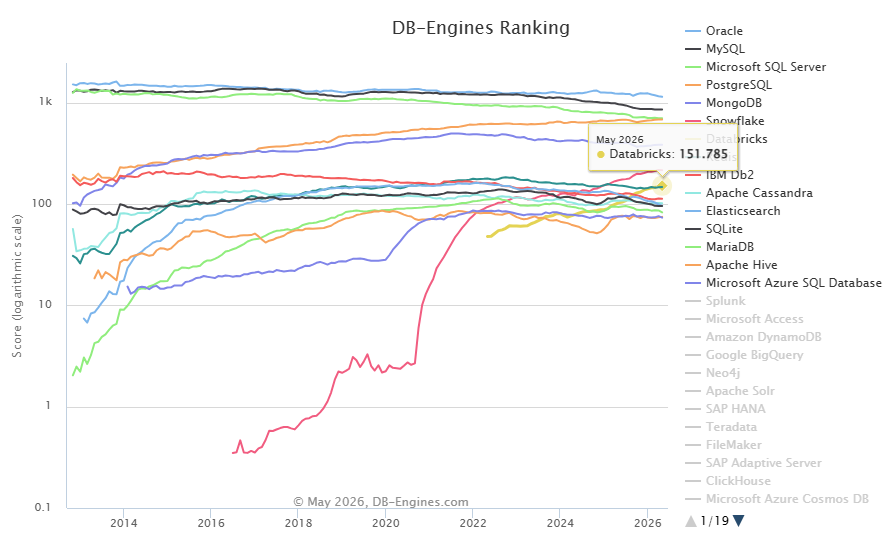
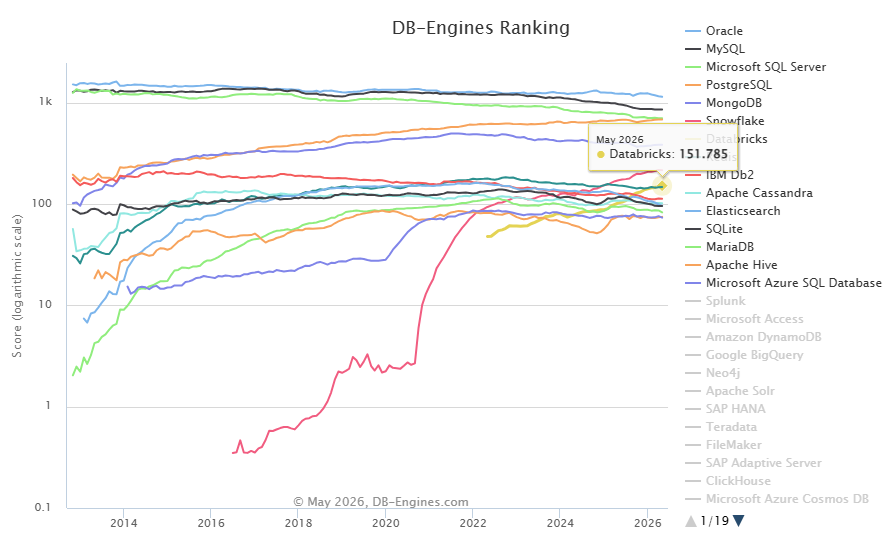
Enter Databricks: a platform ranked 7th in the DB-Engines ranking with a score of 151.79 as of June 2026, built on Apache Spark, designed for massive distributed computing. It’s like being told you need to move your bicycle into a Formula 1 garage because the company bought one.
But here’s the uncomfortable truth: the decision might not be about your workload at all.
When “Enterprise Platform” Means “Corporate Mandate”
The scenario playing out in your company isn’t unique. An enterprise-wide Databricks contract was negotiated at the VP level, probably based on a different team’s needs, streaming data, massive scale, machine learning pipelines. Now the mandate is cascading down: everyone uses the platform, because the platform is what was bought.
This is the core of the dilemma. The people making the purchasing decision aren’t the ones who will live with the overhead. And the overhead is real.
The Hidden Costs Nobody Mentions
- Cognitive overhead: Your team needs to learn Spark concepts (clusters, executors, shuffle partitions) to do work that currently fits in a pandas DataFrame
- Pipeline ceremony: What was
pd.read_sql(query, conn)becomes configuring clusters, managing compute, dealing with Spark session contexts - Cost structure: All-purpose clusters run at $0.55/DBU on AWS Premium tier, and you’re paying DBU costs even when the cluster is idle
- Data movement: Your data lives in Postgres. Now you’re either querying it remotely (with federation overhead) or copying it into Delta Lake
One data engineer on Reddit put it bluntly: “The only advantage of Databricks is that it allows for putting bad practices into production. Scheduled notebooks as workflows, ungoverned data in object storage with no lineage nor metadata, uncommitted code that barely gets version control.”
That’s harsh. But it reflects a real pattern, Databricks can enable sloppy workflows that look productive but create long-term technical debt.
What Databricks Actually Adds (Be Honest With Yourself)
The platform isn’t worthless. For the right use cases, it’s transformative. But you need to be brutally honest about whether those use cases apply to your team.
Where Databricks Shines
- Massive scale: When your data reaches billions of rows and distributed processing is the only option
- Real-time streaming: Processing Kafka streams with Structured Streaming
- ML at scale: Training models on datasets that don’t fit in memory, MLOps with MLflow, model serving
- Multi-team collaboration: When dozens of data scientists and engineers need shared governance
Where It’s Dead Weight
- Small tabular datasets: Spark’s overhead (task scheduling, serialization, shuffle) can make simple operations slower than pandas
- Exploratory analysis: Jupyter with pandas is faster to iterate on 100k rows than Spark notebooks
- Single-data-source queries: If everything lives in one Postgres database, you don’t need a lakehouse
- Teams without Spark expertise: The learning curve isn’t trivial, and the mistakes are expensive
The Medium article on Databricks core components notes that notebooks “run on compute, either all-purpose clusters for interactive work or serverless compute for faster startup with no idle costs.” But that’s the key question: how much compute do you actually need?
The Alternative Stack That’s Quietly Winning
Here’s what’s happening while you’re debating Databricks: a whole ecosystem of lightweight tools has emerged that handles your use case better.
The single-node revolution is already here. Tools like DuckDB and Polars are demonstrating that for workloads up to hundreds of gigabytes, you don’t need a distributed system. These tools run on your laptop, use vectorized execution, and handle the 100k-row, 200-column dataset in milliseconds.
For reference: the single-node revolution as an alternative to distributed platforms for small data shows how teams are abandoning Spark entirely for workloads that fit on a single machine.
And overkill of Spark and distributed systems for smaller workloads, with lighter alternatives demonstrates the specific performance and cost advantages.
Your current stack (Postgres + Jupyter) is closer to this trajectory than to the Databricks path. The question is whether management will recognize that.
The Real Cost Math
Let’s put numbers on this. Databricks pricing varies by tier and cloud provider, but here’s a reasonable estimate for a small team:
| Component | Approximate Cost |
|---|---|
| All-purpose cluster (small, 24/7) | ~$500-1000/month |
| DBU costs for interactive work | ~$200-500/month |
| Storage costs (even for small data) | ~$50-100/month |
| Administrative overhead | Intangible but real |
| Total monthly | $750-1600/month |
| Annual cost | $9,000-19,200 |
For a team that could run the same workload on a $100/month Postgres instance and a free Jupyter environment, that’s a significant premium.
Now, if your team grows to process terabytes of data daily, the Databricks math starts looking better. But for 100k rows? The cost trade-offs for small teams considering managed Databricks vs. DIY alternatives shows that the break-even point rarely works in favor of the enterprise platform for small-scale work.
When You Should Push Back (And How)
Before you reject the mandate outright, consider whether this might be an opportunity in disguise. As one commenter noted: “I would treat this as an absolute win for your career, provided you take this as an opportunity to learn and adopt MLOps best practices.”
But there’s a difference between learning a new tool and being forced to use it for everything. Here’s a framework for deciding:
Red Flags (Push Back)
- Your data stays under 1 million rows
- You have no real-time or streaming requirements
- Your team has no Spark experience and no time to learn it
- The cost is significant relative to your budget
- You’re being asked to migrate working workflows for no clear benefit
Green Flags (It’s Worth Trying)
- You’re already hitting memory limits with pandas
- Your data is growing rapidly and will exceed single-node capacity soon
- Your organization has governance requirements that Databricks addresses (Unity Catalog)
- You need to collaborate across multiple teams working on the same data
If you’re in the red zone, the conversation with your manager should focus on opportunity cost: “Here’s what we could accomplish with the time we’d spend learning Spark, versus the work we’d produce with our current stack.”
The skepticism about Databricks marketing claims and the reality of platform overhead article captures this tension well, the platform marketeers have done their job, but the reality for many teams is more complex.
Making the Mandate Work If You Can’t Avoid It
Sometimes the decision is made above your pay grade. If you’re going to Databricks whether you like it or not, here’s how to minimize the pain:
Start With Serverless Compute
Use serverless notebooks and SQL warehouses instead of all-purpose clusters. The startup time is faster, and you avoid idle costs. Serverless notebooks, jobs, and SQL warehouses “eliminate idle costs and infrastructure management.”
Don’t Migrate Everything
Keep your Postgres database as the source of truth. Use Lakehouse Federation to query it directly from Databricks SQL warehouses, you don’t need to move data into Delta Lake. “Query external databases, MySQL, PostgreSQL, Snowflake, BigQuery, Redshift, without copying data.”
Use Jobs Compute for Production
If you’re running anything on a schedule, use Jobs Compute ($0.15/DBU) instead of all-purpose clusters ($0.55/DBU). That’s a 3.7x cost reduction for the same work.
Learn Lakeflow Before Raw Spark
Delta Live Tables (now Lakeflow) lets you declare data transformations declaratively instead of writing complex Spark code. For your use case, it’s probably the most efficient path, “declarative, with built-in quality rules and automatic dependency management.”
Build for the Future, Work in the Present
Use this as an opportunity to learn the platform, but don’t rebuild everything. Keep your critical path running on Postgres + Jupyter while you explore Databricks for new use cases or growth scenarios.
The Bottom Line
The Databricks dilemma isn’t really about technology, it’s about organizational dynamics. Someone bought a hammer, and now everything looks like a nail. But your data isn’t made of nails. It’s a manageable, tabular, well-understood dataset that works fine in Postgres.
The expensive platform isn’t automatically the right platform. And the quieter truth is that for many teams working with small, tabular data, the smartest move is to stay put and invest in lightweight tools that make you faster today, not in infrastructure designed for problems you don’t have.
As the hidden operational costs of modern lakehouse architectures article points out, the operational tax of these platforms is real, and it’s rarely discussed in the sales pitch.
Your job is to weigh those costs honestly, push back when the math doesn’t work, and, if you’re forced onto the platform anyway, find the fastest path to doing actual work without getting lost in Spark configuration.