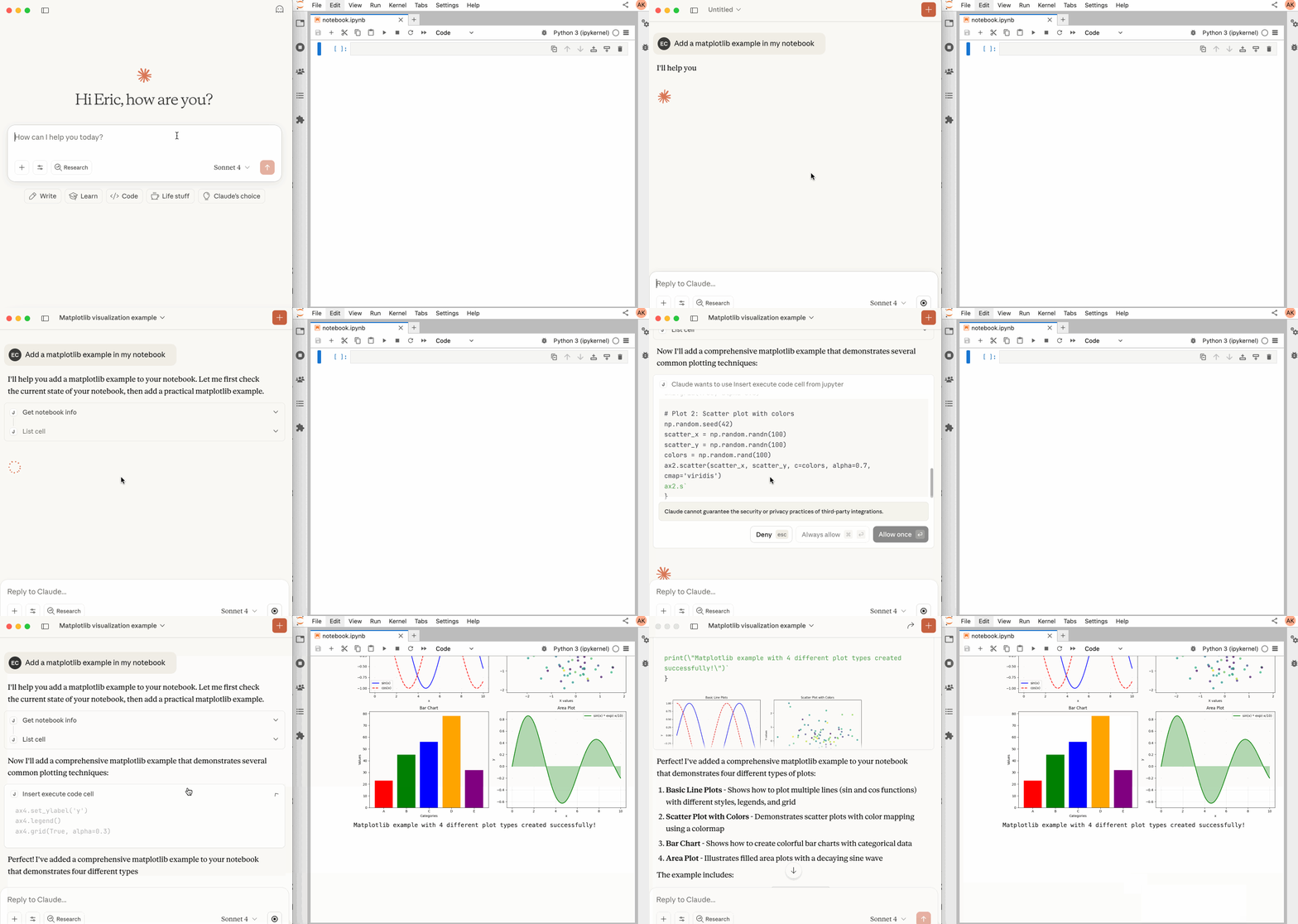
For years, AI-assisted Jupyter work has been a frustrating game of copy-paste theater. You’d ask Claude Code or GitHub Copilot to fix a bug, it would generate plausible-looking code, you’d paste it into a cell, run it, get an error, copy the traceback, paste it back to the AI, and repeat. The AI was an intelligent editor, not a participant in the execution environment. That entire performance is ending with an open source project you’ve likely never heard of: the Jupyter MCP Server.
Developers who’ve tried the setup describe a fundamental shift: “Kernel access changes the failure mode”, as one forum contributor noted. Without direct kernel communication, debugging becomes “pattern matching on code, Claude generates plausible-looking fixes but can’t verify them. With kernel access it can run, observe output, and iterate.” That loop, previously requiring human intervention at every step, now closes automatically.
The difference isn’t incremental, it’s architectural. We’re watching Jupyter notebooks evolve from documentation environments where code happens to execute into autonomous execution environments that happen to use code as their interface.
The Old Way: AI as Bystander
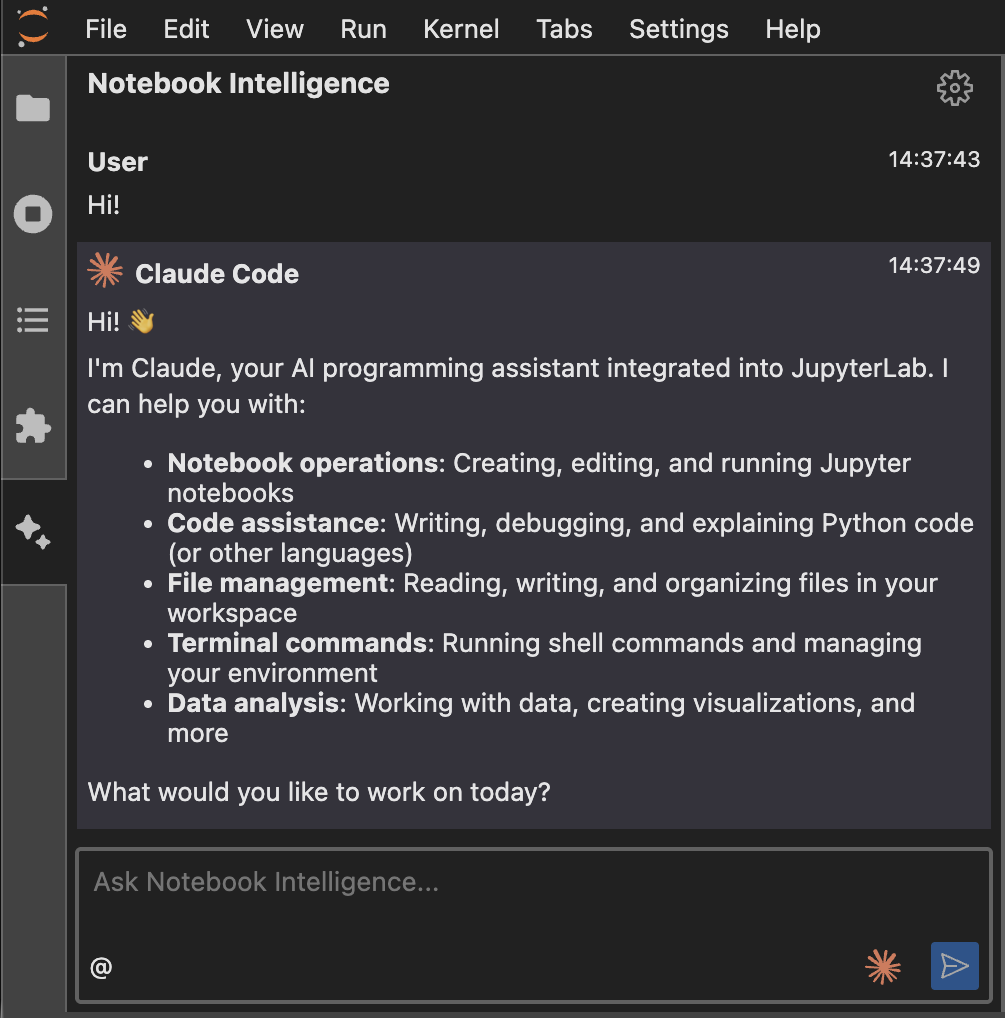
Before direct kernel access, Jupyter AI extensions like Jupyter AI and Notebook Intelligence operated like sophisticated editing tools with view-only access to what should have been a playground. They could read notebook content, suggest changes, but couldn’t execute anything without you manually clicking “Run.”
The workflow fracture was obvious: AI assistants worked adjacent to the kernel rather than through it.
Mission Impossible: Without kernel access, they’re working from static snapshots, missing the dynamic behavior that defines actual software.
- They analyzed code patterns but couldn’t execute commands like
pip install pandas - Couldn’t inspect
locals()to understand the current namespace - Couldn’t measure execution time or validate assumptions against actual output
They were statistically excellent guessers trapped behind a one-way mirror.
This limitation becomes particularly stark when you consider the context limitations of typical AI coding assistants.
Enter Model Context Protocol: The Plumbing That Was Missing
The Model Context Protocol (MCP) emerged as an open standard for connecting AI tools to external resources, but its application to Jupyter represents a particularly elegant solution. Rather than baking Jupyter-specific logic into each AI client, MCP provides a clean interface that any MCP-compatible agent can use.
The Jupyter MCP Server exposes your notebook kernel’s capabilities through a standardized toolset: execute_cell, read_cell, insert_cell, list_notebooks, restart_notebook, and two dozen others. These tools map directly to the actions you perform manually in JupyterLab, but now they’re accessible programmatically through a well-defined protocol.
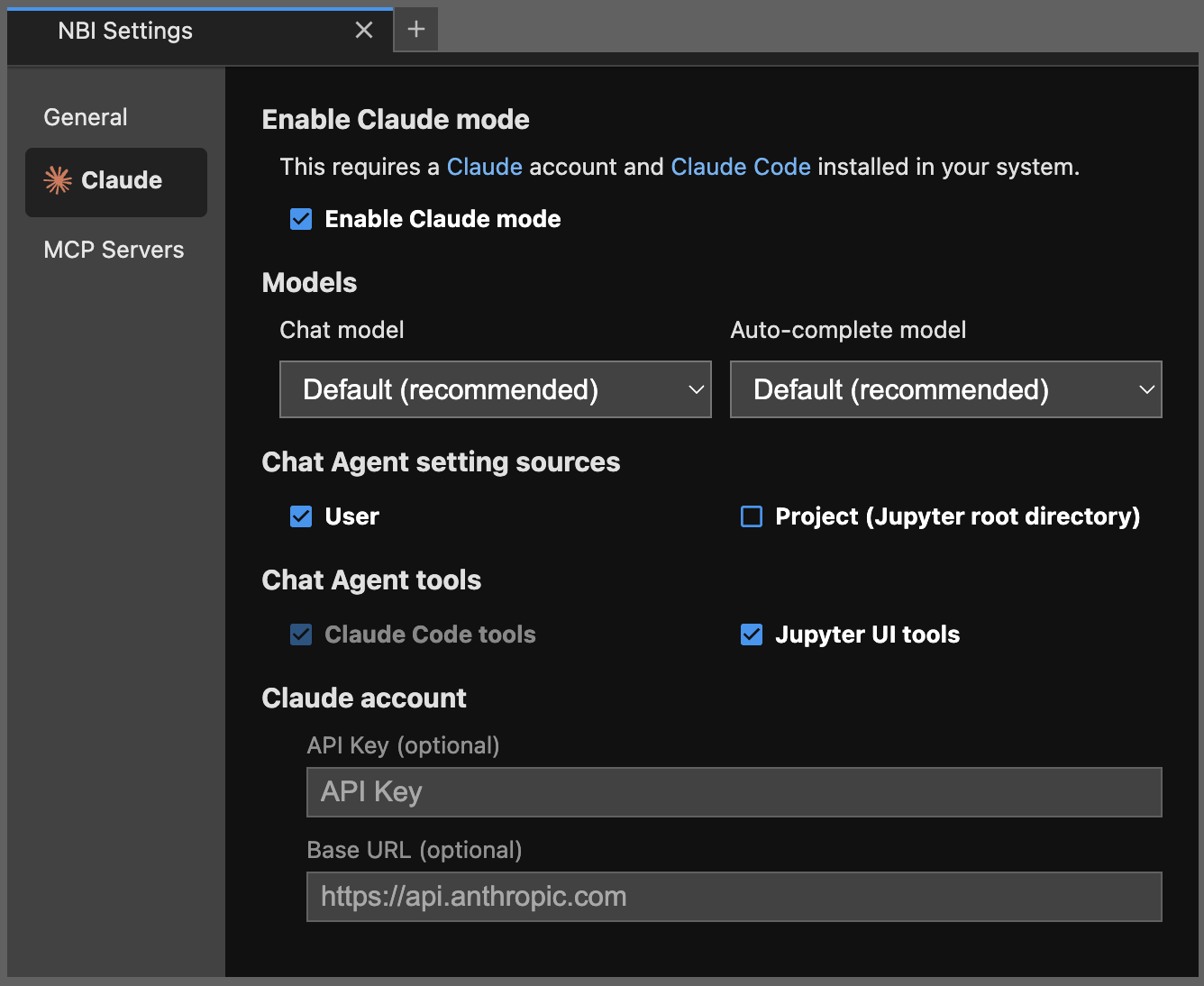
What makes this transformative isn’t just the capability, but the federation. Your Claude Code instance can simultaneously connect to Jupyter via MCP, your filesystem via another MCP server, your database via yet another. Suddenly, “fix this pandas import error” involves the agent inspecting kernel state, checking Python path, potentially installing dependencies, and testing the fix, all in a single autonomous flow.
Setting Up the Future: Is This Production Ready?
Installation reveals this isn’t some experimental proof-of-concept. The project has 1k stars, recent commits addressing authentication breaking changes in v1.0.0, and comprehensive documentation. Setup requires:
pip install jupyterlab==4.4.1 jupyter-collaboration==4.0.2 jupyter-mcp-tools>=0.1.4 ipykernel pycrdt
Then configuration for MCP clients like Claude Desktop becomes straightforward JSON:
{
  "mcpServers": {
    "jupyter": {
      "command": "uvx", "args": ["jupyter-mcp-server@latest"],
      "env": {
        "JUPYTER_URL": "http://localhost:8888", "JUPYTER_TOKEN": "MY_TOKEN",
        "ALLOW_IMG_OUTPUT": "true"
      }
    }
  }
}
The ALLOW_IMG_OUTPUT flag is particularly telling: it enables multimodal support for image, plot, and text outputs, letting AI agents not just execute code but interpret visualizations directly. This is the kind of capability that distinguishes a protocol implementation from a hacky integration.
The Kernel Is the Killer Feature
Without Kernel Access:
- AI generates fix based on error message
- User manually pastes and runs
- Error persists or changes
- User copies new error back
- Repeat with diminishing returns
With Kernel Access via MCP:
- AI generates fix and executes it directly
- Observes failure, inspects actual variable state
- Generates refined fix based on real runtime data
- Executes, validates, repeats until solved
The AI can now install missing dependencies (pip install pandas), inspect loaded modules (import sys, print(sys.modules.keys())), and test hypotheses without human intervention. This fundamentally changes how AI agents approach notebook work, they’re no longer just suggesting code, they’re conducting experiments.
Jupyter AI vs Notebook Intelligence vs MCP: The Emergent Stack
Interestingly, the Jupyter ecosystem is experiencing convergent evolution. While Jupyter AI and Notebook Intelligence both aim to bring AI assistance to JupyterLab, they’re taking different architectural approaches.
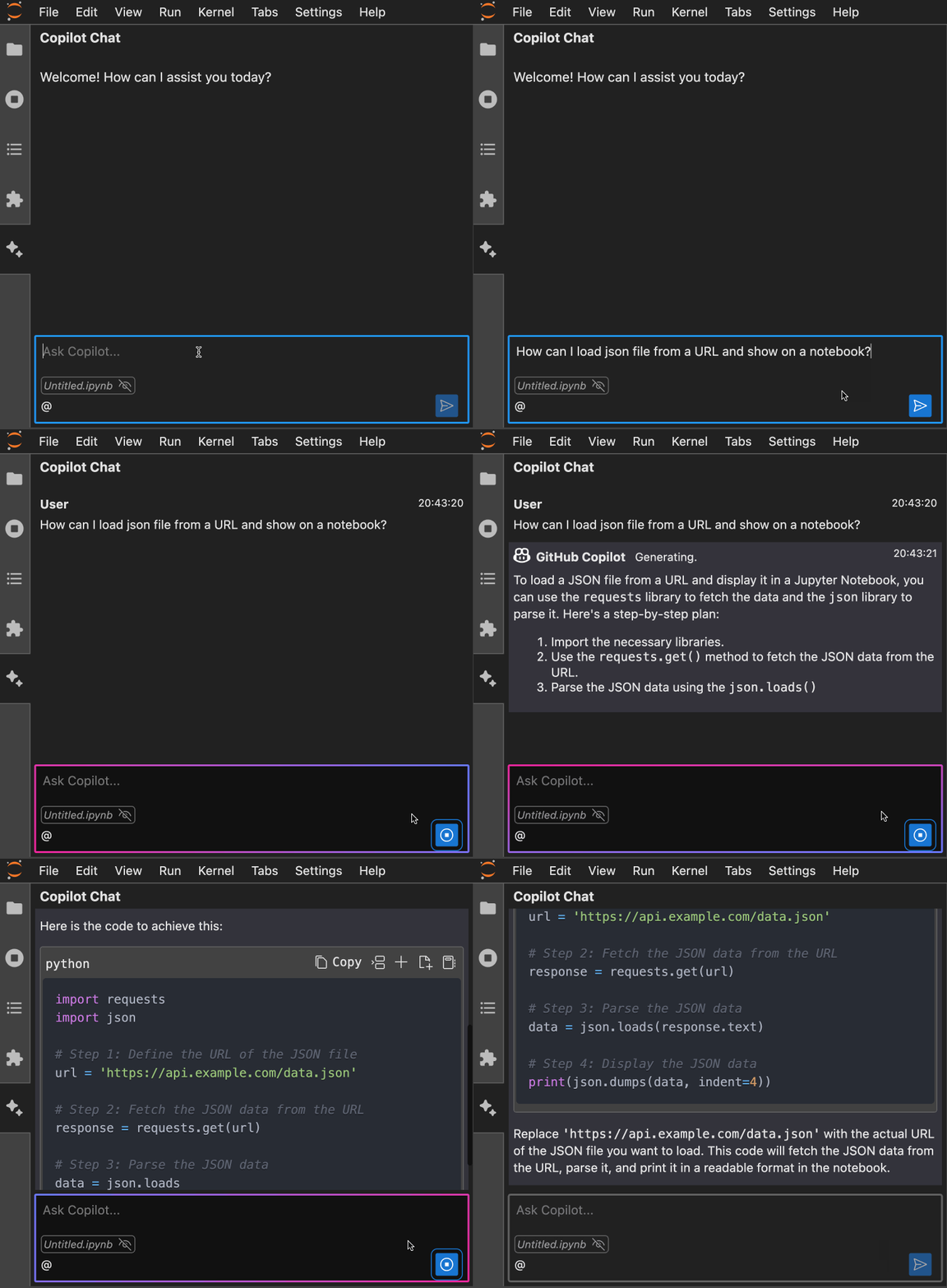
Notebook Intelligence has implemented Claude mode that integrates directly with Claude Code’s existing capabilities. Their documentation emphasizes: “In Claude mode, NBI uses Claude Code for AI Agent Chat UI and Claude models for inline chat (in editors) and auto-complete suggestions. This integration brings the AI tools and features supported by Claude Code such as built-in tools, skills, MCP servers, custom commands and many more to JupyterLab.”
The Jupyter MCP Server, meanwhile, provides a lower-level protocol implementation that any MCP-compatible client can leverage. Both approaches are converging on the same realization: giving AI agents kernel access isn’t just convenient, it’s necessary for them to be truly useful.
The Inevitable Questions: Security, Observability, and Control
Direct kernel execution through AI agents raises immediate security questions, especially when considering the security risks of autonomous agent execution. The Jupyter MCP Server addresses this through multiple layers:
- Authentication requirements with
MCP_TOKENor explicit--insecure-mcp-noauthflags - Configurable allowed tools via
allowed_jupyter_mcp_toolsparameter
- Hook system with OpenTelemetry for tracing tool calls and kernel executions
- Multi-notebook isolation with separate kernel sessions
This isn’t casual security, recent commits show rigorous attention to endpoint authentication. The v1.0.0 release specifically highlighted “breaking change: the streamable-http transport now requires explicit MCP client authentication configuration.”
The Practical Workflow Shift: What Changes Today
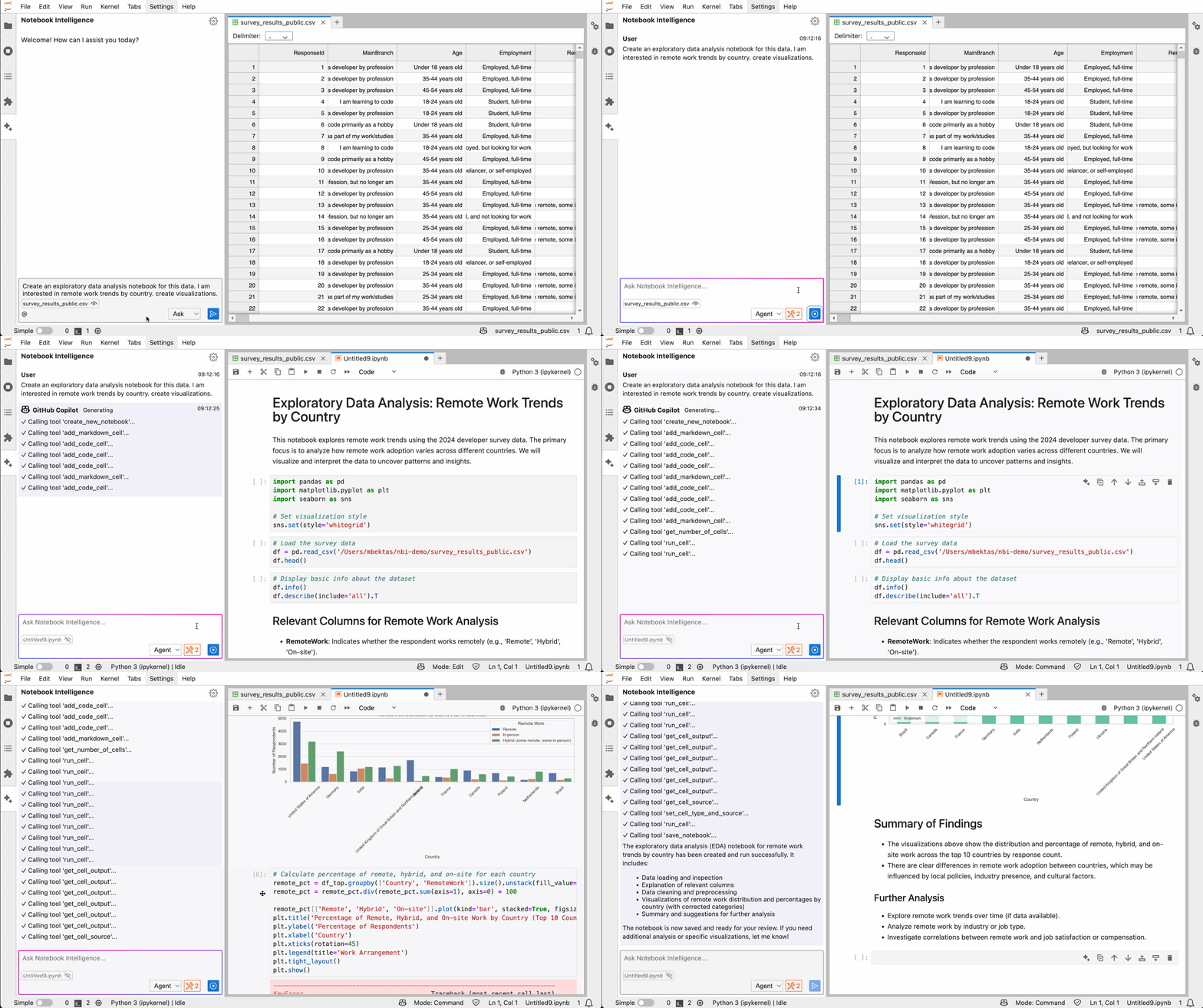
Agent notices ModuleNotFoundError, automatically installs package via kernel, retries execution.
Agent generates data cleaning code, runs it, inspects resulting DataFrame shape and dtypes, adjusts approach.
Agent creates visualization, analyzes actual plot to refine parameters using execute_cell.
The Non-Obvious Implications: Notebooks as API Endpoints
Here’s where things get genuinely interesting. Jupyter notebooks, through MCP, become programmable interfaces. Not just for humans, but for other systems.
Consider:
- Automated report generation systems that feed data to notebooks via MCP
- CI/CD pipelines that execute notebook tests through the same interface humans use
- Data validation workflows where notebooks become test harnesses accessible to monitoring systems
- Educational platforms where student notebooks can be automatically graded via MCP tools
Performance Realities: This Isn’t Magic
Despite the impressive capabilities, there are constraints worth noting. The MCP protocol adds network overhead between AI agent and Jupyter kernel. For quick iterative debugging, this may introduce latency compared to manual execution.
Additionally, while MCP enables more sophisticated AI assistance, it doesn’t solve the fundamental constraints on local model context windows that can limit how much notebook state an agent can consider at once. An AI might have kernel access but still struggle with 500-cell notebooks due to token limits.
Looking Forward: The Notebook as Autonomous Lab
What begins as smarter debugging evolves into something more profound. Notebooks become environments where:
1. AI agents can propose, test, and refine hypotheses autonomously
2. Data pipelines self-diagnose and self-repair through embedded agents
3. Documentation stays synchronized with actual execution behavior
4. Educational content adapts based on learner execution patterns
The integration of local LLMs with internet search via servers becomes even more powerful when those LLMs can act through notebook kernels. Imagine: “Research current stock market trends, download relevant data, analyze it in pandas, produce a visualization, and write a summary”, all in one autonomous notebook session.
The Jupyter MCP Server may appear as a technical integration project, but its implications suggest a rethinking of notebooks from first principles. When AI agents can interact with kernels as flexibly as humans, notebooks stop being coding environments and start becoming problem-solving laboratories where code is just one communication medium among many.
The question isn’t whether your AI can fix your notebook errors, it’s what problems become solvable when your notebook can think alongside you.