You’ve hit the partition ceiling. And KEDA, for all its event-driven brilliance, cannot scale you out of this particular jail.
The Brutal Math of Kafka Parallelism
If your topic has 4 partitions, you can have at most 4 active consumers in a consumer group. Period. The 5th pod spins up, joins the group, and sits there like a junior developer on their first day, present, eager, and completely unable to help with the actual work.
This creates a brutal ceiling on throughput that looks like this:
Max Concurrent Jobs = Partition Count × Jobs Per Pod
The KEDA Trap: When Elastic Scaling Hits a Concrete Wall
The failure mode follows a predictable pattern:
- Lag climbs due to a traffic spike or downstream slowdown
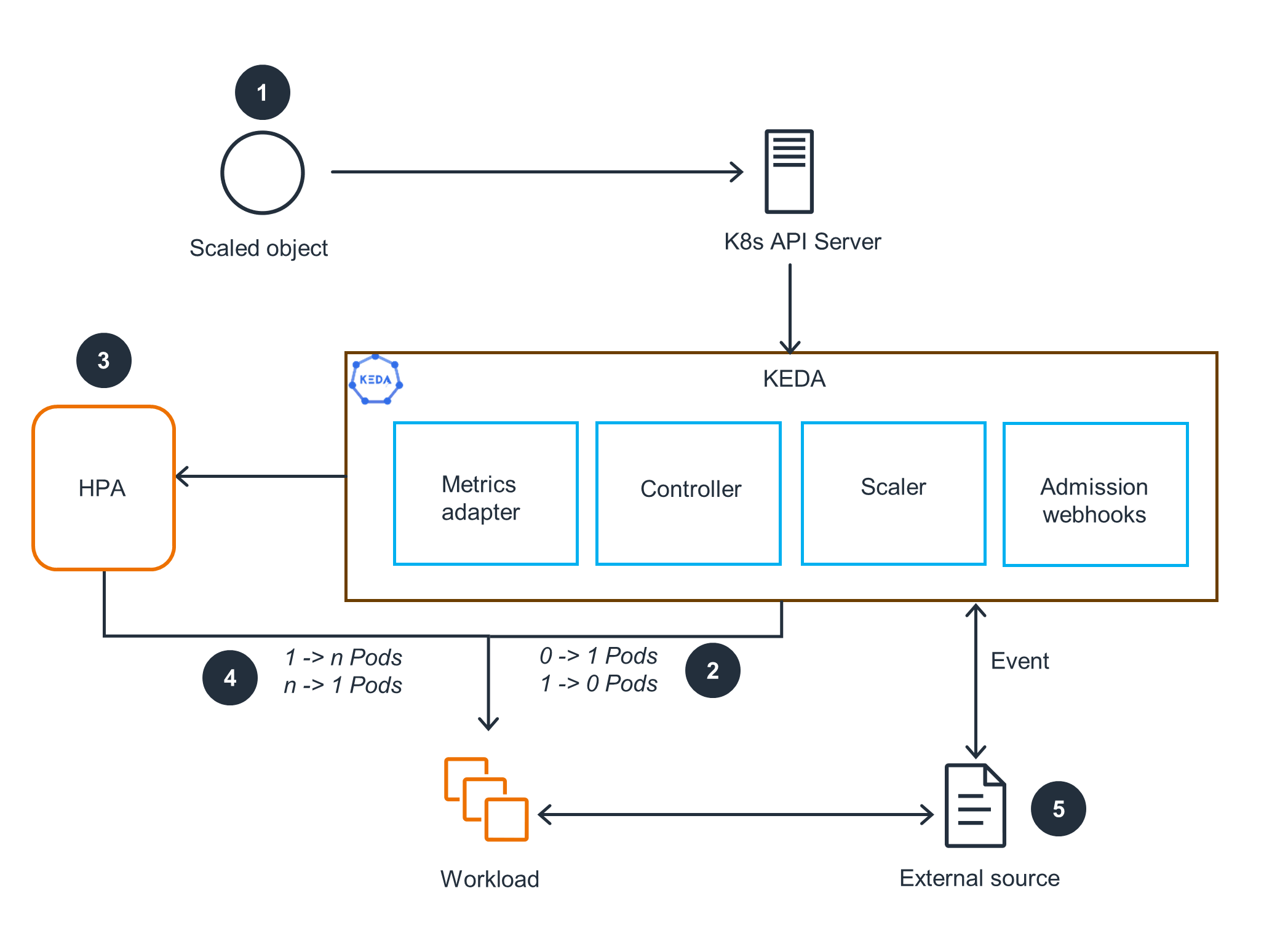
- KEDA scales pods based on
lagThreshold: "50" - Throughput plateaus because you’ve already hit your 4-partition ceiling
- Cost grows linearly while effective work stays flat
- Engineers panic and start configuring Kafka message limits and identifying root architectural issues that have nothing to do with the actual bottleneck
KEDA is elastic scaling bounded by the partition ceiling. If you don’t size your partitions for your peak concurrency target, you’re not autoscaling, you’re auto-wasting money.
Why Partitions Are the Real Bottleneck (Not Pods)
To understand why this happens, you need to look at how Kafka assigns work. When a consumer group subscribes to a topic, the group coordinator assigns partitions to consumers using a range or round-robin strategy. Each consumer owns its assigned partitions exclusively. There’s no work-stealing, no load balancing mid-flight, and no way for a second consumer to help process messages from a partition that’s already claimed.
- Maximum active consumers per topic = partition count
- Per-pod concurrency (running multiple goroutines/processes per pod) multiplies throughput within each active consumer, but cannot bypass the partition ceiling
- Extra pods beyond partition count sit idle on that topic, consuming memory and CPU quotas while processing zero messages
For a system targeting 100,000 concurrent in-flight jobs, the math gets ugly fast. If you want 100K concurrent execution slots and you’re running 10 jobs per pod, you need 10,000 active consumers. If you have 4 partitions, you can support 4 active consumers. You’re short by 9,996 consumers, and no amount of horizontal pod autoscaling will bridge that gap.
The Horror Story: A Job Scheduler’s Death Spiral
At 500 jobs/sec peak dispatch across four priority topics, the initial sizing used 4 partitions per topic. With 10 jobs/pod concurrency, that’s ~40 active slots per topic. During a burst, KEDA dutifully scaled the worker pool to 2,000 pods to handle the 100K concurrent target.
The result? Sixteen hundred idle pods. The lag kept climbing. The scheduler was dispatching work as fast as Kafka allowed, but the partition count created a hard throttle. The system was effectively running at 4 pods’ worth of throughput while paying for 2,000.
This is the failure mode of adding resources when systems hit ceiling limits, you’re not scaling, you’re just making your infrastructure diagram look more impressive while it fails.
The Migration Pain: Why You Can’t Just “Add Partitions Later”
Worse, increasing partition count changes the hashing semantics. If you’re using keyed messages to ensure related jobs land on the same partition (critical for DAG dependency ordering), adding partitions breaks that affinity. Your job_A and job_B that used to land on partition 0 (ensuring A completes before B starts) might now land on partition 0 and partition 5 respectively, creating race conditions in your dependency graph.
The rule of thumb from the job scheduler design is brutal but clear: partitions ≥ max concurrent consumers per topic. For a 100K-concurrent target, that means 100, 500 partitions per topic, not four. And you need to plan this jump in advance, not one-at-a-time during an incident.
Architectural Escape Hatches
1. Partition Multiplication with Topic Migration
Create a new topic with the correct partition count, dual-write to both topics during a transition period, and migrate consumer groups over. This requires application-level coordination and careful handling of in-flight messages.
2. Increase Per-Pod Concurrency
If you’re CPU-bound on I/O wait, cranking up the jobs-per-pod ratio can help. But this just delays the inevitable and introduces head-of-line blocking risks where one slow job stalls others in the same pod.
3. Sharding by Priority
The job scheduler architecture uses separate topics for critical, high, normal, and low priorities. This lets you size partitions differently per priority tier, 100 partitions for critical, 500 for normal, rather than being constrained by the lowest common denominator.
4. The Postgres Fallback
For teams not yet at 100K concurrent, evaluating when event-driven architectures introduce unnecessary complexity can save you from this mess entirely. A Postgres-only design using SELECT ... FOR UPDATE SKIP LOCKED can handle 10M jobs/day without Kafka, Valkey, or the partition headache. River, Oban, and pg_boss all use this pattern. You only earn the distributed systems tax when you actually need DAGs, multi-tenant fairness, and sub-second SLOs that Postgres can’t meet.
The Fix: Capacity Planning That Actually Looks at Partitions
Required Partitions = Peak Concurrent Jobs / Jobs Per Pod
If your peak is 15,000 concurrent jobs and you want 10 jobs per pod, you need 1,500 partitions, not 4. If your KEDA maxReplicaCount is 500 but your partition count is 4, you’re setting yourself up for the 3 AM pager scenario where Kubernetes is winning and your throughput is losing.
Monitor the metric that actually matters: kafka_consumer_lag divided by partition_count. If lag is climbing but your consumer count equals your partition count, KEDA cannot help you. You need more partitions, not more pods.
The Hard Truth
The next time your Kafka lag spikes and your instinct is to increase the maxReplicaCount in your KEDA ScaledObject, stop. Check your partition count first. If partitions < pods, you’re not scaling, you’re just hosting a pod convention where nobody does any work.
And if you’re developers encountering unexpected scalability problems under load, remember: in distributed systems, the bottleneck is rarely where the metrics say it is. It’s usually one layer down, in the fundamental constraints you assumed someone else handled when they created the topic.
Check your partitions. Your wallet will thank you.