DuckDB 2.0.0 LTS “Cinnamon Teal” dropped on October 21st, and if you blinked, you missed the most consequential release in embedded analytics since, well, DuckDB 1.0. Nearly 20,000 commits since version 1.5. A stable client-server protocol called Quack. A first-class VARIANT type that shreds JSON into columnar form. Asynchronous I/O that finally makes remote object storage feel local.
But here’s what the release announcement won’t tell you: this release is a confession. DuckDB spent seven years telling us that in-process was the future, that servers were legacy baggage from an era of underpowered hardware. Now it’s shipping Quack, a full client-server protocol, alongside features like triggers that belong in an OLTP database. DuckDB 2.0 isn’t just an evolution, it’s an admission that the embedded-only story had a ceiling, and the team is now building a ladder.
The question for architects and data engineers isn’t whether DuckDB is fast. We’ve known that since the benchmarks on 11.2 million NYC taxi trips showed it answering complex analytical queries in 16, 44 milliseconds with 237 MB of memory, while pandas needed 3.4 GB and SQLite took seconds. The real question is whether DuckDB’s architectural trade-offs, performance, portability, and scalability, make sense for your workload, not just a benchmark. And 2.0’s new features make that calculus genuinely complicated.
The LTS Promise: Stability as a Feature
Let’s start with what “LTS” actually means here. DuckDB 2.0 will be supported until at least October 2027. The previous LTS release (1.4) gets support until late November 2026, and they extended 1.5’s support to March 2027 as a bridge. That’s a three-release support matrix, three versions of DuckDB receiving security patches and bug fixes simultaneously.
This matters more than it sounds. DuckDB’s storage format has changed across major versions, and the migration story is genuinely tricky. Versions before 2.0 cannot read database files created by 2.0. The team recommends testing on a shadow system before production, and if you’re mission-critical, waiting for the first patch release in November.
That’s not a criticism, it’s honest engineering. But it means the LTS designation isn’t just a marketing label. It’s a commitment that when you pin your pipeline to DuckDB 2.0, you’re not going to be forced into breaking changes for the next two years. For teams that learned the hard way that data infrastructure moves fast, that stability is worth paying for.
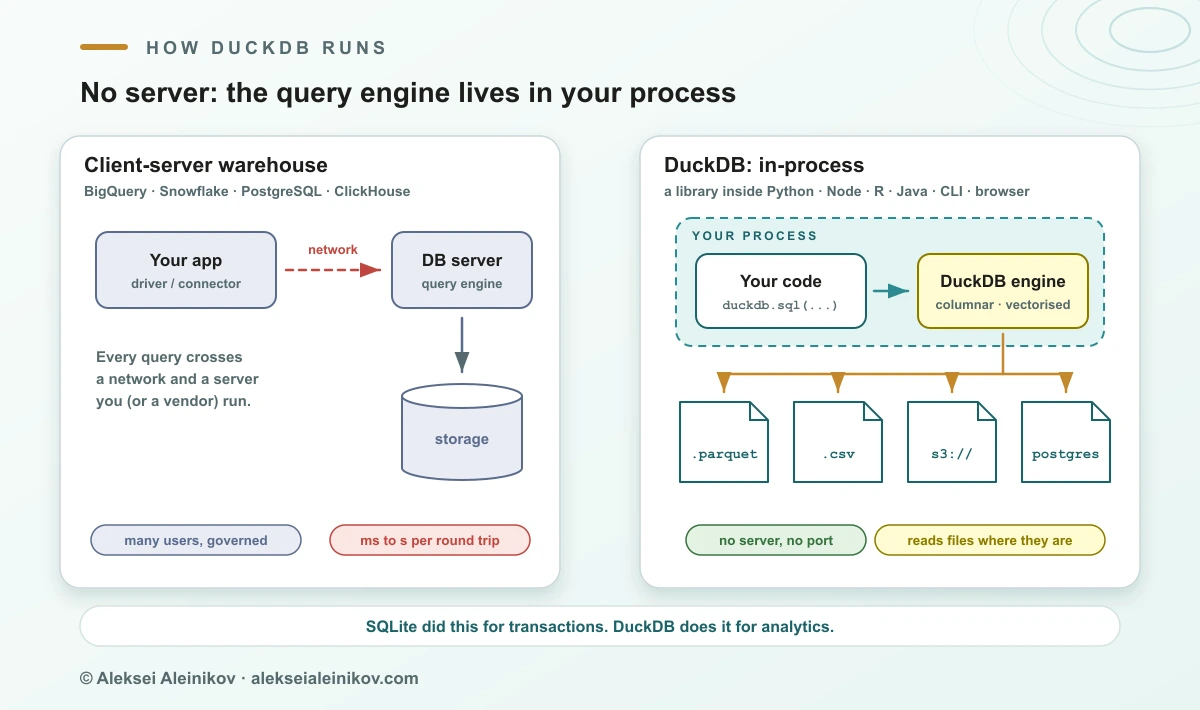
Quack: The Server That Wasn’t Supposed to Exist
Here’s the uncomfortable truth about embedded databases: they’re amazing until you need to share. DuckDB’s in-process model means one process owns the database file. Many can read, but only one can write. For a tool that’s supposed to be “SQLite for analytics”, that’s a significant constraint.
Quack changes the calculus. The protocol, which previewed in DuckDB 1.5.3 back in May, is now stable and polished. The new CONNECT statement is the ergonomic centerpiece, you can attach to a remote database and switch your session in one command:
ATTACH 'quack:localhost' AS qk (TOKEN 'my_token');
CONNECT qk;
SELECT * FROM events;
The performance numbers from the team’s benchmarks are striking: Quack moved 60 million rows in 4.9 seconds where the PostgreSQL protocol took 158 seconds on the same hardware. That’s a 32x difference. And it handled roughly 5,400 small write transactions per second, ahead of PostgreSQL in that specific test.
Now, before you start planning to replace your Postgres instances, consider what Quack actually is. It’s DuckDB’s native protocol, designed for analytical workloads, not OLTP. The server listens on localhost by default and requires a TLS-terminating reverse proxy for anything beyond local development. The allow_other_hostname option that exposes the server directly? The docs explicitly say it’s “only meant for testing.”
That’s not a production-ready server story yet. What it is is a bridge, a way to move from “embedded only” to “embedded with optional server mode” without abandoning the architecture that makes DuckDB fast. The team is hedging their bets, and honestly, that’s the right call. The DuckDB v2.0’s embedded analytics architecture and evolution shows a tool that’s growing teeth without losing its soul.
The Memory Lie: Why Your memory_limit Isn’t a Limit
Let’s talk about the elephant in the room: DuckDB’s memory management. The marketing says “out-of-core processing, automatically spills to disk, you don’t configure anything.” The reality, as Kirill Fedorov’s production checklist makes clear, is more nuanced.
DuckDB’s memory_limit pragma only governs the buffer manager. Allocations outside that scope, vectors, query results, certain aggregate states, can exceed the configured limit. In practice, that means actual consumption can exceed what you set. For a pipeline running inside a container with a hard memory ceiling, that’s not a theoretical concern. It’s how workers get OOM-killed.
The spilling story has similar caveats. The tuning guide documents that some aggregate functions, including list() and string_agg(), don’t spill gracefully. Queries combining aggregations, joins, and sorts can still fail even with temp_directory configured. And if you’re on Kubernetes, a memory-backed emptyDir volume counts as memory usage, pointing your spill directory there doesn’t create the disk-backed escape route you might assume.
This isn’t a DuckDB bug. It’s an architectural consequence of the embedded model. When your database lives inside your application process, it shares memory with that application. The database’s memory budget is only one part of the process’s total footprint. The host application, result handling, and allocations outside the engine’s managed budget all compete for the same container limit.
The fix isn’t a bigger memory_limit. It’s designing your resource envelope from the outside in: total container allowance, minus the host application’s baseline, minus the result path, equals what the engine can use. Then test the entire job, including output publication and error paths, under maximum intended overlap, not just a single query in isolation.
JSON on Steroids: The VARIANT Type
One of the most interesting features in 2.0 is the VARIANT type becoming first-class. The pitch: store semi-structured, schema-less data like JSON while keeping the performance of columnar execution. A VARIANT column can hold differently shaped data in every row, {"user": {"id": 42, "tags": ["a", "b"]}} next to {"event": "click", "x": 10, "y": 20}, but unlike JSON, it’s not stored as text.
DuckDB 2.0 detects common structure in your data and “shreds” it into typed columns. This means it compresses well and executes fast, with the pipeline working end-to-end from storage through Parquet, backed by a family of variant_* functions:
CREATE TABLE events (payload VARIANT);
INSERT INTO events
VALUES
    ('{"user": {"id": 42, "tags": ["a", "b"]}}'::JSON::VARIANT),
    ('{"event": "click", "x": 10, "y": 20}'::JSON::VARIANT);

SELECT variant_type(payload), variant_keys(payload)
FROM events;
This is genuinely powerful for event data, log analytics, or any workload where schemas are more of a suggestion than a contract. Compared to dumping raw JSON into a column and hoping for the best, VARIANT offers real performance benefits. But it’s worth noting that DuckDB 1.5 already introduced VARIANT, 2.0 is completing the integration, not inventing it. The from JSON strings to typed columns pipeline was already in motion.
Triggers: When Embedded Analytics Starts Acting Like a Database
Triggers in DuckDB feel like a strange addition for an analytical database. CREATE TRIGGER with BEFORE and AFTER, FOR EACH ROW and FOR EACH STATEMENT, transition tables via REFERENCING OLD/NEW TABLE, this is OLTP territory. The classic use case is audit tables, where a trigger records changes without application code.
But the more interesting use case is maintaining materialized views incrementally. The team’s example uses triggers to keep a running average age per nationality:
CREATE TRIGGER people_insert
    AFTER INSERT ON people
    REFERENCING NEW TABLE AS n
    FOR EACH STATEMENT
        MERGE INTO age_statistics s
        USING (
            SELECT nationality, sum(age) AS sum_age, count(*) AS num_people
            FROM n
            GROUP BY nationality
        ) d
        ON s.nationality = d.nationality
        WHEN MATCHED THEN UPDATE SET
            sum_age = s.sum_age + d.sum_age,
            num_people = s.num_people + d.num_people,
            average_age = (s.sum_age + d.sum_age) / (s.num_people + d.num_people)
        WHEN NOT MATCHED THEN INSERT
            VALUES (d.nationality, d.sum_age, d.num_people, d.sum_age / d.num_people);
The team positions this as “one step closer to materialized views, a long-standing item in the ‘future work’ section of our roadmap.” That’s a notable shift. DuckDB is moving beyond pure analytics into territory where state management matters. It’s a sign that the boundaries between OLAP and OLTP are blurring, and that DuckDB’s SQL can now be used across other databases via transpilation is just the beginning.
The Performance Question: What 2.0 Actually Delivers
The benchmark rerun from Aleksei Aleinikov’s analysis on the same 11.2 million taxi trips dataset shows where 2.0 wins and where it doesn’t:
| Query | DuckDB 1.5.6 | DuckDB 2.0.0 | Change |
|---|---|---|---|
| Q1: group-by | 16 ms | 17 ms | Level |
| Q2: timestamp + group-by | 40 ms | 33 ms | 1.2x faster |
| Q3: join + sort | 44 ms | 26 ms | 1.7x faster |
| Peak memory | 189 MB | 276 MB | ~90 MB more |
The join and timestamp improvements are real, 1.7x faster on a join plus sort is meaningful. But the memory increase is worth noting. The cause wasn’t investigated in this setup, but for teams with tight memory constraints, that delta could matter.
The bigger performance story is asynchronous I/O. DuckDB 2.0 decouples the I/O layer from query processing, issuing reads in the background with multiple requests in flight. That’s a significant win for remote reads, the network throughput chart from the dedicated blog post shows dramatically better utilization over the course of a query. For object storage like S3, this could be the difference between “milliseconds” and “fast enough to forget it’s remote.”

The Cost Argument: When DuckDB Saves Money (and When It Doesn’t)
The warehouse vs. embedded debate usually devolves into cost arguments. Here’s the honest math: at 11.2 million rows and under half a gigabyte for five columns, BigQuery on-demand costs about a quarter of a cent per query at $6.25 per TiB scanned. At that scale, DuckDB doesn’t save money, it saves the round trip. The milliseconds matter more than the pennies.
The cost argument only starts when dashboards and scheduled jobs rescan terabytes all day. That’s when pulling stable extracts into Parquet and querying them with DuckDB takes a real line off the cloud bill. And on the cheapest MacBook with 8GB of RAM, the team ran all 99 TPC-DS queries at scale factor 300 in 79 minutes. That’s not a laptop benchmark, that’s a legitimate data platform running on consumer hardware.
But the embedded model has a ceiling. When many people need governed, concurrent access to the same data, when rows reach many terabytes, when you need managed backups and someone else on call, the warehouse still wins. The real boundary isn’t data size. It’s concurrency and governance. This is exactly where the broader trend of DuckDB and Polars in modern data pipelines hits its limit.
The AWS Elephant: Governance and the Foundation’s Promise
You can’t discuss DuckDB 2.0’s architectural trade-offs without addressing the governance question. In August 2026, DuckLabs, the company behind DuckDB, announced it would join AWS. The explicit promise: DuckDB, DuckLake, and Quack stay MIT-licensed under the non-profit DuckDB Foundation.
There are reasons to be skeptical. AWS’s track record with open source is complicated. But the DuckDB Foundation structure is different from most: the intellectual property was purposefully moved to the foundation to ensure the MIT license persists regardless of commercial interest. The ownership and open-source governance post-AWS acquisition debate is real, and the risk exists, but the structural safeguards are stronger than most open-source projects.
Compare that to Polars, backed by a VC-funded company with $25 million raised. The MIT license is there, but the company controls development direction. That worked for HashiCorp until it didn’t. The structural risk is different, and for teams choosing tools for 10-year production systems, that distinction matters.
What 2.0 Actually Means for Your Architecture
The release notes are impressive, but the architectural implications are what matter. The new PEG-based parser, which became the default in 2.0, represents a significant internal change. The old YACC/Bison parser was hitting shift/reduce conflicts as DuckSQL grew. Python moved to PEG for the same reason. But beyond the engineering rationale, the extensibility story is the real payoff: extensions can now hook into the grammar itself, exposing entirely new SQL syntax. That’s a platform play, not a parser upgrade.
The deprecations are equally telling. The single-arrow lambda syntax is gone. The amalgamation build, a single header and source file that bundled DuckDB’s entire codebase, is deprecated. macOS x86_64 is being phased out, with community extensions no longer built for it. These are decisions that prioritize long-term maintainability over short-term convenience, and they’re the right calls.
But the compiler requirement change deserves attention: DuckDB 2.0 requires C++17, up from C++11. That’s a significant jump, and it’ll break some older build environments. The switch to Clang as the default compiler on Linux and macOS is another change that could impact how the library behaves in production.
For teams running DuckDB in production, the migration guidance is straightforward: test on a shadow system first, wait for the first patch release if you’re mission-critical, and understand that older versions can’t read files created by 2.0. The memory-efficient data validation patterns you might have built on 1.x will still work, but the storage format changes mean you can’t just swap versions in place.
The Bottom Line: Embedded Analytics Grows Teeth
DuckDB 2.0 LTS is the release where embedded analytics stops pretending it’s just a toy for notebooks and data scientists. The Quack protocol makes it a legitimate server option. VARIANT makes it competitive with JSON-native databases. Triggers push it toward stateful territory. Asynchronous I/O makes remote storage viable.
The architectural trade-offs haven’t disappeared, they’ve shifted. The in-process model that delivers 16ms query latency also means shared memory with your application, and the memory_limit pragma doesn’t protect you from the container OOM killer. The single-writer constraint that made DuckDB fast now has an escape hatch through Quack or DuckLake, but each of those adds operational complexity. The serverless journey has begun, but it’s not complete.
The smart takeaway: DuckDB’s embedded analytics architecture has evolved into something that can genuinely replace the warehouse for single-tenant analytical workloads, and complement it for everything else. The DuckDB versus warehouse benchmarks are real, but they’re also narrow. The tool has limits, and knowing where they are is more valuable than knowing how fast it runs.
If you’re still running analytical workloads through pandas with 3.4 GB of RAM for 11 million rows, the upgrade path is clear. If you’re paying for a warehouse to run queries that a MacBook can handle in milliseconds, the cost argument is obvious. But if you’re building shared, governed, multi-tenant analytics, the warehouse remains necessary, DuckDB 2.0 just makes it avoidable for longer.