Podman v6.0.0 is here, and it’s the most aggressive, opinionated release the project has ever shipped. They dropped support for BoltDB, cgroups v1, iptables, CNI networking, slirp4netns, and Intel Macs. They changed the import path, rewrote the config file parser, and broke every podman machine VM on Linux.
This isn’t a gentle nudge. It’s a declaration.
The question isn’t whether Podman is technically superior to Docker anymore, it’s whether that technical superiority can overcome a decade of muscle memory, ecosystem lock-in, and the simple fact that “it works” usually beats “it’s better.”
The Daemonless Architecture That Actually Matters
Let’s cut through the marketing. Docker’s architecture has a fundamental problem: a central daemon running as root that becomes a single point of failure and a massive attack surface. Every docker command routes through that daemon. If it crashes, your containers don’t just keep running, they become orphaned zombies.
Podman’s daemonless design eliminates this entirely. Each container is a child process of the command that launched it. No central daemon, no root-elevated socket, no docker group that’s functionally equivalent to sudo without a password.
The security implications are hard to overstate. Adding a user to the docker group is effectively granting root-level access to the entire system. Podman’s rootless architecture means containers run with the user’s existing privileges, not escalated ones. This isn’t a theoretical concern, it’s a fundamental architectural difference that makes Podman objectively more secure for multi-tenant environments.
The Breaking Changes That Matter
Podman v6.0.0 isn’t just a feature release, it’s a cleanup. The team dropped support for BoltDB databases (migrating to SQLite), cgroups v1, iptables, CNI networking, slirp4netns, and Intel Macs. They also removed Windows 10 support and changed the import path from github.com/containers/podman/v5 to go.podman.io/podman/v6 as part of the move into a CNCF-owned GitHub organization.
These aren’t arbitrary cuts. Each removal represents a legacy system that was holding back development. The BoltDB to SQLite migration alone eliminates a significant source of database corruption issues that plagued earlier versions. The switch from iptables to nftables aligns with the direction every major Linux distribution is heading. Dropping CNI in favor of Netavark means Podman now has a networking stack designed specifically for containers, not retrofitted from Kubernetes.
The most painful change for existing users will be the podman machine VM recreation requirement on Linux. If you have existing VMs, they’re broken. Period. The team made the call that systemd-based volume mounting was worth the breakage.
Quadlets: The Systemd Integration That Changes Everything
The single most underrated feature in the Podman ecosystem is Quadlets. If you haven’t looked at them since the v4 days, you’re missing out on what might be the most compelling reason to switch.
Quadlets are essentially systemd unit files for containers. Instead of writing a docker-compose.yml and running docker compose up, you write individual .container, .network, and .volume files that systemd reads and manages natively.
Here’s what a basic Nginx Quadlet looks like:
[Container]
Image=docker.io/nginx
ContainerName=nginx
PublishPort=80:80

[Install]
WantedBy=multi-user.target
That’s it. Place that file in ~/.config/containers/systemd/ (for rootless) or /etc/containers/systemd/ (for root), run systemctl --user daemon-reload, and your container is now a first-class systemd service. You manage it with systemctl start, systemctl stop, systemctl status, the same commands you use for every other service on your Linux machine.
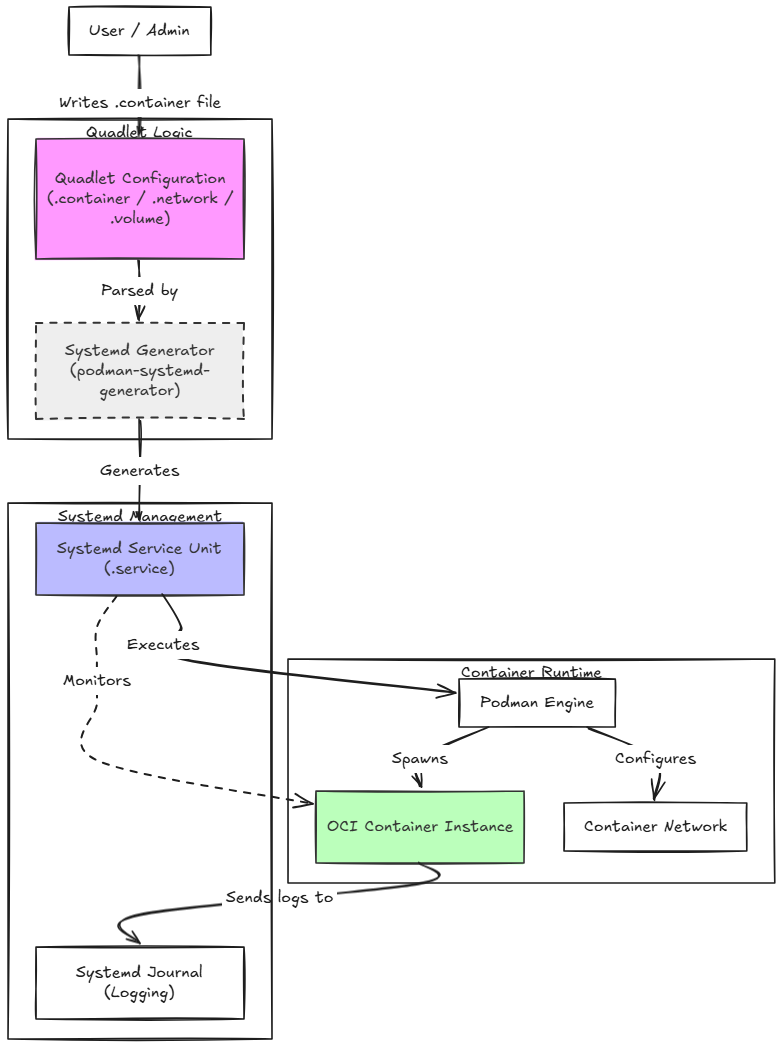
The comparison table between Docker Compose and Quadlets makes the differences clear:
| Question | Docker Compose | Quadlet |
|---|---|---|
| How do I define a container? | A service block in docker-compose.yml | A .container file |
| How do I define a network? | A network block in docker-compose.yml | A .network file |
| How do I define a volume? | A volume block in docker-compose.yml | A .volume file |
| How do I start everything? | docker compose up -d | systemctl start … |
| How do I wire them together? | They’re in the same file | Systemd Requires= / After= |
This isn’t just a different syntax, it’s a fundamentally different philosophy. Docker Compose treats containers as a self-contained application stack. Quadlets treat containers as infrastructure that should be managed the same way you manage DNS, logging, and time synchronization.
The Rootless Reality Check
The most contentious aspect of Podman is its rootless architecture. The Hacker News discussion on v6.0.0 reveals a deep divide. Some users report seamless transitions:
“After Docker Desktop randomly started consuming insane amounts of memory again we switched to Podman and it was literally as easy as installing it and pointing it at our docker-compose.yml. Zero changes needed and now I don’t need to keep a daemon running.”
Others describe a nightmare of permission errors, UID mapping issues, and SELinux headaches:
“I went all in on podman compose last year but went all back because of constant permission errors. I thought it was going to be better than docker because I run the containers as a user… but man the amount of time I wasted on files that either I or the container itself or some other container couldn’t read…”
The truth is somewhere in between. Rootless containers are objectively more secure, but they require understanding user namespace mapping in a way that rootful Docker doesn’t. If you’re running a database container that needs to write to a host volume, you need to ensure the UID inside the container maps correctly to your user’s UID on the host. Docker’s rootful daemon just bypasses this entirely by running everything as root.
The Breaking Changes That Matter
Podman v6.0.0 isn’t just a feature release, it’s a cleanup. The team dropped support for BoltDB databases (migrating to SQLite), cgroups v1, iptables, CNI networking, slirp4netns, and Intel Macs. They also removed Windows 10 support and changed the import path from github.com/containers/podman/v5 to go.podman.io/podman/v6 as part of the move into a CNCF-owned GitHub organization.
These aren’t arbitrary cuts. Each removal represents a legacy system that was holding back development. The BoltDB to SQLite migration alone eliminates a significant source of database corruption issues that plagued earlier versions. The switch from iptables to nftables aligns with the direction every major Linux distribution is heading. Dropping CNI in favor of Netavark means Podman now has a networking stack designed specifically for containers, not retrofitted from Kubernetes.
The most painful change for existing users will be the podman machine VM recreation requirement on Linux. If you have existing VMs, they’re broken. Period. The team made the call that systemd-based volume mounting was worth the breakage.
The Docker Compatibility Gap That Won’t Die
The single biggest barrier to Podman adoption isn’t technical superiority, it’s the long tail of Docker compatibility issues. The Hacker News thread is filled with stories of tools that work flawlessly with Docker but break on Podman:
- Skaffold “pukes all over itself” when pointed at Podman
- Testcontainers has timing issues that cause test failures
- Buildx compatibility is inconsistent
- Devcontainers require special arguments
- K3d is easier to work with Docker
- inotify on volume mounts breaks unpredictably
One user summed it up perfectly: “Podman claims to be a drop-in replacement, but the 5% of the time where it isn’t seamless are super painful.”
This is the fundamental tension. Podman’s architecture is objectively better, daemonless, rootless, systemd-integrated. But Docker’s ecosystem is a decade deep. Every CI/CD tool, every PaaS, every developer workflow has been built around Docker’s API. Podman can emulate that API, but the emulation isn’t perfect, and those imperfections compound.
The Quadlet Revolution
The single most underrated feature in the Podman ecosystem is Quadlets. If you haven’t looked at them since the v4 days, you’re missing out on what might be the most compelling reason to switch.
Quadlets are essentially systemd unit files for containers. Instead of writing a docker-compose.yml and running docker compose up, you write individual .container, .network, and .volume files that systemd reads and manages natively.
Here’s what a basic Nginx Quadlet looks like:
[Container]
Image=docker.io/nginx
ContainerName=nginx
PublishPort=80:80

[Install]
WantedBy=multi-user.target
That’s it. Place that file in ~/.config/containers/systemd/ (for rootless) or /etc/containers/systemd/ (for root), run systemctl --user daemon-reload, and your container is now a first-class systemd service. You manage it with systemctl start, systemctl stop, systemctl status, the same commands you use for every other service on your Linux machine.
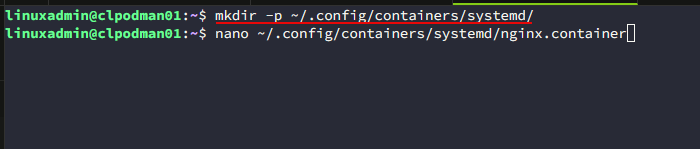
For home lab enthusiasts and sysadmins who already live in systemd, this is transformative. One user on Hacker News reported switching from k3s to Quadlets and seeing an 8% drop in power usage. That’s not a typo, removing the Kubernetes overhead for a home server stack can have measurable power savings.
The Docker Compatibility Gap That Won’t Die
The single biggest barrier to Podman adoption isn’t technical superiority, it’s the long tail of Docker compatibility issues. The Hacker News discussion on v6.0.0 reveals a deep divide between users who had seamless transitions and those who hit frustrating edge cases.
One user reported: “After Docker Desktop randomly started consuming insane amounts of memory again we switched to Podman and it was literally as easy as installing it and pointing it at our docker-compose.yml. Zero changes needed and now I don’t need to keep a daemon running.”
Another countered: “I went all in on podman compose last year but went all back because of constant permission errors. I thought it was going to be better than docker because I run the containers as a user… but man the amount of time I wasted on files that either I or the container itself or some other container couldn’t read…”
The truth is that Podman’s rootless architecture is fundamentally more secure, but that security comes at a cost. Docker’s rootful daemon makes everything “just work” by running as root. Podman forces you to think about user namespaces, UID mapping, and SELinux labels. For developers who just want to spin up a database and get back to coding, that friction is a dealbreaker.
The Breaking Changes That Matter
Podman v6.0.0 isn’t just a feature release, it’s a cleanup. The team dropped support for BoltDB databases (migrating to SQLite), cgroups v1, iptables, CNI networking, slirp4netns, and Intel Macs. They also removed Windows 10 support and changed the import path from github.com/containers/podman/v5 to go.podman.io/podman/v6 as part of the move into a CNCF-owned GitHub organization.
These aren’t arbitrary cuts. Each removal represents a legacy system that was holding back development. The BoltDB to SQLite migration alone eliminates a significant source of database corruption issues that plagued earlier versions. The switch from iptables to nftables aligns with the direction every major Linux distribution is heading. Dropping CNI in favor of Netavark means Podman now has a networking stack designed specifically for containers, not retrofitted from Kubernetes.
The most painful change for existing users will be the podman machine VM recreation requirement on Linux. If you have existing VMs, they’re broken. Period. The team made the call that systemd-based volume mounting was worth the breakage.
The Verdict: Is v6.0.0 Worth the Migration Pain?
For new deployments, absolutely. If you’re starting fresh, Podman v6.0.0 is the most secure, architecturally clean container runtime available. The daemonless design, rootless operation, and systemd integration are genuine improvements over Docker’s decade-old architecture.
For existing Docker users, the calculus is more nuanced. If you’re running a simple stack with straightforward networking and volume mounts, the migration is likely painless. If you’re using Docker Compose with complex networking, SELinux, or tools like Skaffold and Testcontainers, expect to hit edge cases.
The most pragmatic approach is to start with Podman for new projects and gradually migrate existing ones. Use podman-docker for compatibility where needed, and explore Quadlets for services that benefit from systemd integration. The monolith vs microservices debate and containerization is relevant here, sometimes the simplest solution is the right one, and for many teams, Docker’s simplicity still wins.
Podman v6.0.0 is a technical achievement. It’s cleaner, more secure, and more architecturally sound than Docker. But technology adoption isn’t a meritocracy. It’s about ecosystem, documentation, and the simple fact that most developers just want things to work.
The question isn’t whether Podman is better. It’s whether “better” is enough to overcome a decade of Docker muscle memory. For now, the answer is still “not quite.” But with each release, the gap narrows. And v6.0.0 is the closest Podman has ever come to closing it.