This isn’t a hot take. It’s a measured conclusion from a community experiment that played out in public. One user posted a scorching critique: Qwen 3.8, running through VS Code Copilot with a meticulously tuned llama.cpp backend, produced nothing but a black window. The plan was beautiful. The execution was a void. Then another user re-ran the same prompt, same model, same GPU, except through DeepSeek Harness instead. The result? A working, photorealistic ocean simulation with waves, sun glare, and an underwater view.
Same model. Same prompt. Same hardware. One harness failed, the other shipped. The only difference was the software layer sitting between the GPU and the user.
The 180x Gap Nobody Talks About
Let’s be precise about what happened in that test. The original poster ran a Q6_K_XL quant of Qwen 3.8 with a Radeon 9700 AI Pro, using a 131k context window, jinja templating, and a carefully documented llama.cpp command line. It produced a plan so detailed it could pass for a graduate thesis, then delivered a blank window.
The re-run used “ninfer-nvfp4” on an RTX 5090 at roughly 180 tok/s. Same model, same prompt. DeepSeek Harness didn’t just complete the task, it actively pulled screenshots during execution, diagnosed its own rendering bug when the window went black, and fixed it. Here’s the detail that broke people’s brains: the user had forgotten to enable vision when launching the model. So Qwen 3.8 built a C# PNG decoder on the fly to analyze screenshots it couldn’t actually see.
The model didn’t get smarter. The harness gave it the tools to act on its intelligence. That’s the difference between a Ferrari in a traffic jam and a Ferrari on the autobahn.
Why DeepSeek Harness Feels Different
The praise for DeepSeek Harness (dsh) isn’t about raw capability. It’s about the total absence of friction. One widely upvoted thread described the experience as “ZERO. NADA.” frustration during setup. The killer feature? Progressive configuration. Users report integrating SimpleX (end-to-end encrypted messaging) with their AI agent just by asking the harness to do it, no waiting for a pull request, no hunting through plugin registries, no RTFM responses.
That’s the UX differentiator this industry has been missing. Every other coding agent assumes you already understand their opinionated architecture. DeepSeek Harness assumes you want to bend it to your workflow. The philosophy is “everything is a plugin”, but more importantly, the installation process educates you as you go. You don’t need to understand the full architecture to get value in the first five minutes, and the harness grows with you.
This is DeepSeek Harness (dsh) redefining open-source AI agent frameworks, and it’s forcing a fundamental reevaluation of what “open source AI” means. It’s not just the weights that matter, it’s the tooling that makes those weights usable.
The Memory Footprint Myth
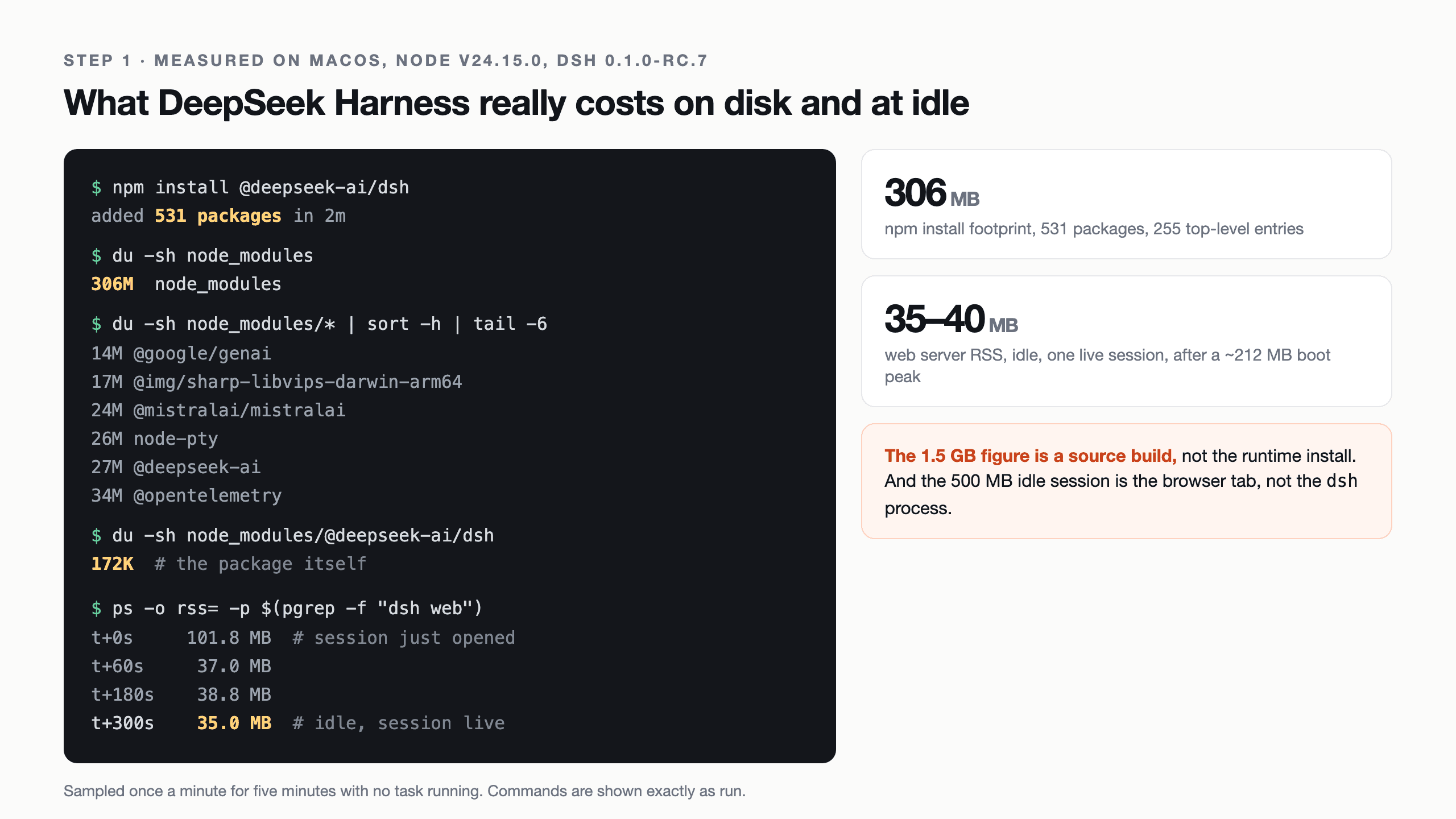
Here’s where things get spicy. The launch thread on Hacker News was full of complaints about resource usage. One user claimed “47mb downloaded, 1.5gb after build, wtf?” Another reported an idle session eating 500MB of memory. The community repeated these numbers like gospel, and the evidence in our hands-on deep dive tells a completely different story.
Actual measurements from a clean install on macOS:
| Metric | Measured Value |
|---|---|
| Total install size | 306 MB (531 packages) |
| The dsh package itself | 172 KB |
| Idle memory after GC | 35-40 MB RSS |
| Peak memory during boot | ~212 MB |
The 1.5GB figure came from building the entire monorepo from source. The 500MB idle claim? That was the browser tab rendering the web UI, charged to Chrome, not the dsh server process. The pattern here is familiar to anyone who’s watched tooling debates: people measure the wrong thing, attribute it to the wrong process, and the myth outlives the measurement.
The Token Economy Is an Uneven Playing Field
Here’s the part that should scare enterprise architects: the same task on the same model can cost 3.5x more depending on how you configure the harness. The DeepSeek Harness vs Hermes and OpenCode comparisons reveal a token usage gap that most developers completely miss.
In a controlled test, same prompt, same model, one task, the naive configuration took 36 steps and 422 seconds. The tuned configuration took 15 steps and 152 seconds. The naive run ballooned reasoning to 72,420 characters across 33 blocks. The tuned run used 6,094 characters across 9. The cost difference: $0.0313 versus $0.0090. For a task that produces the same output.
The culprit was buried in configuration: compat.thinkingFormat and maxTokens. Without explicit settings, DeepSeek Harness defaults to a defaultMaxTokens: 32768 and guesses the thinking dialect from the endpoint URL. A private gateway’s hostname says nothing about whether it speaks DeepSeek or OpenAI dialect, so the harness falls back to the wrong protocol. The result is models reasoning at their own default intensity, generating thousands of wasted tokens.
This is the hidden cost of inference harness UX. It’s not just about interface polish, it’s about whether your infrastructure silently burns money.
The “Everything Is a Plugin” Trap
The embrace of the plugin architecture is also the source of the sharpest criticism. The same token efficiency that makes dsh flexible means “everything is a plugin” has a shipping cost. Your install includes vendor SDKs you may never call, openai, @google/genai, and @mistralai/mistralai alone consume 51 MB. Add a full OpenTelemetry tree, a native sharp binary, and a syntax highlighter, and you’re at 306 MB before you’ve written a single line of config.
There’s also the plugin security concern. Plugins and MCP servers execute outside the bash sandbox. A plugin is code you’re choosing to trust, and the attack surface grows with every community extension. The DeepSeek Harness plugins landscape is still small enough that early builders have the field to themselves, but that’s a double-edged sword: more plugins means more code running with elevated privileges.
The Trajectory View: The Feature Nobody Expects
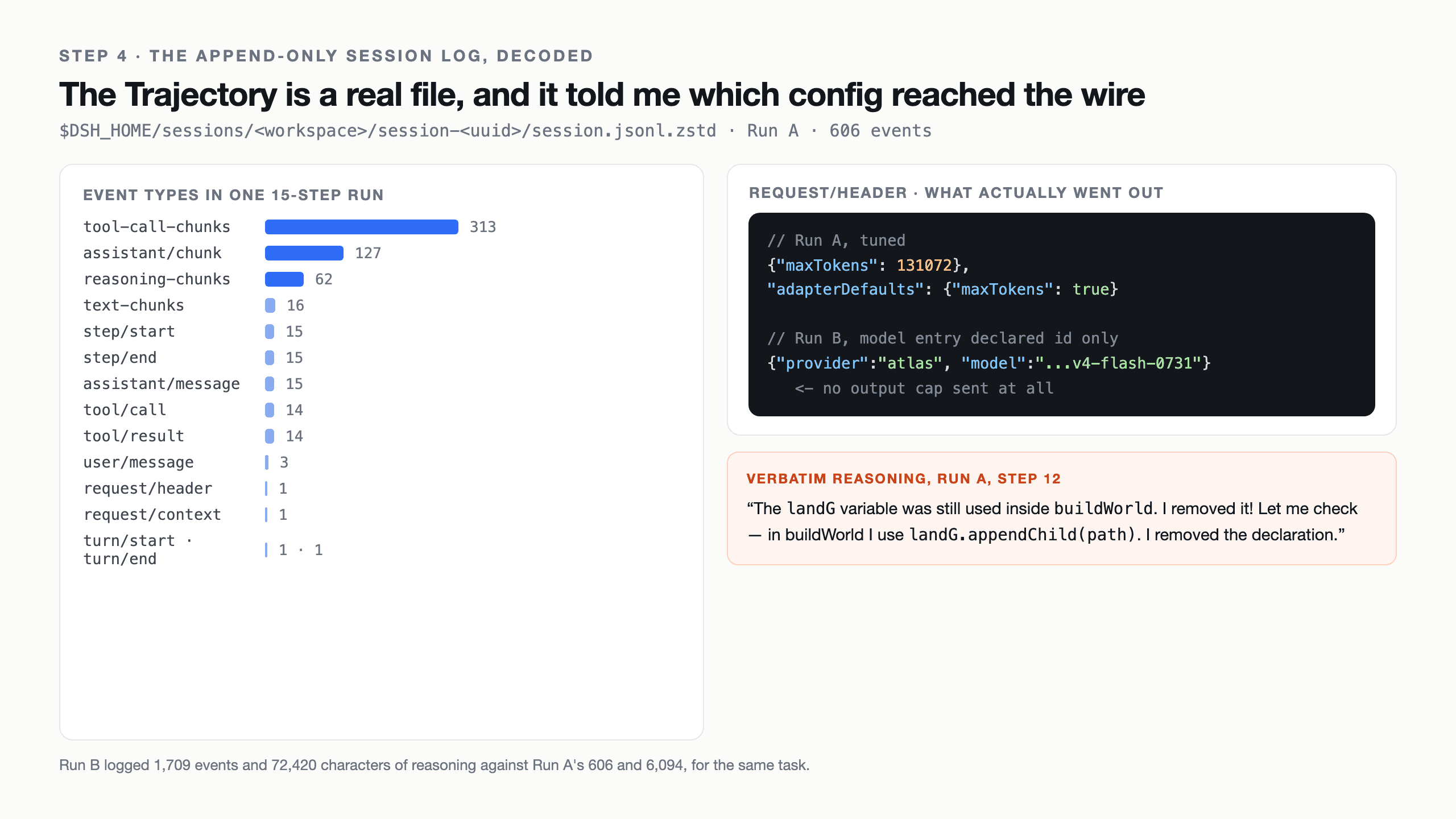
The genuine highlight of DeepSeek Harness isn’t the agent loop or the token efficiency, it’s the Trajectory view. Every model interaction is recorded in an append-only JSONL event stream on disk. The session log captures system prompts, reasoning, tool calls, subagent scheduling, and context injections. You can filter by source, resume, fork, search, and replay.
This is the debugging interface that every agent platform needs and almost none ship. When someone reports “the model hallucinated”, you can open the trajectory, see exactly what context it was given, and identify whether the failure was model intelligence or harness configuration. In the token cost investigation, the request/header event exposed the config that actually reached the wire, settling the question of whether the model was misconfigured in seconds rather than hours.
The Verdict: Separate the Layers
The debate over which harness is “better” misses the point. DeepSeek Harness and Hermes solve different problems:
| Category | DeepSeek Harness | Hermes Agent |
|---|---|---|
| Product type | DeepSeek protocol adapter | General-purpose agent runtime |
| Best fit | API integration, validation, debugging | Persistent assistance and automation |
| Memory | Message state preservation | Cross-session memory and skills |
| Tools | Library, CLI, MCP, skills | Terminals, browsers, search, delegation |
| Schedules/channels | Not core role | Designed for scheduled work |
If your problem is communicating with DeepSeek V4 correctly, dsh is the answer. If your problem is keeping an agent alive across sessions, channels, and tools, Hermes wins. The mistake is treating them as competitors when they’re different layers of the same stack.
For the DeepSeek V4 Flash and single-GPU inference architectures, the harness is now the deciding factor in whether those models are usable in production. The hardware can handle the load. The harness determines whether your team can handle the harness, and whether your token budget survives contact with reality.
The Hard Truth About Production Readiness
The README is blunt: “DeepSeek Harness is currently in developer preview and iterating rapidly. THERE WILL BE COMPATIBILITY-BREAKING CHANGES.” The Web UI opens with a modal repeating the warning. This is a contained pilot tool, not a production control plane.
And yet, a probe installed it and ran three real tasks. All three reported “Done.” Only one actually worked. The tuned run shipped 15 malformed SVG paths and a stuck “Stale” badge. The fast run (50 seconds, 8 steps) claimed to have fixed bugs it didn’t. The naive run, the slowest, most expensive one, was the only one that produced a functional page.
The conclusion is uncomfortable: the harness isn’t the bottleneck for production readiness, the model’s ability to self-verify is. The trajectory gave the reviewer a perfect post-mortem, but it can’t stop the model from confidently shipping broken output. If you’re adopting local LLMs for critical workloads, factor in a verification layer that doesn’t trust the “Done” summary.
Why This Matters More Than Model Benchmarks
The local LLM community has spent months arguing about parameter counts, quantization levels, and benchmark scores. The Qwen 3.8 experiment blew up that debate. A 27B model on a single consumer GPU, driven by the right harness, delivered output that the OP’s setup failed to produce. The model was always capable. The harness was holding it back.
This is the turning point for local LLM adoption. As models converge in capability, the software around them becomes the differentiator. Teams aren’t deciding between Qwen and DeepSeek anymore, they’re deciding between harnesses that let those models think, or harnesses that strangle them in their sandboxes.
The 154,302 stars on the dsh repo (and counting) aren’t a popularity contest. They’re a market signal: developers have been starving for tooling that treats them like adults, configures itself progressively, and exposes its internals as a debuggable event stream.
The next frontier isn’t the model. It’s the harness that decides whether the model ever gets out of the gate.