SQL Server 2008 to 2025: Your Replication Options Are Worse Than You Think
Your production database is SQL Server 2008 R2. Your analytics team needs modern infrastructure. And you’ve just realized that Microsoft doesn’t support direct replication from 2008 to the shiny new SQL Server 2025 that dropped at Ignite back in November. Welcome to the migration nightmare that keeps data engineers awake at 3 AM.
Here’s the situation: SQL Server 2025 (version 17.0, in case you’re keeping track) became generally available on November 18, 2025, with support running through 2036. It’s a solid target, available on Windows, Linux, Docker, and Kubernetes. But getting your legacy data onto it is a different story entirely.
The Hard Stop: Why Direct Replication Breaks
The core problem is simple and infuriating: transactional replication from 2008 R2 to 2025 isn’t supported. Microsoft’s compatibility matrix doesn’t stretch that far, and trying to force it typically ends in tears, undocumented errors, and a support ticket that goes nowhere.
This leaves you with a handful of options, each with its own brand of pain:
- Backup and restore (with downtime)
- Middle-tier server hop
- Change Data Capture (CDC)
- Custom ETL with SSIS or open-source tools
- Cloud-based replication services
Let’s be real about what each option actually requires.
The Backup-Restore Shortcut: Not as Dumb as It Sounds
One approach that deserves more attention than it gets: backup and restore with minimal downtime. A commenter on the original thread made a point that gets dismissed too quickly, if you have snapshot functionality available, direct data file copy can be significantly faster than you’d expect.
For a one-time migration with a scheduled maintenance window, this might be your best bet. The sequence looks like this:
-- On source (SQL 2008 R2)
BACKUP DATABASE [YourDatabase]
TO DISK = '\\migration-server\backups\YourDatabase.bak'
WITH COMPRESSION, CHECKSUM;

-- On target (SQL 2025)
RESTORE DATABASE [YourDatabase]
FROM DISK = '\\migration-server\backups\YourDatabase.bak'
WITH MOVE 'YourDatabase_Data' TO 'D:\data\YourDatabase.mdf',
     MOVE 'YourDatabase_Log' TO 'L:\logs\YourDatabase_log.ldf',
     RECOVERY;
The catch? You need to handle the delta between backup time and cutover. That’s where CDC comes in as a complementary tool, take the backup, then capture changes from the cutover point forward.
The Middle-Tier Server Hack: Playing Hot Potato with SQL Servers
Here’s a pattern that’s ugly but proven: replicate 2008 R2 to SQL Server 2019, then replicate from 2019 to 2025. It’s the “hot potato” approach, and it’s exactly what it sounds like.
One data engineer described their setup: they replicate 2008 R2 to an on-prem SQL 2019 instance that was already running for other purposes, then hop from there to Azure SQL Managed Instance. The confession that follows is painfully relatable: “Someday we’ll actually upgrade the ERP and its legacy DB as well, then I’ll fix it for real.”
This approach works because SQL Server 2019 can subscribe to a 2008 R2 publication, and SQL 2025 can subscribe to 2019. You’re essentially using a compatibility bridge, an extra server you have to maintain, monitor, and eventually decommission.
The math on this isn’t great. You’re paying for an entire SQL Server license just to serve as a translation layer. But compared to building custom replication logic, it might actually be cheaper in engineering hours.
CDC: The Closest Thing to a Free Lunch
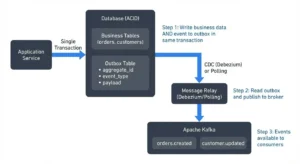
For near real-time replication with minimal engineering effort, Change Data Capture is your most realistic path forward. CDC has been around since SQL Server 2008, so it’s available on your source instance. It works by reading the transaction log and recording changes to dedicated CDC tables, you’re not adding triggers to production tables, which is a huge win for performance.
The setup is straightforward:
-- Enable CDC on the database
EXEC sys.sp_cdc_enable_db;

-- Enable CDC on specific tables (not all tables, just the ones you need)
EXEC sys.sp_cdc_enable_table
    @source_schema = N'dbo',
    @source_name = N'Orders',
    @role_name = NULL,
    @filegroup_name = N'CDC_Data',  -- Put CDC data on a separate filegroup
Once enabled, CDC tables capture inserts, updates, and deletes. Your incremental load strategy then becomes:
-- Extract changes since the last run
DECLARE @last_lsn binary(10) = sys.fn_cdc_get_min_lsn('dbo_Orders');

SELECT
    [__$operation],
    [__$update_mask],
    OrderID,
    CustomerID,
    OrderTotal
FROM cdc.fn_cdc_get_all_changes_dbo_Orders(
    @last_lsn,
    sys.fn_cdc_get_max_lsn(),
    'all'
);
The beauty here is that CDC gives you a reliable, auditable change stream without touching application code. You can poll every 5 minutes, every hour, or whatever frequency your analytics workload demands.
The Cloud Temptation: Fabric’s Copy Job and Its Hidden Costs
The original poster mentioned having Fabric capacity, and the Copy Job does support CDC for incremental loads into SQL 2025. That sounds great until you read the fine print: it burns SKU consumption and cloud costs.
When your source and destination are both on-premises, shipping data through the cloud just to move it between two servers in the same building is architecturally perverse. You’d be paying egress fees, consuming Fabric compute, and adding latency to what should be a local operation. The trade-offs of adopting Microsoft’s unified data vision can be brutal when you’re doing lift-and-shift rather than greenfield architecture.
The more sensible Fabric play is to use it as the eventual analytics destination, not as a replication bridge. Once your data lands in SQL 2025, you can use Fabric for the downstream analytics layer, that’s where it actually adds value.
Open Source ETL: The Custom Code Trap
The “avoid custom code” constraint is smart. But you should know what you’re signing up for if you go the open-source route.
Modern open-source ETL frameworks share a common three-layer architecture: extraction (REST APIs, JDBC/ODBC, or CDC for real-time replication), transformation (row-level cleansing, aggregations, schema mapping), and loading into destinations like Snowflake, BigQuery, or Redshift. The tools have matured significantly, Airbyte offers 300+ pre-built connectors, Apache NiFi handles real-time flow automation with provenance tracking, and Kafka Connect is the standard for sub-second latency streaming.
But here’s the honest assessment: open source ETL isn’t free. The infrastructure, maintenance, and security configuration costs are real. A production-grade Airflow deployment needs dedicated EC2 instances, RDS for metadata, and S3 for logs. And if you’re in a regulated industry, you’re manually configuring encryption, RBAC, and audit logging, none of these tools ship with SOC 2 certification or signed BAAs.
The organizational and cultural challenges often sink these projects faster than the technical hurdles, because someone has to own the maintenance forever.
The Schema Change Trap
Whatever replication method you choose, don’t underestimate the schema migration problem. When you’re moving from 2008 to 2025, you’re crossing 17 years of SQL Server evolution. Database compatibility levels have shifted, SQL 2025 runs at compatibility level 170, and that means query behavior, cardinality estimation, and even basic syntax handling will differ.
The classic mistake: copy the schema, replicate the data, and assume everything just works. Then analytic queries that ran fine on 2008 start timing out on 2025 because the optimizer is making different decisions with the same statistics. The operational risks of schema changes during live database migrations are real, and they’re amplified when you’re jumping 17 versions.
What Actually Works: The Pragmatic Playbook
Based on the thread discussion and real-world patterns, here’s the strategy that makes sense:
Phase 1: Assess and select
- Identify the specific tables that need replication, don’t move everything
- Measure data volume and change frequency to pick the right mechanism
- Check whether CDC is already enabled (it might be, from other initiatives)
Phase 2: Choose your replication strategy
| Data Volume | Change Frequency | Recommended Approach |
|---|---|---|
| Small (< 50 GB) | Low | Backup + restore with scheduled incremental refreshes |
| Medium | Moderate | CDC with hourly incremental loads |
| Large | High | Middle-tier server or CDC with near-real-time polling |
Phase 3: Build the pipeline
- For CDC: enable it on selected tables, build a polling job that reads changes and applies them to the 2025 target
- For middle-tier: set up transactional replication to 2019, then to 2025
- Test the fallback path, you will need it
Phase 4: Validate and cut over
- Run data validation queries comparing source and target row counts, checksums, or sample data
- Time the cutover for low-traffic windows
- Keep the old system running in read-only mode for at least a full reporting cycle
The 2025 Destination: What You’re Actually Getting
Before you put in all this work, it’s worth understanding what SQL Server 2025 gives you. It’s currently at Cumulative Update 8 (build 17.0.4075.5, released August 13, 2026), which means the platform has had time to stabilize. Mainstream support runs through January 2031, with extended support to January 2036, you’re not going to be in this migration situation again for a decade.
But don’t expect magic. The cloud integration features and AI enhancements in 2025 only matter if your analytics workloads can actually use them. If your team is still writing T-SQL stored procedures for reporting, the fancy new features are wasted on you.
The Real Cost of Waiting
Here’s what nobody wants to admit: every month you stay on SQL Server 2008 R2, the migration gets harder and the risk gets higher. The version is obsolete. It’s not getting security patches. And the longer you wait, the more likely you’ll hit the hidden data extraction challenges when someone eventually asks to feed that data into an AI initiative.
The legacy system trap is real, 70% of IT capacity at major enterprises goes to keeping legacy systems running, and modernization initiatives face a 60-70% failure rate. Don’t let your SQL Server migration be another statistic.
Start with CDC. Start with a few tables. Start now. The migration isn’t going to get easier, and the gap between your legacy system and what modern analytics demands is only widening. You don’t need a perfect plan, you need a working one.