The Silent Profit Leak: Snowflake Cost Optimization Secrets
A junior data engineer at a mid-sized company recently made a change so trivial it required exactly five lines of SQL. They dropped the auto-suspend timeout on their Snowflake warehouses from ten minutes to one. Four days later, daily credit consumption had collapsed by approximately 50%. Annual projected savings: $50,000. The CTO still doesn’t know why the bill suddenly got cheaper.
This isn’t a story about architectural genius or infrastructure rewrites. It’s about the silent profit leak that exists in nearly every Snowflake deployment: the assumption that default settings are cost-optimized, and that “cloud-native” automatically means “efficient.” The uncomfortable reality is that Snowflake’s architecture, while elegant, is designed for enterprise scale first and your budget second. Enterprise Snowflake architectures and vendor lock-in risks often create invisible taxonomies of waste that only become visible when someone bothers to look at the warehouse monitoring tab.
The Ten-Minute Trap
Snowflake ships with auto-suspend defaults that favor performance over parsimony. Ten minutes is the typical starting point, a duration chosen to minimize cold-start latency for analysts running ad-hoc queries. The problem? Most data teams aren’t running continuous analytics. They’re running bursty ETL jobs, scheduled dbt transformations, and sporadic BI dashboard refreshes. In that context, a warehouse sitting idle for nine minutes and fifty seconds is pure margin for Snowflake and pure burn for you.
The mechanics are brutal. Snowflake bills in per-second increments, but with a catch: every time a warehouse spins up to execute a query, you’re hit with a minimum charge. If your BI tool fires ten queries that each take two seconds, you aren’t paying for twenty seconds of compute. You’re paying for ten minutes, sometimes more depending on your warehouse size. This “idle compute tax” creates a 300x markup on actual usage for interactive workloads.
Teams that have aggressively optimized their auto-suspend policies, dropping development warehouses to one minute and production to five, report warehouse usage reductions of 45% without touching a single line of transformation logic. The spin-up latency? Negligible. Modern Snowflake clusters provision in under a second, meaning your analysts won’t notice the difference, but your finance team definitely will.
Right-Sizing: The XS vs. XL Delusion
Auto-suspend is the low-hanging fruit, but warehouse sizing is where teams really hemorrhage cash. There’s a persistent myth that bigger warehouses always equal faster queries. In reality, an XL warehouse running a simple SELECT * is just an expensive way to waste money faster.
The evaluation criteria for selecting the right type of data warehouse should focus on workload specificity, not ego.
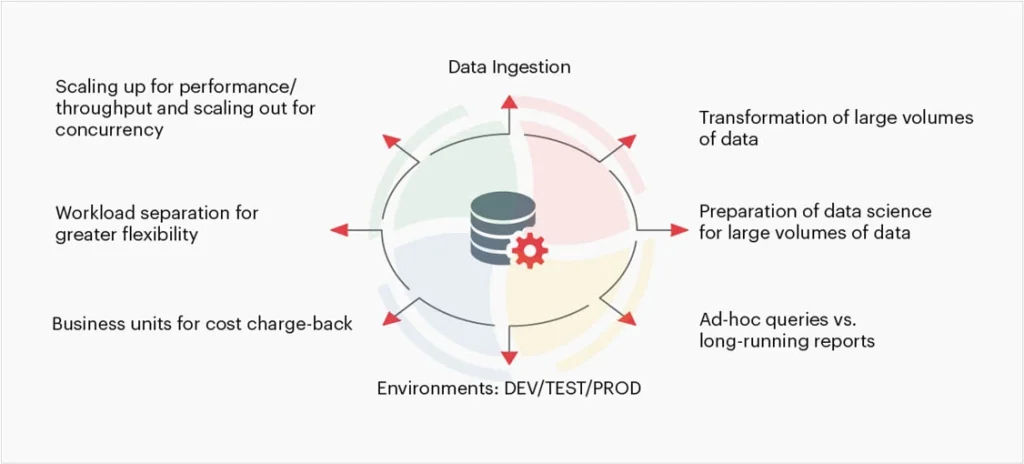
According to implementation best practices, ad-hoc queries and exploratory analysis should live on XS or S warehouses. Heavy data transformations might justify M or L. The critical insight is that Snowflake’s credit consumption scales linearly with warehouse size but query performance doesn’t. Doubling your warehouse size doubles your cost, but only improves query time by 30-50% at best, and often less if your data isn’t properly clustered.
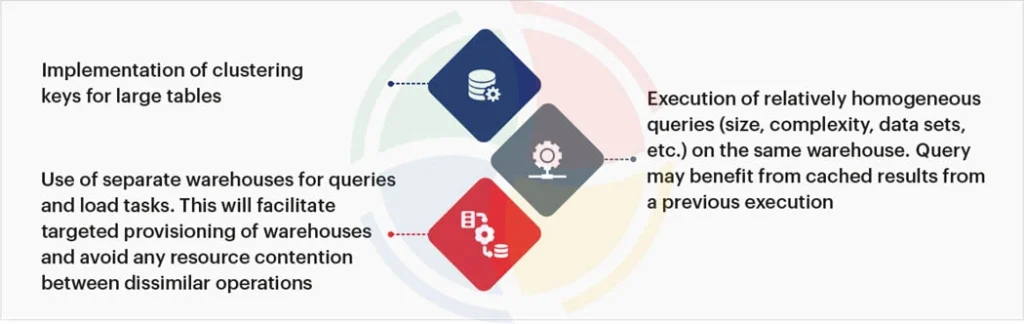
Speaking of clustering: unclustered large tables are credit vampires. When a query scans micro-partitions containing irrelevant data because you skipped the clustering keys, you’re paying for compute that returns nothing. Implementing clustering on date columns for time-series data can cut query execution times in half for 80% of analytics workloads, effectively halving your compute costs for those queries.
The SELECT * Syndrome
Query optimization isn’t just about infrastructure configuration, it’s about behavioral discipline. Using SELECT * in production queries is the data engineering equivalent of leaving the lights on in every room of a mansion. You’re paying to move and process data you don’t need.
Materialized views exist for a reason. Result caching isn’t just a performance feature, it’s a cost feature. When you rerun the same query without caching, you’re not “refreshing the data”, you’re burning credits on work already done. Query profiling tools can identify these patterns, showing exactly which operations are consuming credits without delivering value.
The sins of the cloud data warehouse, as one veteran put it, stem from making things so fail-proof that you can still get things working in the worst way. The platform doesn’t stop you from writing expensive queries. It just bills you for the privilege.
The Architecture Trap
Why do these leaks persist? Because AI infrastructure cost economics and per-run pricing models create a psychological blind spot. When compute is abstracted into “credits”, the sting of waste is dulled. A dashboard that costs $50 per run feels acceptable until you realize it runs 200 times a day.
Traditional cloud data warehouses bill in 60-second minimums, creating a structural incentive for waste. Modern alternatives built on hybrid execution models, processing data locally where possible and cloud-only when necessary, demonstrate 70-90% cost reductions by eliminating the idle compute tax entirely. When you compare cloud inference cost comparisons and local versus hosted options, the pattern becomes clear: the future of cost-effective data engineering is moving compute to the data, not the other way around.
Your Immediate Action Plan
Don’t wait for your next bill shock. Audit these settings today:
- Auto-Suspend: Set dev warehouses to 1 minute, production to 5 minutes or less. Monitor for 48 hours. If nothing breaks, keep it.
- Right-Size: Downsize one warehouse tier and measure query latency. If the impact is under 20%, stay down.
- Clustering: Identify your largest tables (especially fact tables with date columns) and implement clustering keys.
- Query Hygiene: Ban
SELECT *in production dbt models. Use materialized views for frequently accessed aggregations. - Alerting: Set up warehouse alerts for unusual credit consumption. If a warehouse burns through its daily budget in two hours, you want to know before the CFO does.
The $50,000 saved by that junior engineer wasn’t magic. It was just paying attention to the defaults. In a world where cloud inference cost comparisons and local versus hosted options are dominating infrastructure discussions, your data warehouse is likely the biggest unchecked line item in your cloud bill. Fix the leaks before someone else does, and takes the credit.