Your Mac Can’t Run Kimi K3. Here’s What It CAN Run (And What’s Coming)
Apple’s M6 Mac mini and M5 Ultra Mac Studio push local LLM boundaries, but 1.4TB models remain out of reach. Here’s the real hardware picture.
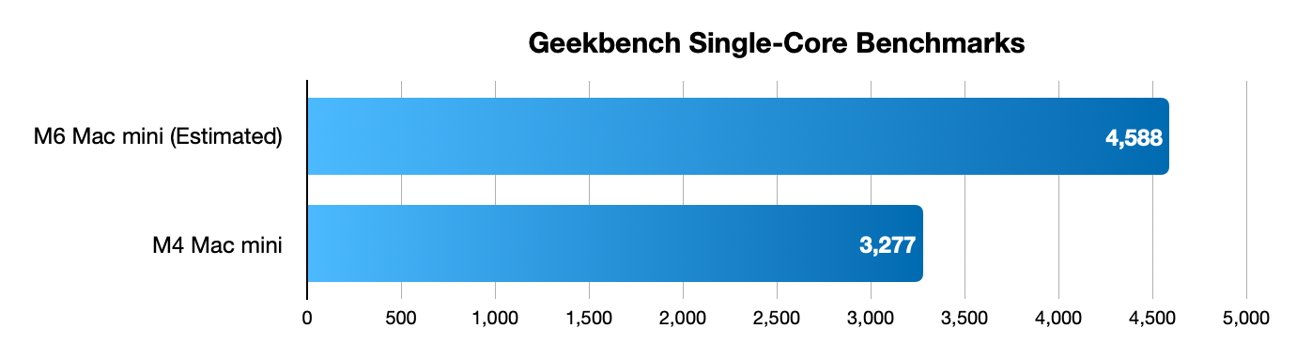
Let’s get the uncomfortable truth out of the way first: that 1.4 terabyte Kimi K3 model you’ve been dreaming about running locally? Not happening. Not on a Mac mini. Not on a Mac Studio. Not even on the new M5 Ultra with its ridiculous 512GB unified memory ceiling.
A recent discussion about which foundational models can actually run on Apple’s compact desktops poured cold water on the fantasy. The video chart making the rounds shows current foundational models like Kimi K3’s 1.4TB parameter count sitting in the “absolutely not” category, even at aggressive 4-bit quantization, you’d need roughly 700GB of memory just for weights, before accounting for context windows and OS overhead.
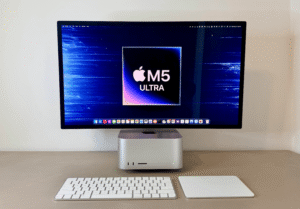
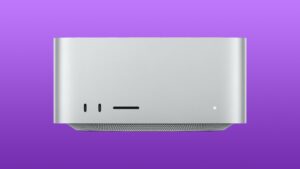
But here’s what makes this moment genuinely interesting: we’re at an inflection point where the gap between “what fits” and “what’s useful” is narrowing faster than anyone predicted. Apple’s August 2026 refresh, the M6 Mac mini ($899) and M5 Pro variant ($1,699), plus the M5 Max ($2,499) and M5 Ultra Mac Studio ($5,499), has fundamentally reshaped what consumer hardware can do. The M5 Ultra’s 512GB ceiling, paired with Apple’s demonstration of running a 1-trillion-parameter model across four clustered M3 Ultra Studios, suggests the path forward isn’t bigger single machines but smarter distributed ones.
The Memory Wall: Why Your 32GB M6 Mac Mini Hits the Ceiling Fast
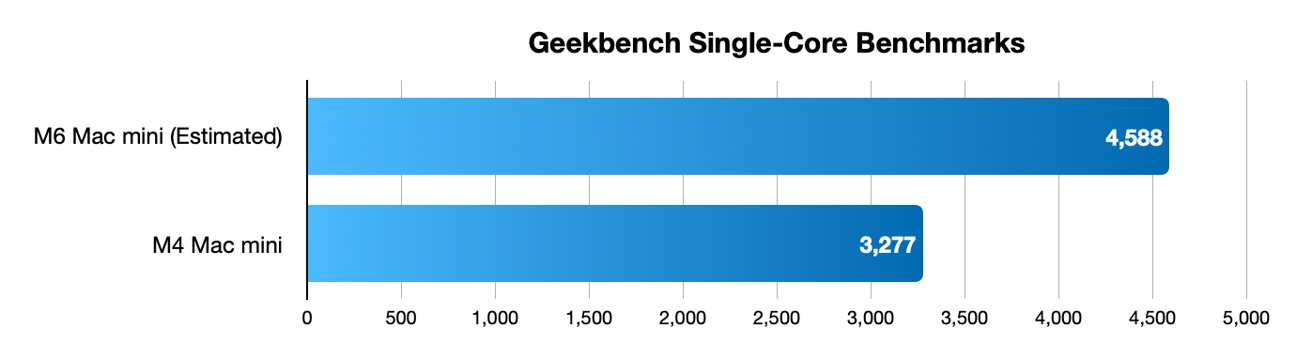
Apple’s marketing for the M6 is genuinely impressive. The company claims up to 13.5x faster LLM prompt processing in LM Studio versus the M1, and 4.8x faster than the M4. The Dual 16-core Neural Engine and Neural Accelerators in every GPU core are architectural shifts, not incremental bumps. OWC’s analysis notes the M6’s relevant improvements aren’t the CPU numbers, the Neural Engine delivers up to 2x peak compute of previous generations, with system frameworks able to use both engines simultaneously.
But here’s the dirty secret hiding in the spec sheet: the M6 Mac mini caps at 32GB of unified memory.
That’s a regression from the M4 Pro Mac mini, which offered 64GB in its top configuration. The base M6 starts at $899, $300 more than the M4’s launch price, and memory upgrades run $200 per tier. A 32GB config lands you around $1,299. That’s a lot of money for a machine that can’t fit a 70B parameter model, even at Q4 quantization where a Llama 3.3 70B needs roughly 40GB of RAM just for weights.
The practical ceiling for a 32GB M6? Models up to 32B parameters at Q4, which Faceofit’s compatibility matrix maps out nicely:
| Model | Params | 16GB Base | 24GB Upgrade | 32GB Upgrade | Suggested Format |
|---|---|---|---|---|---|
| Phi-4 Mini | 3.8B | Excellent | Excellent | Excellent | Q8/Q6/Q4 |
| Qwen3 4B | 4B | Excellent | Excellent | Excellent | Q8/Q6 |
| DeepSeek-R1 Distill Llama 8B | 8B | Excellent | Excellent | Excellent | Q6/Q8 |
| Gemma 3 12B | 12B | Works | Excellent | Excellent | Q4/Q6 |
| Phi-4 | 14B | Works | Excellent | Excellent | Q4/Q5 |
| Mistral Small 3.1 | 24B | No | Works | Excellent | Q4 |
| Qwen 3.6 27B | 27B | No | Works | Excellent | Q4 |
| Qwen3-Coder 30B-A3B | 30B (3B Active) | No | Works | Excellent | Q4 |
| DeepSeek-R1 Distill Qwen 32B | 32B | No | Tight | Works | Q4 |
| Llama 3.3 70B | 70B | No | No | No | Requires 64GB+ |
The stream of consciousness from Reddit’s r/LocalLLaMA captures the frustration perfectly. One user succinctly noted, “64GB is about right for 27B at 8 bit/8 bit KV. It JUST fits into a 48GB GPU w/256K context.” Another pushed back, warning against Q8 KV on Apple Silicon: “I really would not recommend this on Apple Silicon seeing as it’s starved for compute.”
That last point matters more than most people realize.
The Bandwidth Bottleneck: Where Tokens Actually Die
Here’s the uncomfortable physics of LLM inference: token generation speed scales linearly with memory bandwidth, not GPU cores. Your M6 Mac mini’s 170GB/s bandwidth sounds decent until you realize the M5 Pro hits 307GB/s and the M5 Max ranges from 460-614GB/s. The M5 Ultra? A staggering 1.2TB/s, the first meaningful bandwidth jump at the Ultra tier in four years, as OWC’s analysis notes.
The token generation estimates tell the real story:
| Chip | Max RAM | Bandwidth | Dense 8B | Dense 14B | Dense 27, 30B | Dense 70B | 30B-A3B MoE |
|---|---|---|---|---|---|---|---|
| M4 | 32GB | 120GB/s | ~17 tok/s | ~10 tok/s | ~5 tok/s | won’t fit | ~35 tok/s |
| M5 | 32GB | 153GB/s | ~21 tok/s | ~12 tok/s | ~6 tok/s | won’t fit | ~45 tok/s |
| M6 | 32GB | 170GB/s | ~23 tok/s | ~14 tok/s | ~7 tok/s | won’t fit | ~50 tok/s |
| M4 Pro | 64GB | 273GB/s | ~38 tok/s | ~22 tok/s | ~11 tok/s | ~4 tok/s | ~75 tok/s |
| M5 Pro | 64GB | 307GB/s | ~43 tok/s | ~25 tok/s | ~13 tok/s | ~5 tok/s | ~85 tok/s |
| M4 Max | 128GB | 546GB/s | ~75 tok/s | ~44 tok/s | ~23 tok/s | ~9 tok/s | compute-limited |
| M5 Max | 128GB | 460, 614GB/s | ~85 tok/s | ~49 tok/s | ~26 tok/s | ~10 tok/s | compute-limited |
| M3 Ultra | 512GB | 819GB/s | ~113 tok/s | ~65 tok/s | ~35 tok/s | ~13 tok/s | compute-limited |
| M5 Ultra | 512GB | 1.2TB/s | ~165 tok/s | ~96 tok/s | ~51 tok/s | ~20 tok/s | compute-limited |
The corollary that most buyers miss? The base M6’s 170GB/s only applies to the 24GB and 32GB configurations. The 16GB base model stays at 153GB/s, same as the M5. Memory upgrades buy you speed as well as capacity, which makes the $200 step up to 24GB feel like the minimum viable purchase.
But here’s the counterintuitive insight that emerged from the discussion: MoE (Mixture of Experts) models are the great equalizer. A 30B-A3B model on a base M6 should hit roughly 50 tok/s, snappy, usable, feels instant. The same machine running a dense 27B model crawls at 7 tok/s. The entire calculus changes when you’re only reading 3B active parameters per token instead of the full model.
Rather than chasing expensive Pro/Max/Ultra chips for memory bandwidth, MoE models let you get near-30B capability at speeds a base chip can deliver comfortably. Most people read at roughly 5-6 tokens per second. Anything above 10 feels conversational. Above 30? Instant.
The Quantization Wars: How Much Precision Do You Actually Need?
The comment section of that Reddit thread devolved into the classic quantization debate. One user argued passionately:
“The audiophile-type quant superstition has taken over. For tiny models, yes Q4 is preferable. For 200b plus (let alone 700b+) it’s a different story. Most modern benchmarks require reasoning steps. Yet we have zero evidence that medium or large reasoning models are affected by quantization until q3.”
There’s real truth here. Quantization isn’t the boogeyman it was two years ago. Modern quantization techniques have narrowed the quality gap dramatically, especially for larger models where the sheer parameter count provides redundancy. One user runs GLM Flash at Q4 despite having room for Q8, citing benchmarks showing negligible difference.
But the opposite camp has equally valid points, especially for agentic workloads:
“I use 8 bit for all my agentic tasks with qwen. 4bit is too unreliable.”
The nuance that emerged: KV cache quantization is where the real quality loss happens. One commenter noted the big win for Qwen is ensuring your KV cache isn’t quantized, it’s a 15-20% performance hit but preserves model quality far better than aggressive weight quantization. For agentic tasks with multi-step tool calls, that reliability premium often beats raw speed.
The pragmatic middle ground: depending on model scale. For models under 30B, Q8 is worth the memory cost if you have the headroom. For 70B+ models, Q4 is the only realistic option, and the quality trade-off is acceptable in practice.
The Clustering Workaround: When One Mac Isn’t Enough
The most intriguing development in the Mac Studio clustering discussion isn’t about single-machine specs at all. Apple has explicitly enabled Thunderbolt 5 clustering for distributed inference, and the community has run with it.
Four Mac Studios clustered together can theoretically run “open flagship models with about up to 3TB parameters at q4.” The bandwidth numbers are staggering, Thunderbolt 5’s RDMA capabilities enabled Exo Labs to demo 4.8TB/s cluster bandwidth. According to one commenter, this might be “one of the most energy-efficient ways of running frontier models at usable speeds.”
But reality checks apply. Cluster interconnect bandwidth through Thunderbolt 5 tops out around 80Gb/s per connection, fractional compared to the 4Tbps+ interconnect speeds on fused chips like the M5 Ultra. The difference is like piping water through a garden hose versus an industrial pipeline. Multiple users noted that a cluster of two M5 Ultra Studios wouldn’t match a single M5 Ultra with equivalent memory, simply because inter-chip communication becomes the bottleneck.
The more practical application of clustering might be Apple’s own demonstration of running a 1-trillion-parameter model across four M3 Ultra Studios, each with 512GB of unified memory, pooling 2TB total. That milestone validates the approach for extreme use cases. But for most developers, the Thunderbolt 5 clustering story remains more theoretical than practical.
There’s an 80-160B model gap that unified memory users deserve better options for, a desert between the 70B models that fit on 128GB machines and the 120B+ models that need 512GB monsters.
The Cloud Disruption Nobody Saw Coming
Look at what’s happening with the broader Mac mini disruption: a manufacturing company’s IT department was stuck on a data migration project for months, bound by vendor evaluations and security protocols. Then a non-technical employee, someone whose job title had nothing to do with engineering, bought a $599 M4 Mac mini, loaded a local model through Ollama, and solved the problem in an afternoon.
That’s the real story here. Cloud AI providers built business models around per-token pricing, but local processing costs a one-time hardware purchase and pennies in electricity. The economics are brutal for the cloud providers: Mac Mini M6 consumes 25-35W under LLM load versus 350-450W for a desktop RTX 4090. At $0.15/kWh, running 24/7 inference costs roughly $35/year on Apple Silicon versus $400/year for a GPU workstation.
And that’s before considering data privacy benefits that can’t be priced. For legal, medical, financial, or proprietary business work, local processing eliminates data processor agreements entirely. In the EU, that means no Article 28 GDPR contracts at all. In China, it sidesteps the Data Security Law’s offshore transfer restrictions entirely.
Real Talk: Which Mac Should You Buy?
The honest answer depends on which models you need to run:
- $899 M6 Mac mini (16GB): Starter tier. Handles 3B-8B models comfortably. A decent entry point for experimentation.
- $1,299 M6 Mac mini (32GB): The practical sweet spot for most users. Runs 13B models comfortably and 27-32B models at Q4. Great MoE performance with models like Qwen3-Coder 30B-A3B.
- $1,699+ M5 Pro Mac mini (64GB): The 70B-class entry point. Already proven with Llama 3.3 70B at 10-15 tok/s on the previous-gen M4 Pro, and the M5 Pro’s faster bandwidth should improve that.
- $2,499+ M5 Max Mac Studio (128GB): For anyone serious about 70B models. The sweet spot for quality/speed balance.
- $5,499+ M5 Ultra Mac Studio (512GB): The ceiling. The only consumer hardware that runs 120B+ models. Also the only machine that runs 70B in FP16 with zero quality loss.
That said, Apple’s hardware memory restrictions are a genuine blow to local AI’s future. The M6’s 32GB ceiling, a regression from the M4 Pro’s 64GB, feels strategic rather than technical. Apple is segmenting the market: affordable entry machines with limited memory, expensive Pro machines with actual capability. The $899 M6 is a gateway drug, not a destination.
The deeper concern is ecosystem momentum. The difference between M4 (2024) and M6 (2026) in memory capacity? Zero at the top end, both cap at 32GB. The M5 Ultra’s 512GB ceiling is the first real capacity improvement at the top tier since the M1 Ultra’s 128GB in 2022.
The 1TB Question: When Will Kimi K3 Become Feasible?
Assuming Kimi K3 becomes available as an open-weight model (current models like Kimi K1.5 are API-only), at Q4 quantization a 1.4TB parameter model would need roughly 700GB of memory. A single M5 Ultra with 512GB doesn’t fit it. Two 512GB M5 Ultra Studios clustered via Thunderbolt 5? With RDMA improvements and models specifically architected for distributed inference, this becomes feasible, if imperfectly.
The Reddit consensus is surprisingly optimistic. With rapid hardware progression, “M7, M8” generations might make it possible “in the next couple of years.” The M5 Ultra’s 1.2TB/s bandwidth at the top tier signals Apple’s direction. The bigger question isn’t whether Apple silicon can eventually run 1TB+ models, it’s whether open-weight model ecosystems will produce models worth running.
Maybe Capacity numbers. What matters is capability.
The tooling landscape has matured dramatically. Open-source voice AI pipelines run entirely on a MacBook. Agent frameworks like OpenClaw are model-agnostic and work fine with local models. RAG pipelines with embedding models, LLMs, and vector databases fit entirely in 36GB of unified memory.
The hardware is no longer the limiting factor for most practical use cases. The models are.
And that’s the real story. Apple has built an impressive piece of hardware in the M6, no doubt about it. The 4.8x LLM prompt processing improvement over the M4 is real. The silent operation, the 25-35W power draw, the sub-$1,000 entry price, the zero-configuration Metal acceleration, all genuinely impressive.
But the 32GB memory ceiling makes it a well-engineered constraint rather than an unlocked capability. For the price of two M6 Mac minis, you could buy one M5 Pro with twice the memory, and for the price of those two you could step up to a M5 Max Mac Studio.
Buy for capacity. The next Kimi K3 would thank you.