Your Smart Home Should Survive a Nuclear Winter (or at Least an ISP Outage)
Your $300 smart thermostat just became a brick because Google changed an API. Your Samsung fridge is displaying a TLS certificate error on its own screen. Your Camp Chef grill needs Wi-Fi to show you the temperature of the meat it’s literally cooking. And somewhere in your house, a meat thermometer from a startup that went out of business has stopped working entirely, the hardware outlived the company, but the cloud dependency killed it anyway.
This isn’t a parade of edge cases. It’s the systemic failure of an industry that built smart homes on a fundamentally broken architectural premise: that your house should depend on someone else’s servers.
The One-Minute Test That Separates Controllers from Mirrors
Here’s a test that takes exactly sixty seconds and reveals everything about a smart home system’s architecture: unplug the router. Not the modem, the router. The local network stays up, but the internet goes away. Then try the things your smart home promises.
Turn on a light. Run a scene. Unlock a door for a scheduled cleaner. View a camera feed.
A system with genuine local control does all of it at full speed, because commands travel from glass to radio inside your building. A cloud-dependent system spins, errors, or shows greyed-out tiles, because every tap was making a round trip to a server that’s now unreachable.
The result is the single most honest line in any smart home’s specification, and it never appears on the datasheet, because “requires internet for control” doesn’t sell units.
The Rules That Survive a Decade
Spencer Kittleson has been building offline-first home automation for about ten years, and his detailed account of what works and what breaks reads like a decade of architectural lessons compressed into eleven rules. The first one is non-negotiable: no internet, no problem. Core stuff has to work with the internet unplugged. Voice assistants like Alexa are acceptable as one way in, but never the only way.
The second rule is the one most smart home enthusiasts violate on day one: don’t remove the old way while adding the new one. If someone has to tape a wall switch on so a smart bulb keeps power, you’ve failed. The wall switch should still control the light directly, with automation as an overlay, not a replacement.
Checklist for resilience
- Be agile. Rooms get used differently, people move in and out. Everything must be cheap to change.
- Check your automations. Kittleson once found four scheduled triggers all hitting the same garden pump.
- Exceptions must be exceptional. “I was in a hurry” doesn’t count as a reason to break the rules.
After year five, when the house went from single-user to multi-user, the rules expanded: cloud devices need APIs with logs, configuration lives in one place instead of five vendor apps, and there must be more than one way in, an app, Alexa, a QR code, or an NFC tag.
Beyond Convenience: Privacy, Security, and 500 Milliseconds of Latency
The edge computing argument isn’t just about surviving outages. The numbers tell a story that’s hard to dismiss. A single 4K security camera streaming to the cloud can consume 2-4 GB of data daily. That’s not just bandwidth, it’s a continuous broadcast of your life to someone else’s infrastructure. Latency from cloud round-trips typically adds 100-500 milliseconds to every interaction, which is why video doorbells feel sluggish and motion-activated lights feel like they’re thinking about it.
Edge processing flips this model. Processing data locally eliminates network latency almost entirely, with security systems triggering alarms within 10-20 milliseconds of detecting intrusion. On-device AI can distinguish between people, vehicles, animals, and packages with 95%+ accuracy, dramatically reducing false alerts while keeping footage private.
The cost structure is equally compelling. Gartner predicted that 75% of enterprise-generated data would be processed at the edge by 2025, and consumer devices are following the same trajectory. Local processing can reduce bandwidth consumption by 90% or more while extending storage retention, a four-camera edge system might consume less bandwidth than a single traditional cloud camera.
The Architecture That Actually Works
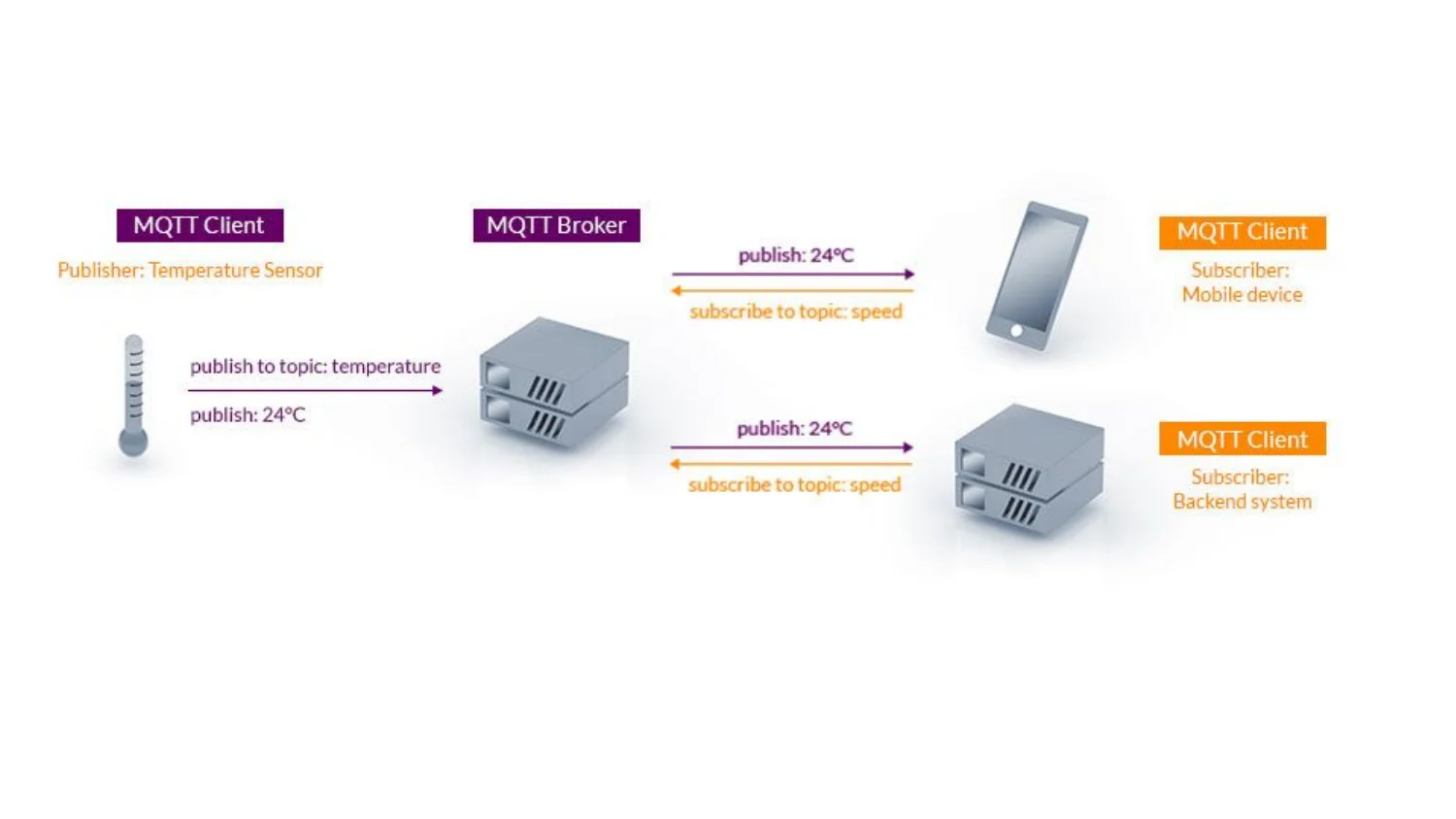
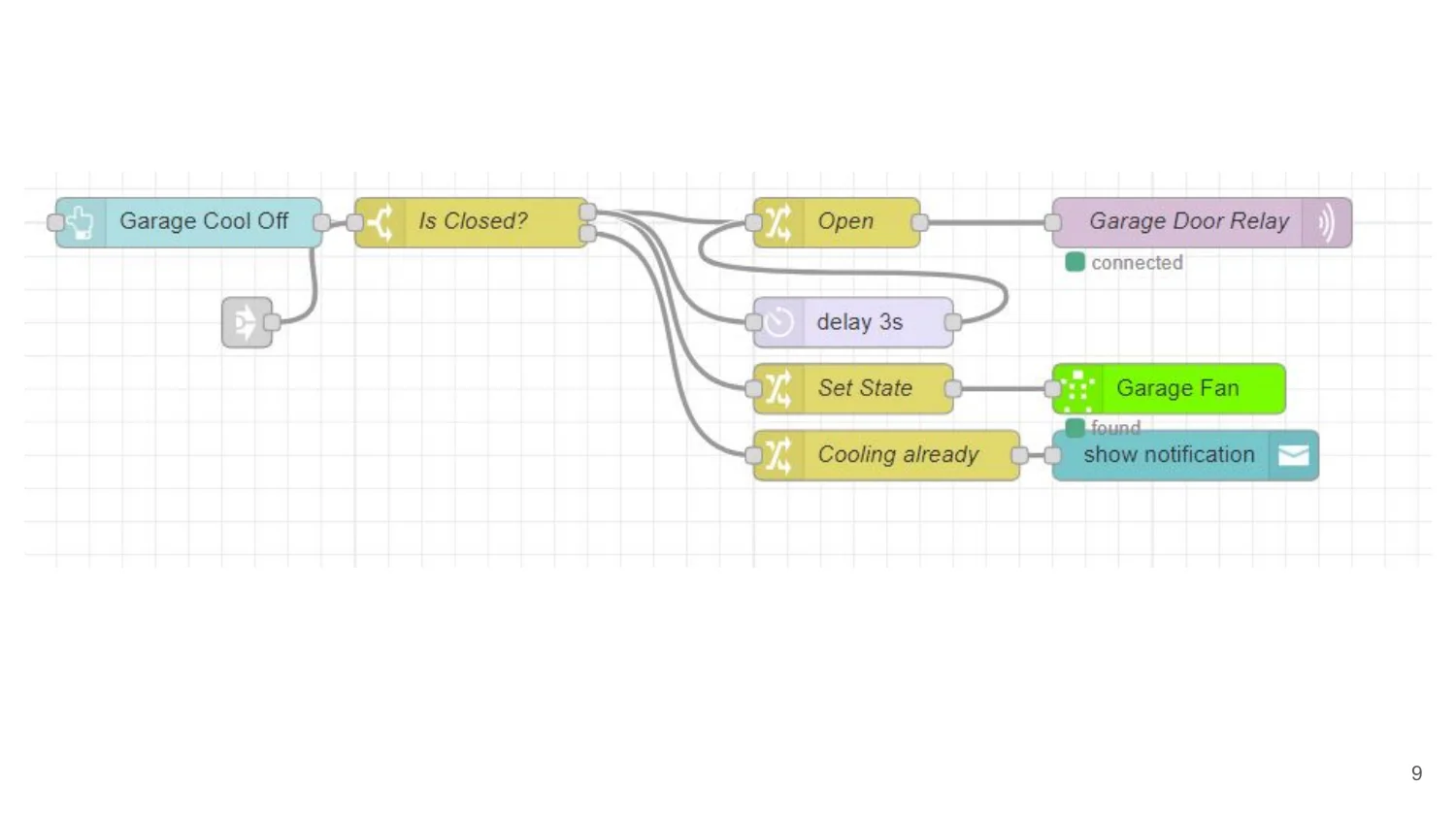
The stack that emerges from a decade of offline-first experimentation is refreshingly boring: Tasmota firmware on ESP boards, an MQTT broker, and Node-RED on a Raspberry Pi. No proprietary ecosystems, no vendor lock-in, no cloud dependencies.
Why Pub/Sub Wins
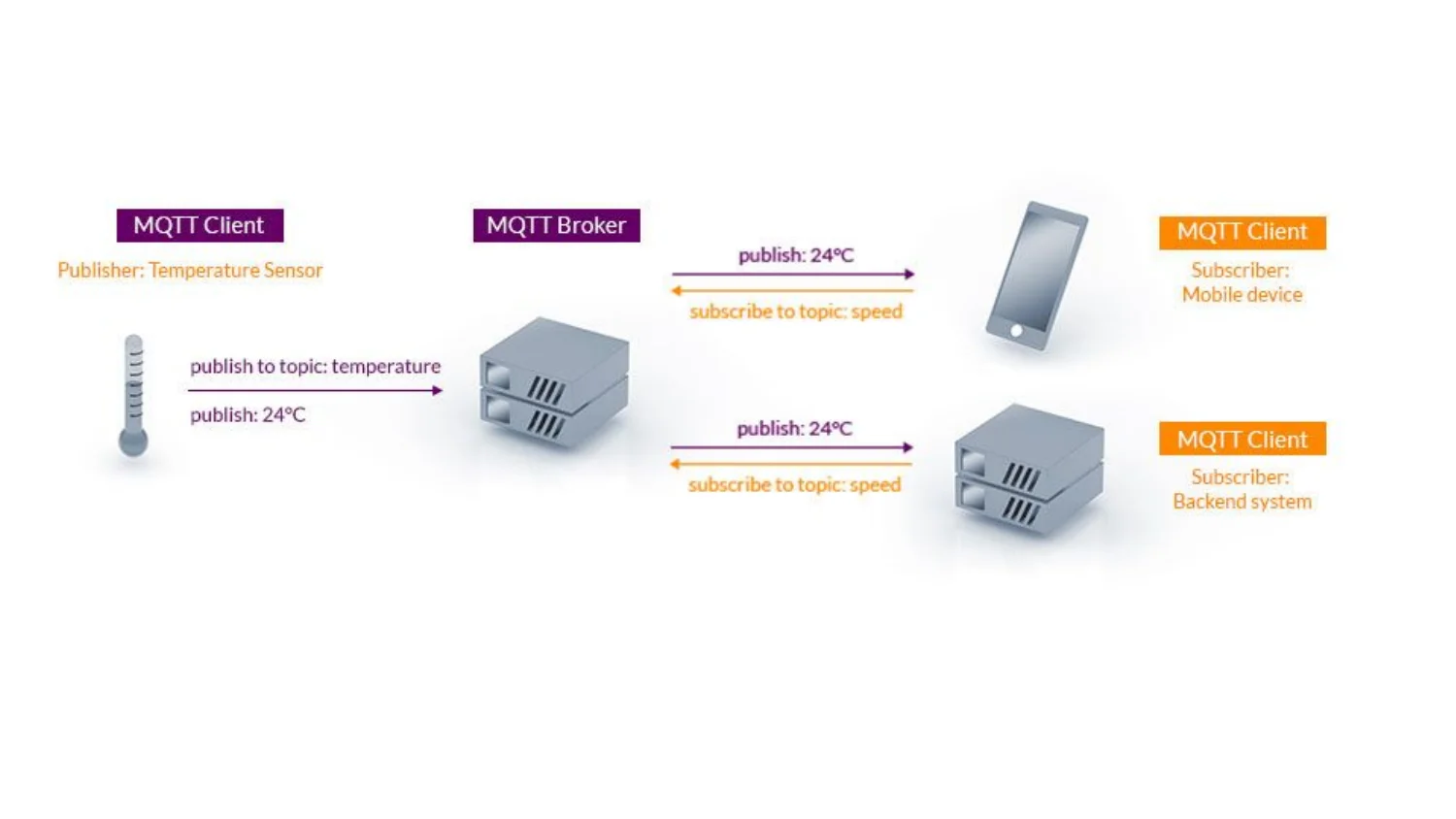
The architectural principle that makes this work is pub/sub over point-to-point. MQTT keeps things decoupled: a temperature sensor publishes its reading and doesn’t care who’s listening. A phone and a backend can both subscribe without the sensor doing anything extra. This decoupling is what makes the system resilient to change, add a new device, remove an old one, and nothing else in the system cares.
Hardware Choices
The hardware choices follow the same philosophy. An ESP32 D1 mini handles anything custom. Off-the-shelf smart plugs work when you don’t need custom hardware. A Raspberry Pi 4 runs Node-RED and Grafana for the “is everything okay” dashboard.
The Broader Pattern: Offline-First as a Design Philosophy
This isn’t just about smart homes. The offline-first architecture pattern is a growing force in distributed systems, and the smart home is arguably its most visible battlefield. The core distinction: offline-first treats no connectivity as the normal case rather than an error. The application stores and operates on data locally, works fully while disconnected, and syncs opportunistically when a network becomes available.
The conventional model writes to a server over the network, and with no network the write fails. Offline-first writes land on the device instantly, get queued, and sync whenever a path exists, whether that’s over a mesh network or the internet.
This philosophy maps perfectly onto the smart home. The hard questions are the same ones distributed systems engineers face everywhere: which data lives on the device, which actions may complete offline, and which system has the final say. In a smart home context, the answer to all three is “whatever keeps the lights working when the internet dies.”
What Still Needs the Cloud (Honestly)
Local control isn’t isolation. Remote access from outside the house, voice assistants, push notifications, and firmware updates are all legitimate cloud services. The mature architecture is a split: everything inside the house runs inside the house, and the cloud layer adds reach. When the internet fails, the house keeps working, and only the convenience features pause.
The failure mode to avoid is the inverted split, where the cloud layer becomes load-bearing. Some platforms keep the automation engine in the cloud deliberately, because it’s simpler to develop and update, and because residency on vendor servers has commercial value. That design decision is theirs to make, and yours to detect.
The one-minute router test catches this every time. A panel that keeps the house running with the fibre cut is a control panel. A panel that needs the internet to turn on a hallway light is a subscription with a screen.
The Part That Should Scare You
The failure cases documented by Kittleson and dozens of respondents in his Hacker News thread aren’t exotic edge cases, they’re the typical experience:
- A fridge whose temperature can’t be changed due to a bug in the manufacturer’s phone app.
- A TV that can’t switch inputs when the internet is down.
- A heating system whose app doesn’t work from the local network.
- A kitchen vent that needs the internet even when controlled from Home Assistant.
- Noise-cancelling headphones that search for Bluetooth forever, so you can’t enable noise cancelling.
- Synthesizers that need cloud login for firmware updates.
- A meat thermometer that only worked through its app and died when the company went bankrupt.
The meat thermometer is the one that should bother you most. The hardware outlived the company, and it stopped working anyway. That’s not a connectivity issue, that’s an ownership issue.
Practical Rules for the Offline-First Home
The collected wisdom from a decade of failures and the technical community’s responses distills into actionable principles:
- Offline first, with the internet for extras. A device should do its main job on its own.
- Treat every third-party dependency as a risk. APIs change, companies die, products get discontinued. Plan a local fallback or a clear degraded mode.
- Decide what must work offline. Lights, temperature and safety controls, and anything a guest has to use without learning an app.
- Smart features never take away the dumb ones. The wall switch should control the light directly and let automation flip it. A switch that only sends a request to the automation server fails.
- Use local protocols. Zigbee and Z-Wave over Wi-Fi where possible, because a switch that doesn’t need the cloud tends to behave the same year after year.
- Clean up when you throw things away. Remove a connected printer from your account before disposing of it. An abandoned connected device is an easy way in for attackers.
The Economics of Local-First
One of the more interesting developments in this space: LLMs are now being used to find and flash custom firmware. One reader buys the cheapest hardware that does the job, ignores reviews complaining about the app, and asks an LLM to write local-first custom firmware. This has worked across switches, thermostats, air quality monitors, and window fans, at roughly 2.5x cost savings over hardware that’s local out of the box.
This is precisely what local-first software and edge AI were supposed to enable. The cloud isn’t disappearing, but the load-bearing cloud is becoming optional. The technology to build resilient systems exists today, the barrier isn’t technical, it’s cultural.
The Bottom Line
Your home is too important to depend on someone else’s servers. The architectural pattern is clear: protocol stacks, rules engines, and state storage that all work without phoning home. Real local control is an engineering commitment, it’s cheaper to build a thin client that renders a web app, which is exactly why the market is full of thin clients priced like controllers.
But the tools exist. Tasmota on ESP boards. MQTT for decoupled communication. Node-RED for automation logic. Grafana for visibility. Zigbee and Z-Wave for inherently local protocols. And increasingly, on-device AI models that can recognize faces, distinguish packages from people, and learn your routines without broadcasting them to corporate servers.
The smart home of the future isn’t just connected, it’s genuinely intelligent, and that intelligence lives where it matters most: at home, not in a datacenter you don’t control.
Build yours to survive the internet. Not because you’re paranoid, but because the companies selling you cloud-dependent devices are betting you won’t test them with the router unplugged. The one-minute test settles the bet.