GPUs from the Graveyard: Inside the eBay Scavenger Hunt Powering the Local AI Revolution
The cloud AI boom has a dirty secret: it’s pricing out the very developers who built it. While OpenAI and Anthropic charge premium rates for API access, a growing underground movement is fighting back, one eBay auction at a time. Forget waiting lists for H100s or paying through the nose for cloud credits. The new AI arms race is happening in garages, where hobbyists are turning discarded gaming rigs and “broken” data center cards into serious local LLM powerhouses.
The eBay Gambit: When “Parts Only” Means Jackpot
The community’s favorite success story involves an A100 40GB that listed for $1,000 with the ominous description: “card reports CUDA error.” Most buyers scrolled past. One developer’s risk tolerance looked different.
“I figured it was worth the risk”, they explained. “I could’ve probably sold it for the price I paid.” The card arrived, was recognized instantly by nvidia-smi, and immediately began training models. No RMA, no support ticket, just pure compute for 10% of retail.
This isn’t isolated. The hunt for consumer GPUs on secondary markets has become a sport. A Netherlands-based builder snagged dual RTX 5060 Ti 16GB cards after their original order sat in limbo for weeks. The premium paid, €600 instead of €509, was worth it for same-day availability. “Really happy it arrived just in time”, they noted, referencing the sudden unavailability announcement that followed.
What Actually Matters: VRAM Over Everything
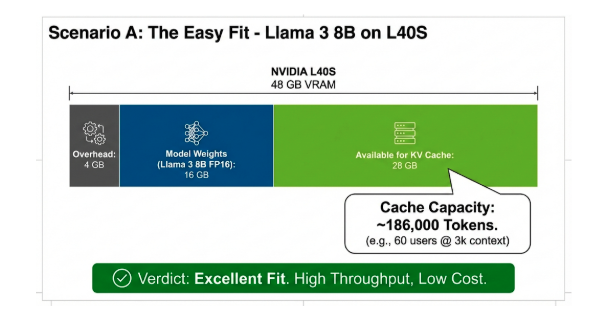
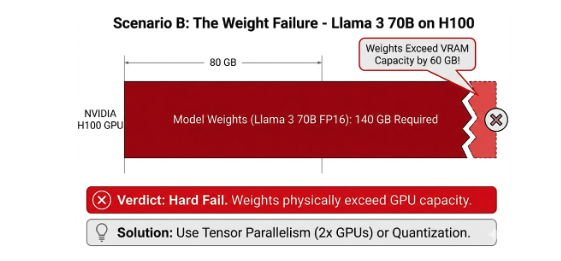
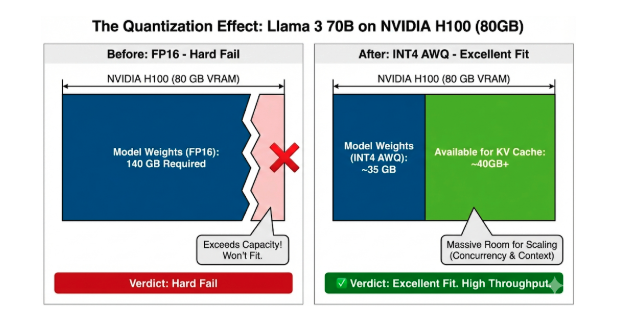
The DigitalOcean GPU sizing guide makes one thing brutally clear: VRAM capacity sets absolute limits. A Llama 3 70B model in FP16 requires 140GB for weights alone, impossible on single consumer cards. But quantization changes the game entirely.
The field-tested formula is straightforward: VRAM (GB) ≈ Parameters (Billions) × Bytes per Parameter
| Precision | Bytes per Parameter | Llama 3.1 70B VRAM |
|---|---|---|
| FP16/BF16 | 2 | 140GB |
| FP8/INT8 | 1 | 70GB |
| INT4 | 0.5 | 35GB |
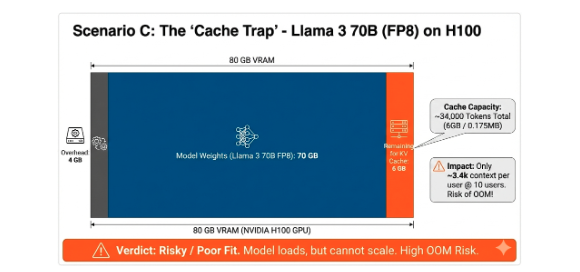
Suddenly that 24GB RTX 4090 becomes viable for a quantized 70B model. The KV cache still demands its pound of flesh, 112GB for FP16 cache with 10 concurrent users at 32k context, but FP8 cache halves that to 56GB. This is why dual-GPU setups dominate community builds.
The PCIe Lane Reality Check
One builder’s question about upgrading to a 9800X3D for CPU inference revealed a critical misconception. The prevailing wisdom on forums is clear: LLM inference isn’t gaming. The 3D cache that boosts frame rates does nothing for matrix multiplications.
“Only the raw RAM throughput and CPU speed matter”, explained one respondent. “Threadripper with 4-channels or EPYC with 12-channels are ideal.”
The conversation exposed another hard truth: consumer platforms hit lane limits fast. A Ryzen 7800X3D offers 24 PCIe lanes total. Run dual GPUs at x8/x8 and you’ve consumed most of them. Need NVMe storage? You’re making compromises. The ASUS ProArt X870E-Creator becomes the budget enthusiast’s choice at €400 because it splits PCIe 5.0 intelligently, but even it can’t defy physics, 16x/8x splits are impossible because the processor lacks the lanes.
Thermal and Power: The Hidden Tax
Dual 3090s in a standard case? “They got kinda hot during longer inference”, one builder admitted. The solution: riser cables and vertical mounting against glass panels, turning a gaming case into a wind tunnel.
Power draw during inference hits ~300W for dual mid-range cards. That’s before the 7950X or 9600X CPU, DDR5-6000 CL30 RAM, and NVMe drives. The community consensus: 1000W PSU minimum, with quality cooling mandatory. Liquid cooling isn’t vanity, it’s voltage stability.
The Software Stack: From Scrap to Service
Hardware is only half the battle. The toolchain defines usability:
Ollama dominates for simplicity. Pull a model, run it, done. Performance tuning is environmental variables:
export OLLAMA_VULKAN=1  # For AMD GPUs lacking ROCm
export OLLAMA_CONTEXT_LENGTH=16384
export OLLAMA_FLASH_ATTENTION=1  # Default in v0.13.5+
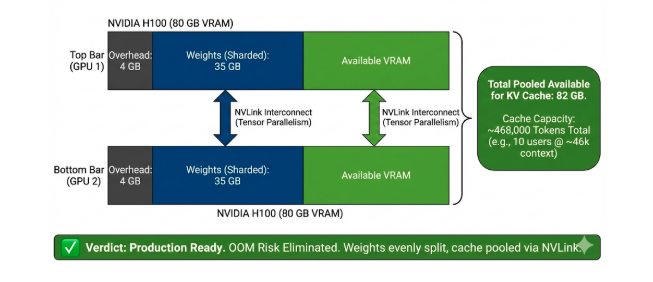
vLLM offers production-grade serving with continuous batching and tensor parallelism. The DigitalOcean guide demonstrates how adding a second GPU moves you from “risky” 6GB cache to 82GB, enabling 46k context per user across 10 concurrent sessions.
LM Studio and GPT4All provide GUIs for the command-line averse, democratizing access to local AI. The Boltic guide emphasizes no-code solutions, but power users quickly outgrow point-and-click interfaces.
The Quantization Arms Race
The difference between a paperweight and a workhorse is often 4 bits. Quantization transforms deployment possibilities:
- Q4_0: 4.2GB memory usage, 320 tokens/sec on an 8GB VRAM card
- Q4_1: 5.1GB usage, 280 tokens/sec with slightly better accuracy
- Full precision: 18.5GB, crawling at 120 tokens/sec
For code generation and math, the community warns against aggressive quantization. “Lower precision can degrade structured reasoning”, notes the DigitalOcean analysis. But for chat and RAG workloads, INT4 is the default choice, accuracy loss is negligible compared to the ability to run at all.
When Does the Math Work?
Building a DIY rig makes sense when cloud costs exceed hardware depreciation. A developer running 10 million tokens monthly through GPT-4 pays roughly $600. A €1,200 dual-5060 Ti rig pays for itself in two months.
The break-even accelerates with scale. One healthcare provider processing 50,000 medical reports daily achieved 1500 RPM with 98.2% accuracy using local models, costing 40% less than cloud alternatives while maintaining HIPAA compliance.
But the hidden value is control. No API rate limits. No unexpected pricing changes. No data leaving your premises. For organizations with strict sovereignty requirements, this isn’t just cheaper, it’s the only compliant option.
The Community Knowledge Gap
Forum threads reveal critical insights no vendor documentation covers:
- PCIe bifurcation requires specific motherboard support, not all x8/x8 splits are equal
- HSA_OVERRIDE_GFX_VERSION unlocks AMD cards not officially supported by ROCm
- GTT size adjustments let integrated GPUs handle larger contexts
- Vertical mounting isn’t aesthetic, it’s thermal management for multi-GPU setups
The Controversial Truth
Cloud providers want you to believe local AI is impractical. Their business models depend on it. Yet the evidence suggests otherwise: the same models running on $20,000 servers operate on $2,000 of scavenged hardware with 80% of the performance.
The controversy isn’t technical, it’s economic. Every local rig represents lost recurring revenue for cloud AI platforms. Every eBay GPU sale bypasses the official supply chain. This is a grassroots rebellion against the artificial scarcity and pricing power of a handful of companies.
The spiciest take? You’re paying cloud premiums for convenience, not capability. The developer who scored that $1,000 A100 isn’t an outlier, they’re a pioneer. The question isn’t whether DIY AI rigs work. It’s whether the cloud cartel can maintain its pricing power while garages full of repurposed gaming hardware match their performance.
Building Your Own: The Checklist
- GPU Hunting: Target 24GB+ VRAM cards. RTX 3090s dip under $700. “Parts only” A100s appear at $1,000-$1,500. Verify seller ratings and request photos of the card recognized in BIOS.
- Motherboard Math: Ensure PCIe bifurcation support for dual GPUs. X870E or TRX40 platforms start at €400. Check lane allocation in the manual, marketing lies.
- CPU Reality: Skip the gaming chips. A 7950X or Threadripper offers the memory bandwidth inference actually uses. The 9800X3D’s cache is wasted silicon for LLMs.
- Power Budget: 1000W 80+ Gold minimum. Dual GPUs spike hard during model loading. Don’t cheap out here, stable voltage prevents silent data corruption.
- Cooling Strategy: Plan for 300W sustained per GPU. Open-air cases or vertical mounting with 200mm fans beat closed cases with inadequate airflow.
- Software Stack: Start with Ollama for prototyping. Migrate to vLLM for serving. Quantize to INT4 for capacity, FP8 for quality. Use
ollama psto monitor real VRAM usage, calculations are optimistic. - Context Planning: The KV cache will OOM you before weights do. For 10 users at 32k context, you need 82GB+ total VRAM. Single cards are a trap for multi-user scenarios.
The Future Is Refurbished
The cloud AI boom created a secondary market that’s democratizing access. Data center refresh cycles dump A100s and 3090s onto eBay. Crypto mining failures flood the market with silicon. Smart developers are the vultures turning this e-waste into inference infrastructure.
The trend is accelerating. As cloud providers raise API prices and throttle access, more developers are asking: Why rent when I can own? The answer, increasingly, is that ownership isn’t just cheaper, it’s more capable.
Your gaming PC isn’t obsolete. It’s an AI workstation waiting for the right GPU, a BIOS setting, and a community-tested set of environmental variables. The revolution won’t be centralized. It’ll be built from scavenged parts, running in spare bedrooms, and documented in Reddit threads.
The cloud cartel’s worst nightmare isn’t a better data center. It’s a million garages, each running their own AI.