Eighteen years ago, UML was the only game in town. Every architecture diagram looked like a ransom note written in a language only certified enterprise architects could read, all those inheritance arrows, dependency stereotypes, and aggregation diamonds. Then everyone got tired of maintaining documentation that became obsolete faster than a hotfix can ship, and the pendulum swung hard toward “just draw some boxes in PowerPoint.”
Enter the C4 model, Simon Brown’s 2011 attempt to bring structure back to the chaos. Fifteen years later, it’s still struggling to reach anything close to universal adoption. The Reddit thread on this topic, where the original poster explicitly noted C4’s limited uptake despite its age, racked up comments that perfectly capture the fragmentation: PowerPoint for non-technical stakeholders, ArchiMate for enterprise architects, Mermaid in Obsidian for the diagram-as-code crowd, and a whole lot of “simple diagrams that just convey the idea.”
Meanwhile, the GitHub issue titled “[SPEC-CONTRACT-06] Establish UML/C4 architecture-view policy” frames the debate as a policy decision: C4 is a modeling convention, not a mandatory vendor-specific DSL. Mermaid is preferred for repository-native diagrams where adequate. PlantUML remains the choice when richer UML or executable component verification matters.
That’s not standardization. That’s a buffet.
The UML Death Spiral: What Happened to the Standard?
UML didn’t fail because it was technically deficient. It failed because it was a change management disaster wrapped in 14 diagram types. The Unified Modeling Language promised to be the lingua franca of software design, and instead it became the poster child for over-engineering.
The core problem: UML asked teams to maintain detailed class diagrams and sequence diagrams that would not survive a simple patch or bug fix. One Reddit user put it bluntly, strict UML is too cumbersome, and at its natural level of detail, it becomes outdated too fast. The maintenance burden fell on developers who had better things to do than keep whiteboard sketches in sync with actual code.
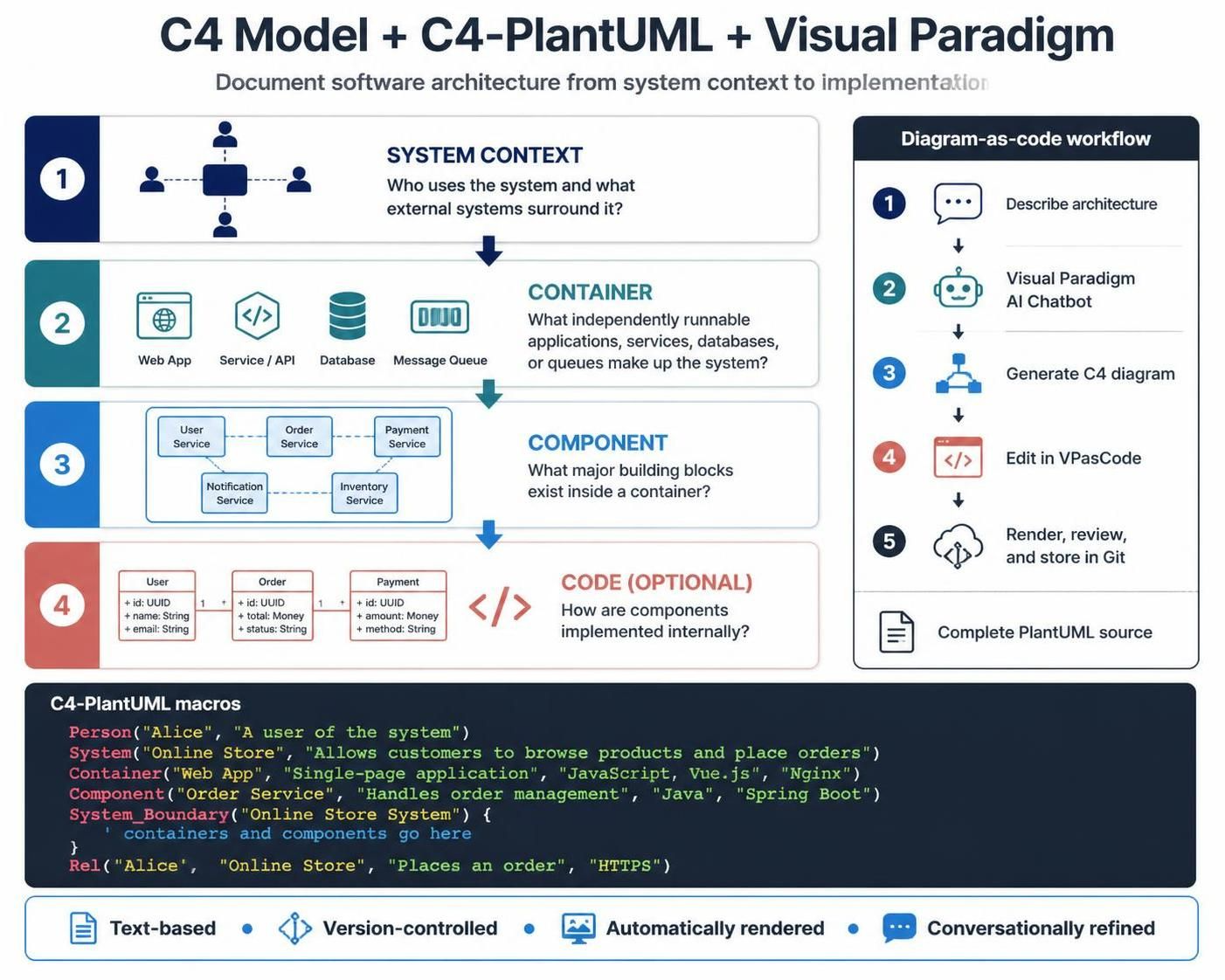
C4’s genius move was recognizing that most architecture diagrams fail for two reasons: they show too much detail too early, and they’re static images that become outdated. The model solves the first problem with four abstraction levels, Context, Container, Component, Code, and the diagram-as-code movement solves the second by making diagrams reviewable in Git.
The question nobody wants to answer: if C4 is genuinely better, why has adoption been so slow over 15 years?
Why C4 Still Hasn’t Won: The Adoption Paradox
C4 is not the first better standard to lose the adoption battle. It won’t be the last. The reasons are uncomfortable to acknowledge.
First, the audience problem. A solution architect in the Reddit thread admitted they almost never go beyond C2 (Container level) because their job is illustrating integration points and network plumbing, not internal component structure. A product manager needs PowerPoint. A developer needs Mermaid in a notebook. C4 introduced a hierarchy of abstraction, but most teams still don’t know which level serves which audience, and C4’s own documentation doesn’t make this easy enough.
Second, the container confusion. The most common C4 mistake, as detailed in the Habr comprehensive guide (280,000 views and counting), is treating C4 containers as Docker containers. They’re not. A C4 container is any independently runnable or deployable unit, a web app, database, background worker, or serverless function. The naming is terrible, and it creates a mental model collision that trips up newcomers. Microsoft Visio veterans read “container” and think infrastructure. Cloud engineers read “container” and think Docker. The diagram is wrong before anyone starts drawing.
Third, the tooling gap. C4 adoption mirrors the how engineering teams manage cognitive load in system design problem: if the tool doesn’t reduce friction, teams revert to freehand chaos. Structurizr, C4’s diagram-as-code tool, requires learning a DSL and mastering tags and styles. C4-PlantUML requires PlantUML knowledge. Even the draw.io support requires users to enable the shapes in settings. There’s no “just works” moment for most teams.
The Diagram-as-Code Revolution: Git as the Source of Truth
The most significant shift in architecture diagramming isn’t C4 itself, it’s the realization that diagrams are code. The C4-PlantUML workflow documented in the ArchiMetric guide shows what this looks like: store .puml files in version control, render them automatically, review changes through pull requests, and treat architecture modifications with the same rigor as code modifications.
The practical repository structure looks like this:
architecture/
  ├── README.md
  ├── context/
  │   └── quickbite-system-context.puml
  ├── containers/
  │   └── quickbite-containers.puml
  ├── components/
  │   └── quickbite-api-components.puml
  ├── dynamic/
  │   └── quickbite-place-order.puml
  ├── deployment/
  │   └── quickbite-production.puml
  ├── code/
  │   └── quickbite-order-code.puml
  └── rendered/
      ├── quickbite-system-context.svg
      ├── quickbite-containers.svg
      ├── quickbite-api-components.svg
      ├── quickbite-place-order.svg
      └── quickbite-production.svg
The source .puml files are the authoritative artifacts. Rendered images are derived. This is exactly how code works, and it’s why diagram-as-code is the single most important development in architecture documentation since UML.
But diagram-as-code only works when the tooling supports it. VPasCode, Visual Paradigm’s code editor integration, represents where the ecosystem is heading: AI-generated diagrams refined conversationally, then opened in a controlled editor for line-by-line fixes. The AI chatbot generates initial drafts from structured prompts, VPasCode lets you correct aliases, relationships, and styling, then the result goes through Git-based review.
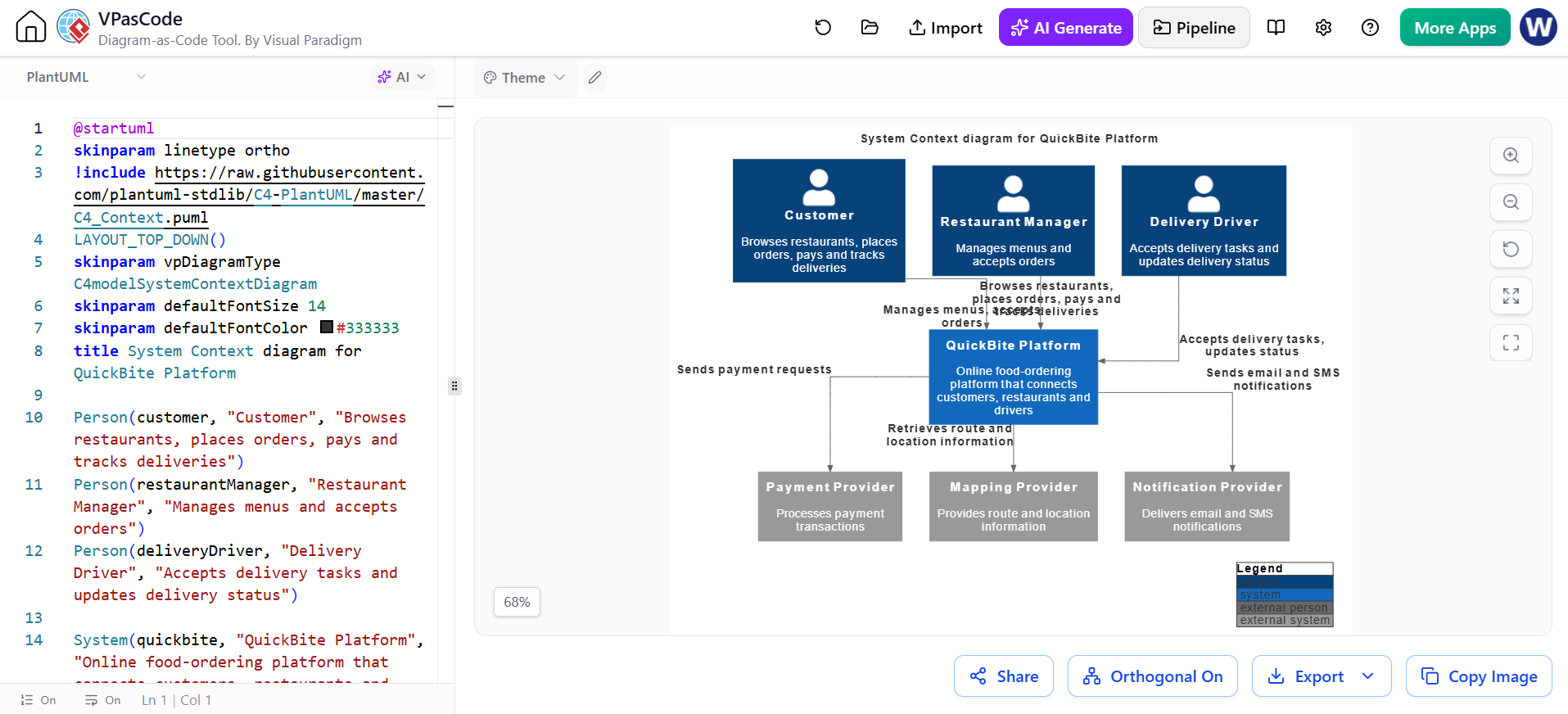
The critical caveat, repeated throughout the ArchiMetric guide: AI-generated diagrams can introduce nonexistent services, incorrect technologies, missing dependencies, and relationships that are plausible but false. The output should be treated as a draft, verified against the actual system. For teams that skip this review step, AI-powered diagramming becomes a faster way to produce confidently wrong documentation.
The Real War: Abstraction Levels vs. Getting Things Done
The C4 vs. UML vs. freehand debate isn’t really about notation. It’s about how much rigor teams can afford.
UML’s failure teaches a lesson about rethinking foundational tools for modern collaboration and architecture: standards that impose too much overhead die, regardless of their technical merit. C4’s relative success stems from its flexibility, you don’t have to create all four levels, and the model explicitly says component and code diagrams are optional. As the Habr guide notes, “[Component] level необязателен”, feel free to skip it unless internal structure matters for the current decision.
The beginner’s guide to C4 modeling for agile enterprise architecture makes the same point: don’t create all four levels for every system automatically. Create only the diagrams that help the team make a decision, communicate a dependency, or understand a change.
This is the philosophy that makes C4 compatible with agile delivery. It’s also why C4 adoption is slow, standards that succeed by being flexible are harder to teach and enforce than standards that succeed by being rigid.
The Freehand Problem: Why PowerPoint Isn’t the Enemy
The most common response in the Reddit thread wasn’t UML or C4, it was “simple diagrams” or PowerPoint. The top comment, with 14 upvotes, was about creating diagrams for non-technical people in PowerPoint. One user mentioned spending “waaaaay too long just fucking with diagrams” in Visio. Another prefers Mermaid in Obsidian for markup, but admits missing the ability to tweak layouts.
This isn’t laziness. It’s pragmatism. Freehand diagrams succeed because they’re fast and flexible. The cost is that they become outdated, and nobody owns their maintenance. The stakeholders get the pretty picture, and the engineering team is left with a whiteboard photo from 18 months ago that nobody can interpret.
The validation checklist from C4’s infrastructure guide is a useful corrective here. Before publishing any diagram, check:
- Scope: Is the purpose clear? Is the correct system boundary shown?
- Elements: Does every container have an independently meaningful purpose?
- Relationships: Does every label explain the interaction with protocol or technology?
- Consistency: Are names consistent between Context and Container diagrams?
- Rendering: Does the source compile? Are labels clipped?
One of the most telling recommendations: “Prefer several focused diagrams over one dense diagram.” Architecture documentation fails when someone tries to explain business context, containers, components, runtime behavior, AND deployment topology in a single image. The C4 model’s differentiator is that it makes this failure mode visible.
The AI Wildcard: Both the Problem and the Solution
AI is transforming architecture diagramming in ways that are still playing out. Feedback loops and limitations in AI-driven development workflows apply directly: AI can generate diagrams quickly, but without human validation, accuracy suffers. The Visual Paradigm AI chatbot workflow addresses this by pairing generation with VPasCode editing and architectural review.
The Habr guide includes a detailed AI prompt for C4 generation. The prompt instructs the model to act as an experienced system architect, follow the official C4 model documentation, and validate syntax against Structurizr. Key language: “воспринимайте полученный результат как черновик архитектуры, который необходимо проверить”, treat the result as an architecture draft that must be verified. The prompt even instructs the AI to ask clarifying questions rather than invent requirements.
This is the right approach. AI diagram generation has the same problem as AI code generation: it can produce confident, coherent output that is factually wrong. The team that treats AI-generated diagrams as birth, rather than draft, is creating technical debt at the speed of inference.
Where This Leaves Us
The diagram wars aren’t over, they’re just shifting. UML will continue its decline into legacy system documentation. Freehand diagrams will remain dominant for stakeholder communication. C4 will keep growing in engineering teams, supported by diagram-as-code tooling and increasingly AI-assisted generation.
The teams that get this right share a few practices:
-
Know your audience. PowerPoint/Google Slides for executives. Context and Container diagrams for cross-team communication. Component diagrams only for complex containers. Code-level diagrams only for implementation-critical areas.
-
Treat diagrams as code. Store them in Git. Review them in pull requests. Use consistent terminology across all levels.
-
Embrace the C4 hierarchy, selectively. One System Context diagram per system. One Container diagram per major system. Component diagrams where the internal structure matters. Dynamic and Deployment diagrams only when they answer a specific question.
-
Use strategic simplicity in early-stage architecture decisions. Don’t generate four levels of diagrams for a system that’s still finding its boundaries. Create just enough architecture documentation to support the next decision, then evolve it.
The ultimate test of any diagramming standard isn’t whether it produces beautiful diagrams. It’s whether the diagrams help the team ship software with fewer misunderstandings. By that measure, C4 is winning, not because it’s the most rigorous standard, but because it’s the most practical one. The slow adoption curve isn’t a failure of the model. It’s a reflection of how long it takes for good ideas to replace entrenched habits.
The diagrams that matter will survive the next architecture fad. The rest, well, they were already outdated the moment the deploy button was clicked.