On June 22, 2026, AWS quietly dropped a bomb on the serverless world. Lambda MicroVMs aren’t just another feature, they’re a fundamentally new compute primitive that collapses a decade of architectural tradeoffs into a single API call. VM-level isolation, near-instant launch, stateful sessions up to 8 hours, and you don’t manage a single hypervisor.
If you’ve ever had to choose between “secure but slow” and “fast but risky” for running untrusted code, this changes everything.
The Three-Body Problem of Compute Isolation
Every team that’s built a multi-tenant application running user-supplied or AI-generated code has faced the same impossible choice. Three options, three compromises:
| Option | Isolation | Startup Time | State Retention |
|---|---|---|---|
| Traditional VMs | Hardware-enforced | Minutes | Full |
| Containers | Shared kernel | Seconds | Full |
| Lambda Functions | Firecracker-backed | Milliseconds | Stateless |
Traditional VMs give you a hardware-enforced security boundary but take minutes to boot. Nobody wants to watch a loading spinner for two minutes before their AI coding sandbox appears.
Containers start in seconds, but they share the host kernel. A kernel-level escape in one tenant’s container can, in principle, reach every other tenant on that host. Locking that down takes serious security engineering.
Lambda Functions excel at short, event-driven, stateless work. They were never designed to hold a session’s state open for an hour while a user steps away.
Lambda MicroVMs sit exactly in the gap those three leave open. Each session runs in its own dedicated Firecracker VM with no shared kernel, no shared resources, and full memory and disk state preserved across suspend-resume cycles.
How It Actually Works: The Image-Then-Launch Model
The architecture follows a clean pattern that feels familiar to anyone who’s worked with containers, but the unit of execution is a hardware-isolated VM instead of a process.
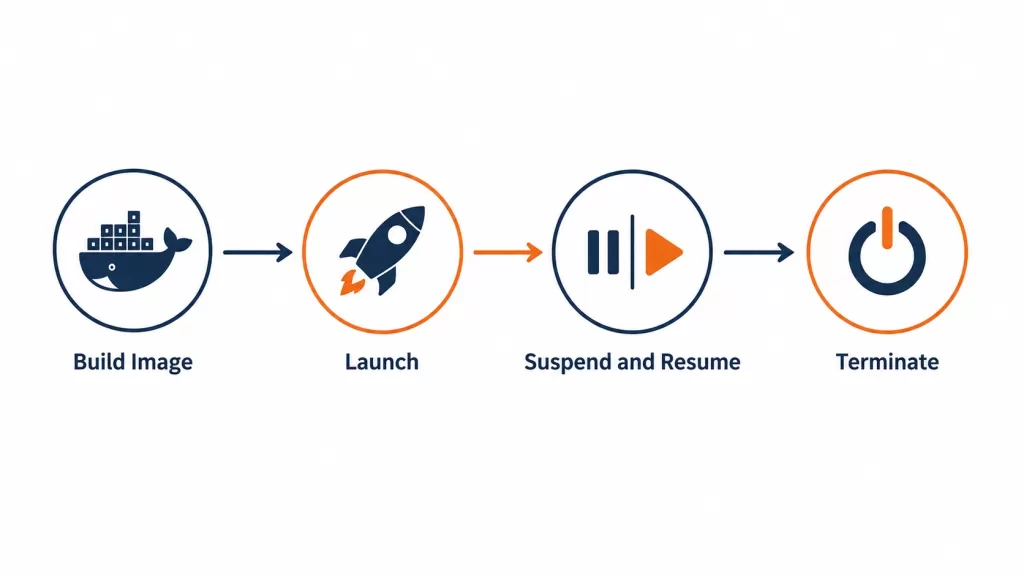
Step 1: Build a MicroVM Image
You package your application code and a Dockerfile into a zip archive and upload it to Amazon S3. The Dockerfile starts from an AWS-provided base image:
FROM public.ecr.aws/lambda/microvms:al2023-minimal
RUN dnf install -y python3 python3-pip && dnf clean all

WORKDIR /app

COPY requirements.txt .
RUN pip install --no-cache-dir -r requirements.txt

COPY app.py .

EXPOSE 5000

CMD ["gunicorn", "--bind", "0.0.0.0:5000", "app:app"]
Then you call the API:
aws lambda-microvms create-microvm-image \
--code-artifact uri=<path/to/s3/artifact.zip> --name <VM_image_name> \
--base-image-arn arn:aws:lambda:us-east-1:aws:microvm-image:al2023-1 \
--build-role-arn <IAM role ARN>
Lambda retrieves the zip, executes your Dockerfile, starts your application, and takes a Firecracker snapshot of the running environment’s full memory and disk state. Build logs stream live to CloudWatch. The resulting image gets an ARN and version number.
This is the magic. You’re not starting your application from cold every time. You’re capturing it already running, then reusing that exact state.
Step 2: Launch a MicroVM From the Image
aws lambda-microvms run-microvm \
--image-identifier arn:aws:lambda:<region>:<acct>:microvm-image:my-image \
--execution-role-arn arn:aws:iam::<acct>:role/MicroVMExecutionRole \
--idle-policy '{"maxIdleDurationSeconds":900,"suspendedDurationSeconds":300,"autoResumeEnabled":true}'
Lambda assigns the MicroVM a unique ID and a dedicated HTTPS endpoint. Because it resumes from a pre-initialized snapshot rather than booting cold, the application is already running by the time the call returns. No load balancer to configure, no ingress controller, no networking setup.
Step 3: Connect, Suspend, Resume, Terminate
Clients talk to the MicroVM through its dedicated endpoint, authenticated with a short-lived JWE token in the X-aws-proxy-auth header. When the session goes idle, Lambda suspends the MicroVM automatically, snapshotting memory and disk state. The next request triggers an automatic resume, and from the client’s side, the pause is invisible.
Installed packages, loaded models, open files, and running background processes all come back exactly as they were left. AWS notes that even a multi-gigabyte interactive session comes back online fast enough to feel responsive.
This Is Not Just Another Lambda Feature
It’s worth being precise here, because the naming invites confusion. Lambda MicroVMs is a new, separate resource inside AWS Lambda with its own API surface. It isn’t a configuration option on an existing function.
| Lambda Functions | Lambda MicroVMs | |
|---|---|---|
| Best for | Event-driven, request-response | Long-running, stateful sessions |
| Execution model | Stateless, ephemeral | Stateful, session-scoped, suspendable |
| Isolation | Firecracker-backed, optimized for short bursts | Dedicated Firecracker VM per session, full OS |
| Max duration | 15 minutes | Up to 8 hours |
| Typical use | APIs, data processing, event handlers | AI sandboxes, IDEs, CI/CD runners, analytics |
The two are designed to complement each other, not compete. An application’s event-driven backbone keeps running on Lambda Functions. The steps that need to execute untrusted code call into Lambda MicroVMs for that isolated piece.
What AWS Manages vs. What You Still Own
This is where the devil lives. Lambda MicroVMs remove a lot of undifferentiated infrastructure work. They do not remove platform ownership. The work shifts from managing hosts to managing images, sessions, state, permissions, egress, evidence, and cleanup.
| Layer | AWS provides | Your team still owns |
|---|---|---|
| Execution boundary | Firecracker-based MicroVM isolation and lifecycle APIs | Workload selection, tenant mapping, image contents, session cleanup |
| Identity | IAM controls for Lambda resources and API calls | Which principal can launch sessions, pass roles, access data, invoke tools |
| Endpoint access | Dedicated HTTPS endpoint and token-based auth | Token issuance, expiration, allowed ports, client routing, app-level authorization |
| Network | Default outbound internet, optional VPC egress | Egress policy, security groups, deny-by-default decisions |
| State | Memory and disk preservation during suspend/resume | Which state belongs inside the MicroVM, which must be externalized, how sensitive state is removed |
The biggest risk teams face is assuming “inside a VM” means “safe.” The right question is what the session can access, change, disclose, or authorize beyond the task it was created to perform.
The Two Gotchas That Will Bite You
The Image Drift Problem
A MicroVM starts from an image and initialized snapshot. That’s what makes launch fast, but it also means your sandbox environment has a release lifecycle of its own. Dependency updates, OS patches, language runtimes, agent tools, certificates, and bootstrap scripts all need versioning and rollback.
If the platform can’t tell which image version launched which tenant or session, image drift becomes hard to debug. One user may be running a patched sandbox while another is still on yesterday’s dependency set.
The Stale State Problem
Suspend and resume are powerful because a user can return to a warm working state. They also create a new failure boundary. To the MicroVM, memory and disk look preserved. Outside the MicroVM, database connections may have been closed, bearer tokens may have expired, remote services may have rotated credentials.
Treat resume as a partial reinitialization path, not as proof that the world stayed still. Application code should validate connections, refresh credentials, re-check clocks, rebuild clients when needed, and fail safely before handing execution back to a user workload.
Where This Fits in Your Architecture
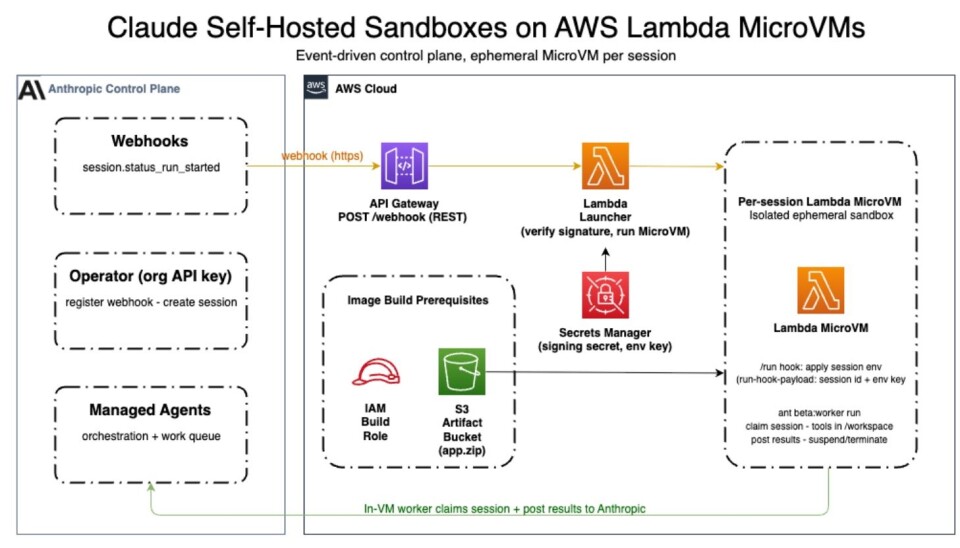
This is the playbook. AI coding assistants that generate and execute code. Interactive notebooks where users upload scripts. CI/CD pipelines building pull requests from external contributors. Vulnerability scanners executing malicious payloads. Game servers running user-submitted mods.
Each one needs the same primitive: a private, disposable compute environment per user or per AI agent session.
The pattern is strongest when isolation, session state, and a custom runtime are all central to the product experience. It gets weaker when the workload is just a short task or when launch constraints rule out the design.
| Fit | Use MicroVMs when… | Be careful when… |
|---|---|---|
| Strong | Each user/task/tenant needs a dedicated environment with preserved state and an HTTPS endpoint | The session also needs broad data or tool access, isolation doesn’t replace authorization |
| Conditional | The workload is a notebook, analytics session, or security scanner | Private networking, audit evidence, or data-governance requirements are unresolved |
| Poor | The work is short, stateless, event-driven, or already fits Lambda Functions cleanly | The workload needs x86, GPU, longer sessions, or a non-launch Region |
The Cost Model Isn’t Lambda Pricing
Do not model MicroVM cost as classic Lambda invocation pricing. The economics are closer to Fargate-style capacity planning: choose a baseline, account for active burst above that baseline, and model one representative session from launch to termination.
- Baseline resources: You pay for configured baseline compute while running. Over-provisioning raises the floor for every active session.
- Peak resources: A running MicroVM can vertically scale up to 4x its configured baseline during peak activity.
- Idle time: Suspended MicroVMs incur no compute charges. This is the main lever for controlling cost on sessions with unpredictable idle time.
- Snapshot operations: Image storage and snapshot reads/writes affect startup behavior and cost outside active compute.
MicroVMs support up to 16 vCPUs, 32 GB of memory, and 32 GB of disk per instance, running on ARM64 (Graviton) architecture. Available today in US East (N. Virginia, Ohio), US West (Oregon), Europe (Ireland), and Asia Pacific (Tokyo).
The Bigger Picture: Sessions, Not Invocations
This is the key shift that most developers will miss at first. Lambda MicroVMs don’t behave like a normal Lambda Function with a handler waiting for events. Your application calls run-microvm when it needs an isolated environment for a user, job, or agent. Lambda launches that MicroVM from an image snapshot and returns a dedicated HTTPS endpoint for that session.
Clients connect over HTTP/2, gRPC, or WebSockets. When idle, the MicroVM suspends and later resumes with memory and disk intact. The practical unit is a session, not an invocation.
This also changes the platform work your team owns. Lambda can vertically scale a running MicroVM above its configured baseline, but it does not automatically create a fleet of MicroVMs behind one shared endpoint. If you need more isolated environments, your application creates them, tracks endpoints, routes users or jobs to the right session, and cleans them up.
Why This Matters Right Now
The timing isn’t incidental. AI coding assistants that write and execute code without human review are exploding. So are interactive notebooks, CI/CD runners, and security scanners. Every one of these workloads faces the same threat model: the platform’s own engineers didn’t write the code, so the platform can’t fully trust it.
That’s precisely the threat model AWS designed Lambda MicroVMs to address. A language model writing and immediately executing code looks, from a security standpoint, just like an anonymous user submitting a script. You have to assume it can be wrong. Sometimes you have to assume it can be adversarial.

The Verdict
Lambda MicroVMs is less a feature update than an acknowledgment of where serverless computing is heading. The applications defining this decade all need the same underlying primitive: an isolated, stateful, disposable environment that someone else operates, so you don’t have to.
For years, getting that primitive meant accepting a security compromise or building and running virtualization infrastructure yourself. AWS just closed that gap using the same Firecracker technology that has quietly run over 15 trillion monthly Lambda invocations without most developers ever thinking about it.
If your roadmap includes AI-generated code execution, interactive developer tooling, or any flavor of multi-tenant sandboxing, this service is worth prototyping against now. Not because it’s new, but because it removes a problem you were probably planning to solve yourself.
The real question isn’t whether MicroVMs are interesting. They are. The useful question is whether they fit a specific workload better than Lambda Functions, a managed code interpreter, containers, or a custom VM platform. Start with one workload, not a platform rewrite.
And for the love of all that is holy, don’t bake secrets into snapshots.