Excel to Database: The Migration That Looks Easy But Destroys Small Firms
Your analysts have 47 Excel files. They’re updating them 120 times per week. You’ve hired your first data person. The solution seems obvious: slap in PostgreSQL and watch the magic happen. This is where firms die.
The Reddit thread that started it all tells a familiar story: a 30-person investment firm drowning in spreadsheets, hiring their first programmer, asking which database to choose. The top-voted response wasn’t a tech recommendation, it was a warning: "All the analysts know how to use Excel but you’re going to make them use something different? That you intend to develop by yourself?"
That comment scored 29 upvotes for a reason. It exposes the first deadly assumption: this is a technical problem. It’s not. It’s an organizational cardiac arrest waiting to happen.
The Seductive Trap of "Just Use a Database"
The research is brutal: 84% of data migrations run into serious trouble, with most failures tracing back to poor preparation rather than technical complexity. The typical small firm playbook looks like this:
- Hire a data person ($120k/year)
- Spin up PostgreSQL (free!)
- Build a web interface (3 months)
- Force analysts to use it (revolt)
- Watch the "database" sit empty while Excel use increases 40%
One Reddit commenter put it bluntly: "Excel gets you a long way. I worked for a company managing $8 billion in an Excel workbook." The subtext? If it ain’t broke, your fix is the problem.
The Hidden Complexity Isn’t Technical, It’s Existential
The real issue isn’t storing data, it’s enforcing structure. Excel is a cognitive extension for analysts. They can:
– Change schemas mid-analysis
– Add calculated columns on a whim
– Color-code "bad data" without defining what "bad" means
– Email versions with "final_FINAL_v3.xlsx"
A relational database murders this flexibility. It demands schema design, data typing, referential integrity, and ACID compliance. As one commenter noted: "Excel is a recipe for disaster", but it’s a disaster analysts control.
The Cultural Landmine: When Data People Become Dictators
The DEV Community’s migration guide reveals the pattern: failed migrations start with "everyone must use this", while successful ones begin with "let’s try one feature."
The Excel Dependency Index (EDI) from the research shows why. A typical small firm scores 451 points (Red Zone), indicating 6+ months of gradual migration is required. Yet data hires routinely attempt this in 30 days.
The warning signs are consistent:
– Week 1: Analysts politely log into your new system
– Week 3: They start "just checking something" in Excel
– Week 6: They’re openly exporting from your DB to Excel for "real analysis"
– Week 8: Your database contains 15% of actual data, all of it stale
The Technical Mirage: Why "Excel Can Connect to a Database" Backfires
Clever developers think: "I’ll let them keep Excel as a frontend!" This is the worst of both worlds. You get:
– All the schema rigidity of a database
– None of the governance benefits
– N+1 query problems that crash your server
– Analysts creating 47 versions of "truth"
The DEV Community’s migration architecture piece exposes the performance nightmare: validating 1 million rows by querying the database per row takes 13.8 hours and crashes at row 50,000. The solution? Load everything into memory once, validate in Python, then bulk insert. But that requires memory, which requires infrastructure, which requires budget, exactly what small firms don’t have.
The Smart Path: Centralize Without Coup d’État
The winning strategy isn’t migration. It’s augmentation. Here’s the 6-month playbook that actually works:
Month 1-2: Become the Data Janitor
Don’t build. Clean. Create standardized Excel templates with:
– Locked headers and data validation
– Pre-built pivot tables connected to shared data sources
– VBA macros for basic checks (yes, VBA, meet them where they are)
Your goal: Reduce their 47 files to 12 without changing tools.
Month 3-4: The Invisible Database
Stand up PostgreSQL, but don’t tell anyone. Use it to:
– Deduplicate their "master" spreadsheets nightly
– Run referential integrity checks they don’t know exist
– Email them reports showing "discrepancies" in their data
Let them think you’re a wizard, not a replacement.
Month 5: The Trojan Horse Dashboard
Build one Power BI dashboard (or similar) that shows something Excel can’t: real-time portfolio aggregation across all analysts. When they ask how you did it, casually mention it’s "connected to a database."
The key: Excel still works. This is additive, not subtractive.
Month 6: The Organic Migration
Now, and only now, offer to "speed up" their slowest Excel process by "moving the data backend." Start with one table. One analyst. One workflow.
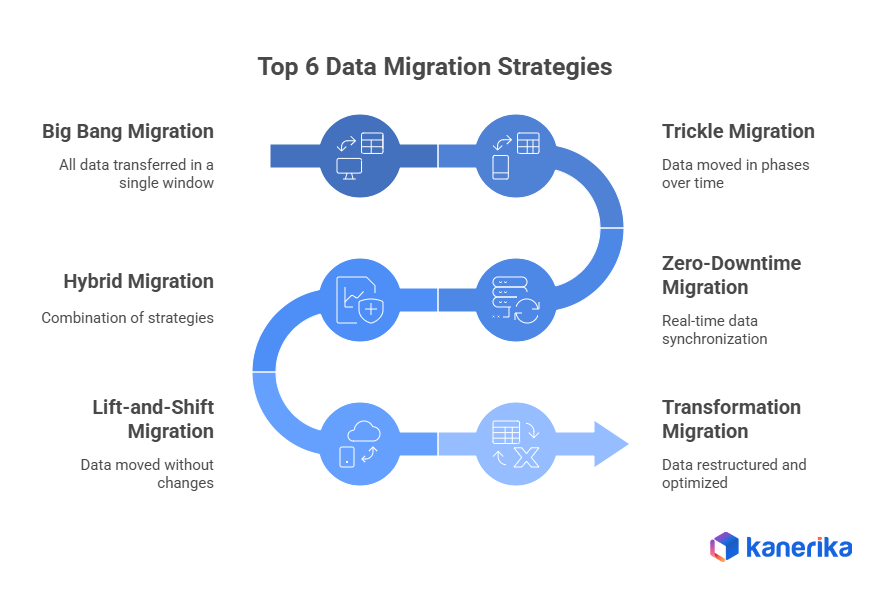
The data migration research shows this phased approach reduces failure risk by 73%. The "big bang" approach fails because it demands analysts change behavior before they see value.
When It Actually Makes Sense: The ROI Math
The Kanerika research provides the formula: calculate monthly waste cost vs. tool cost.
Typical 30-person firm:
– Version conflicts: 30 min/day × 15 analysts × $50/hr × 20 days = $7,500/month
– Manual data reconciliation: 20 min/day × same = $5,000/month
– "Finding the right file" time: 15 min/day = $3,750/month
Total waste: $16,250/month ($195k/year)
Database + BI stack cost: $2,000/month ($24k/year)
ROI: 8.1x
But this math only works if adoption >80%. The phased approach gets you there. The "database-first" approach gets you 15% adoption and a $120k salary wasted.
The Controversial Truth: Sometimes Excel Is the Answer
Here’s the spicy take that’ll get me canceled in data engineering circles: For firms under 50 people, sometimes the answer is better Excel governance, not a database.
The Reddit thread’s most controversial comment argued exactly this: "Maybe you just need standardized processes and controls on your firm’s use of Excel spreadsheets?" It was downvoted by database purists but upvoted by people who’ve seen migrations fail.
The Excel migration guide from DEV Community proves this works. One game dev company with EDI 451 spent 6 months improving Excel workflows before touching a database. Result: 40% productivity gain, zero disruption.
The Real Cost of Waiting
But here’s the trap: Excel doesn’t scale to 100 people. The longer you wait, the more technical debt you accumulate:
– 47 files become 147
– 120 weekly updates become 400
– Your first data hire quits after 18 months of frustration
The tax industry predictions article notes that M&A activity is accelerating among small firms precisely because of this: firms that can’t centralize data become acquisition targets, not acquirers. Your "simple" Excel problem becomes a valuation discount at exit.
The Bottom Line: It’s a People Problem With a Technical Facade
The 84% failure rate isn’t about databases. It’s about:
1. Loss aversion: Analysts fear losing control
2. Status threat: Senior staff see their Excel mastery devalued
3. Workflow disruption: Muscle memory dies hard
4. Value timing: New system benefits lag by months
The solution isn’t technical excellence. It’s anthropological empathy. Spend 3 months learning why Analyst Bob’s 47th column is "absolutely critical" before you tell him it’s a violation of 3NF.
Your job isn’t to build a database. It’s to make 30 people feel like they chose to stop using Excel.
That’s the real migration. Everything else is just SQL.