
Deno 2.8 isn’t just another point release. It’s a shot across the bow of every architectural assumption Node.js has taken for granted since 2009. The runtime that started as Ryan Dahl’s apology tour for Node’s mistakes has quietly become a credible threat to its predecessor’s dominance.

The numbers tell the story. Against Node’s own test suite, Deno jumped from a 42% pass rate in January 2026 to 76.4% today, that’s 3,405 of 4,457 tests passing cleanly. For context, Bun 1.3.14 manages only 40.6% on the same benchmark. Deno 2.8 lands 500+ commits touching nearly every node: module, and it’s not just about compatibility theater. The performance gains are real: cold npm installs are 3.66x faster than 2.7, node:http throughput more than doubles, and node:buffer base64 operations run at 3.07x the previous speed.
The question isn’t whether Deno is catching up. It’s whether Node.js has already peaked.
The “npm: Prefix Is Dead” Gambit
The most architecturally significant change in 2.8 is subtle but devastating: Deno now defaults to npm: at the CLI. When you type deno add express, it just works. No prefix. No error asking if you meant npm:express. The command that every Node developer has in muscle memory executes without friction.
This eliminates the primary cognitive barrier to adoption. Before 2.8, onboarding a Node developer meant explaining why deno add lodash failed and why they needed deno add npm:lodash. That friction alone has been enough to keep teams on Node during evaluation periods. Now the command that makes them feel at home is the default.
JSR packages still require the jsr: prefix, so the two registries stay unambiguous. But for the 2.1 million packages on npm, Deno has effectively become a drop-in replacement for npm install, yarn, or pnpm install in an existing Node project. It reads package.json, writes a compatible node_modules layout, and does it faster than any competitor.
The architectural implication is uncomfortable for Node advocates: if Deno can run your Node code better than Node can, what’s the argument for staying?
The Performance Numbers That Should Worry Node Core
Let’s be precise about the improvements. These aren’t marginal gains, they’re structural rewrites:
| Benchmark | Deno 2.7 | Deno 2.8 | Improvement |
|---|---|---|---|
| Cold npm install | 3,319 ms | 906 ms | 3.66x faster |
node:buffer base64 |
2,594 ms | 844 ms | 3.07x faster |
node:http throughput |
8,339 req/s | 18,431 req/s | 2.21x faster |
node:crypto scrypt |
1,533 ms | 724 ms | 2.12x faster |
node:http p99 latency |
20.86 ms | 11.89 ms | 1.75x lower |
node:fs recursive cpSync |
432 ms | 290 ms | 1.49x faster |
These improvements come from specific, measurable engineering decisions:
- Abbreviated packuments: Deno now uses npm’s smaller metadata document (
application/vnd.npm.install-v1+json) for resolution, only fetching the full document when necessary. - Parallel npm resolution: The resolver used to walk parent nodes sequentially. 2.8 fans out across independent branches of the dependency tree simultaneously.
- Decompression off the event loop: Large packument gzip decompression now routes through a blocking thread pool, freeing the event loop for concurrent requests.
- Tarball extraction split: CPU-bound decompression and I/O-bound filesystem writes are now decoupled, paired with a faster gzip decoder (
libdeflater) and fewer syscalls.
The node:http improvements are particularly telling. Deno’s native HTTP server (Deno.serve) has always been fast, but the node:http compatibility layer historically dragged. Not anymore. Hello-world node:http more than doubles throughput and cuts p99 latency by roughly 40%. For teams running Express or Node-native HTTP servers, the migration math just got compelling.
Node.js API Compatibility: The Pain Points That Matter
The 76.4% test suite pass rate is impressive, but the real story is which features finally work. Several long-standing gaps in Node compatibility have been closed:
lib.node Included By Default
This is a quality-of-life change that eliminates an entire category of friction. Before 2.8, you had to add "node" to compilerOptions.lib in deno.json or sprinkle /// <reference types="node" /> across files to get NodeJS.*, Buffer, and process to resolve at the type level. Now they’re just there.
// 2.8: type-checks with no compilerOptions.lib configuration
const buf: Buffer = Buffer.from("hello");
const t: NodeJS.Timeout = setTimeout(() => {}, 0);
console.log(process.versions.node);
The implementation pulls @types/node from npm matching the Node version Deno reports in process.versions.node, currently Node 24.x types. If your project standardizes on Node 22, just declare @types/node@^22.10.0 as a dependency and Deno uses yours instead.
Module Loader Hooks (module.registerHooks)
Deno 2.8 implements Node’s module.registerHooks() API, letting you customize module loading at runtime: intercept resolution, transform source, redirect specifiers, or mock dependencies for tests.
Here’s a concrete example, a 14-line loader that teaches Deno to import .css files as text:
import module from "node:module";

module.registerHooks({
  load(url, context, nextLoad) {
    if (!url.endsWith(".css")) {
      return nextLoad(url, context);
    }
    const css = Deno.readTextFileSync(new URL(url));
    return {
      format: "module",
      source: `export default ${JSON.stringify(css)};`,
      shortCircuit: true,
    };
  },
});
This is the kind of extensibility that enterprise teams need to adapt runtimes to their internal tooling. It also works inside binaries produced by deno compile, enabling self-contained CLIs with custom resolution baked in.
file: and link: Dependency Handling
Plenty of published npm packages accidentally ship with file: specifiers left in their package.json:
{
  "dependencies": {
    "local-helpers": "file:../local-helpers"
  }
}
Those used to break Deno with a cryptic error during resolution. In 2.8, they’re silently skipped. The actual code those deps reference is bundled into the published tarball anyway, so nothing’s lost by ignoring them. This matters more than it sounds like, it means Deno can install a broader swath of the npm ecosystem without modification.
The TypeScript Advantage Compounds
Deno 2.8 ships TypeScript 6.0.3, the first breaking-change release on the path to the natively-ported 7.0. Every Deno tool that touches TypeScript, deno check, deno bundle, the LSP, deno compile, uses it automatically. No flag, no config change.
The comparison with Node.js 24’s experimental TypeScript support is instructive. Node requires --experimental-strip-types to strip type annotations during runtime, but it lacks type checking and doesn’t support TypeScript-specific constructs like enums and namespaces. Deno processes TypeScript in ~38 ms with full type-checking by default. Node with tsx takes ~150 ms with no runtime type checking.
For teams building TypeScript-first projects, the choice is increasingly clear: one runtime treats TypeScript as a first-class citizen, the other treats it as a compatibility shim.
Debugging: The Killer Feature Node Doesn’t Have
Deno 2.8 ships Chrome DevTools network inspection for server-side code. Run with --inspect-wait, open chrome://inspect, click Inspect on the Deno target, and the Network tab shows every fetch(), node:http client request, and WebSocket your program makes, headers, status codes, bodies, timing. Exactly the way you’d debug network traffic in a browser tab.
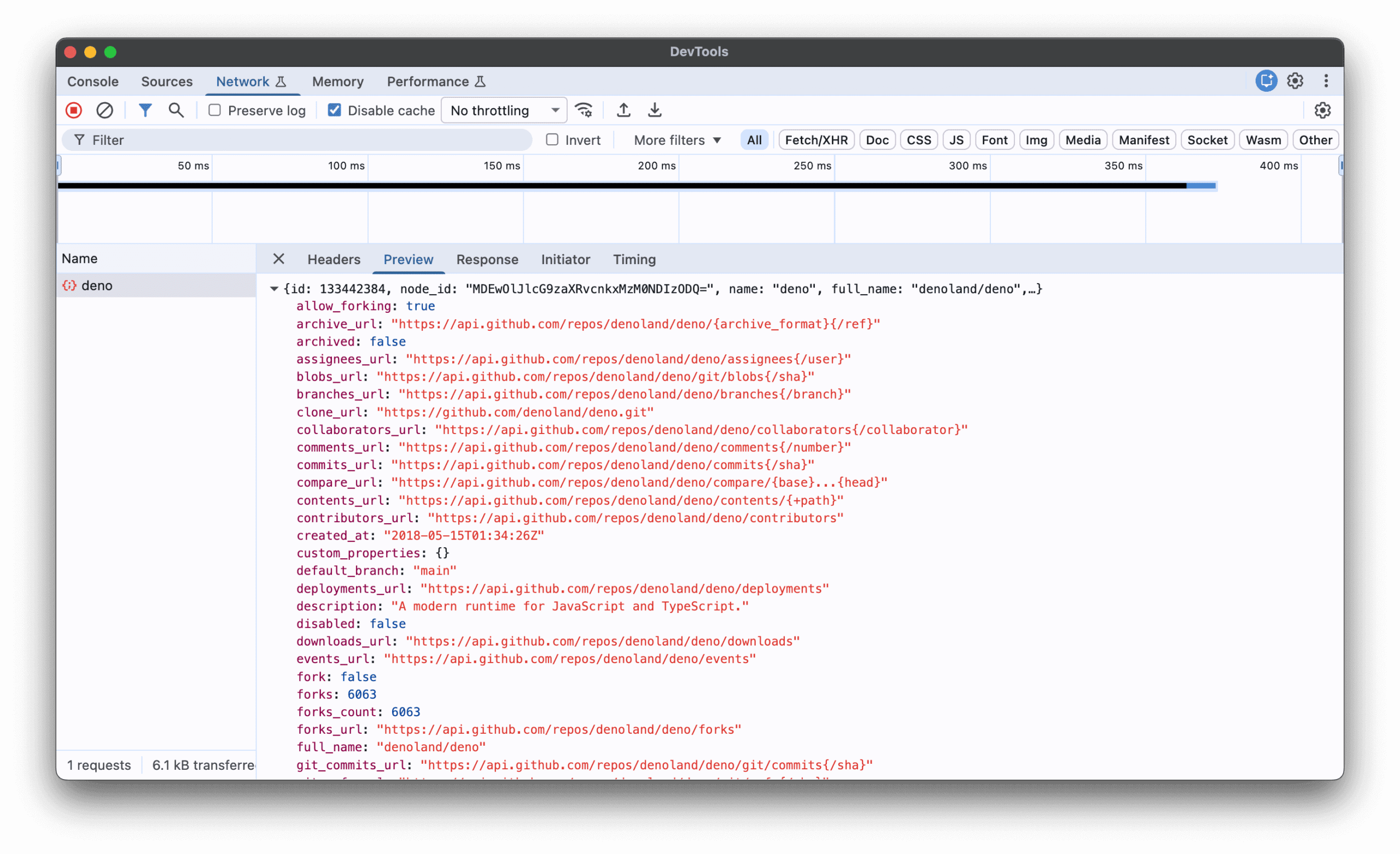
Under the hood, this required implementing the Network CDP domain on the inspector side and wiring fetch(), node:http, and WebSocket into it on the runtime side. The same events surface through node:inspector and any CDP frontend, VS Code’s JavaScript debugger, the standalone chrome-devtools-frontend, etc.
The built-in CPU profiler ships alongside it: --cpu-prof writes a V8 CPU profile to disk, --cpu-prof-flamegraph produces an interactive SVG, and --cpu-prof-md generates a Markdown report with the hottest functions and call tree. Combine all three in a single run:
$ deno run --cpu-prof --cpu-prof-flamegraph --cpu-prof-md main.tsThis eliminates an entire category of “install 3 separate profiling tools” workflow that Node developers have tolerated for years.
Package Management: The pnpm Catalog Protocol
Deno 2.8 adopts pnpm’s catalog: protocol for monorepo dependency management. Declare versions once in the workspace root and reference them by name from each member:
// deno.json (workspace root)
{
  "workspace": ["./packages/api", "./packages/web"],
  "catalog": {
    "hono": "^4.6.0",
    "zod": "^3.23.0"
  }
}
// packages/api/package.json
{
"dependencies": {
"hono": "catalog:",
"zod": "catalog:"
}
}Multi-catalog setups are supported for separating production dependencies from build tooling. This is the kind of enterprise-focused feature that signals Deno isn’t just competing on speed, it’s competing on team-scale workflow.
The Architecture of Deferred Evaluation
The TC39 import defer proposal lands in 2.8, letting you load and parse a module without running its top-level code. Evaluation happens only on first access to an export:
import defer * as deferred from "./deferred.js";

console.log("before access");
console.log(`value: ${deferred.value}`);
console.log("after first access");
before access
deferred module evaluated
value: 42
after first accessThe import.defer() syntax works for dynamic imports, fetch both branches of a decision upfront, evaluate only the one you pick:
const png = await import.defer("./png-decoder.js");
const jpeg = await import.defer("./jpeg-decoder.js");

const format = Deno.args[0];
const decoder = format === "png" ? png : jpeg;
For serverless and edge deployments where cold start time directly impacts user experience, this is a meaningful architectural tool. Parse the code, defer the evaluation until the code path is actually taken.
Where This Leaves Node.js
The JavaScript runtime landscape in 2026 looks genuinely different. Node.js still commands 42.65% developer adoption and 85% of enterprise traffic. Its 30-month LTS cycles make it the default for regulated industries. But the advantages are eroding.
Bun dominates raw throughput, 110,000 req/s on native HTTP vs Deno’s 85,000 and Node’s 45,000. Bun’s cold start times of 8-15 ms make it the choice for latency-sensitive serverless. But Bun lacks formal LTS and still has compatibility gaps.
Deno occupies the middle ground with a clear thesis: security-first defaults, native TypeScript, web-standard APIs, and increasingly credible Node compatibility. The permissions model is genuinely innovative, zero permissions by default, explicit grants required for filesystem, network, and environment access. The deno audit tool scans dependencies against the GitHub CVE database. For security-conscious teams in finance, healthcare, or government, Deno’s architectural premise is more defensible than Node’s legacy behavior of trusting all code implicitly.
The broader implication is one of WebAssembly breaking JavaScript’s monopoly at the edge. The runtime wars are forcing innovation across the board. Node is getting experimental TypeScript support and permission models it wouldn’t have bothered with otherwise. Deno is getting the package ecosystem that was its original blind spot. Bun is getting enterprise adoption that no startup runtime has achieved before.
The Verdict
Deno 2.8 isn’t a revolution. It’s a very competent, very aggressive evolution that closes the remaining gaps between “interesting alternative” and “practical daily driver.” The npm prefix change removes the last onboarding friction. The performance improvements make the compatibility layer faster than native Node in several benchmarks. The debugging tools give developers something Node can’t match.
For new projects, the calculus is straightforward: Deno offers better defaults (security, TypeScript, tooling), competitive performance, and 95% npm compatibility. For existing Node projects, the migration path is clearer than it’s ever been, deno install reads your package.json, lib.node resolves your type references, and module.registerHooks handles your custom loaders.
The siege on Node.js architecture isn’t coming. It’s already here. The next 12-18 months will determine whether Deno captures real market share or remains a niche for the security-conscious and the TypeScript-obsessed. But the trajectory is unmistakable: the architectural assumptions that made Node.js dominant for 17 years are being challenged on every front, and the challenger is getting better faster than the incumbent.